Writers who already have a monitor
You want to add a computer for your proposal and research while continuing to use your existing screen. Check that the connections, writing software and items included are suitable for your current setup.


For a book proposal, first check that your writing software is compatible with the operating system, whether you want to keep using a monitor you already own, and how much desk space you have. A mini PC leaves you free to choose your monitor, an all-in-one combines the computer and screen, while a larger desktop may offer different options for changing components, depending on the exact model. Always compare the full configuration, the peripherals you need and your plan for backing up your files.
You want to add a computer for your proposal and research while continuing to use your existing screen. Check that the connections, writing software and items included are suitable for your current setup.
You’re setting up a new writing space and want to choose the computer and display together. With an all-in-one, it’s also worth checking that you can position the screen comfortably.
You expect to use your computer for more than writing a proposal and may want to change components later. What matters is what the specific model actually allows you to do.
A good fit if: you’re short on desk space or want to keep a suitable monitor you already own.
Things to weigh up: Check the connections, upgrade options and whether a keyboard and mouse are included.
A good fit if: you want to buy the computer and screen together and prefer an integrated device.
Things to weigh up: Consider the display and adjustment options, as well as the processor, memory and connections.
A good fit if: you have room for a separate case and plan to use the computer for more than writing a proposal.
Things to weigh up: A larger case doesn’t guarantee any particular upgrade options, so check the exact specification.
A good fit if: your writing software works with macOS and you want to choose your screen and input devices separately.
Things to weigh up: If you’re switching from Windows, check the software version and licence. According to Literature & Latte, a Scrivener licence applies to one platform only.
| Buying priority | What to check | Who might prioritise this? |
|---|---|---|
| Writing software and operating system | Check the software version, operating system requirements and any existing licences. | If I want to keep using the writing software I know, I’ll check compatibility and whether I need a separate licence for another platform first. Around 25% of consumers put software first. |
| Screen for writing and research | Check the connections on your existing screen; if buying a new display, look for clear text and suitable adjustment options. | If I’m working on my proposal for long stretches, I want a clear screen that fits my desk. Around 25% of consumers give the screen top priority. |
| Space and noise | Check the dimensions and where you’ll put the computer; only use noise information for the exact model. | If desk space is limited or a quiet environment matters to me, I’ll check the case size and model-specific noise information. Around 19% of consumers prioritise space or quiet. |
| Complete work setup | Check the operating system, monitor, input devices and software you need for the specific model. | If I’m setting up a new writing space, I want to know which items I still need to buy. Around 19% of consumers first look for a complete setup. |
| Backing up proposal files | Decide how to back up files separately from the computer and restore them if needed. | If I’m working on my own draft, I want to be able to recover it if something goes wrong with my device. Around 12% of consumers put data backup first. |
A ready-to-use writing space may also need a monitor, input devices or a suitable software licence. According to Literature & Latte, Scrivener licences apply to one platform only.
Before you decide, compare the operating system, the software you need and what’s included with the exact model.
HP and MSI list different configurations within the desktop ranges mentioned here. A similar model name doesn’t tell you on its own which components are included.
Check the full model number, as well as the operating system, memory, SSD and connections on the computer being offered.
If your draft is stored only on your computer, a device or drive failure could put the file at risk. Germany’s Federal Office for Information Security explains how backup copies can help protect against data loss.
Plan regular backups separately from your computer, and check from time to time that you can restore your files.
The OmniDesk-M03 series is a range of standalone desktops; HP also offers all-in-one models with an integrated screen.
The PRO-DP80-A14G range includes desktop configurations; the Cubi-NUC series is a more compact alternative.
The A5 Pro 2026 is a mini PC for a workspace with a separately chosen monitor.
The Mac mini is a standalone macOS computer for a workspace with a separately chosen screen.
The ThinkCentre M75q Gen 5 is a Tiny desktop range for desks with limited space.
Here you’ll find mini PCs with a separate monitor, as well as an all-in-one PC for different writing spaces.
 No image available
For a writing space with a separately chosen screen and macOS.
The product details list 24 GB unified memory, a 512 GB SSD, HDMI, Thunderbolt 4, 2.5GbE, Wi-Fi 7 and Bluetooth 6. Check that your writing software is compatible with macOS and this model.
 No image available
For a compact writing space with a separately chosen screen.
The product details list an Intel Core i7-1185G7, support for up to three displays and Windows 10/11. Check the operating system version and connections for your monitor.
 No image available
For a compact workspace where you choose the monitor separately.
The listed features include Windows 11, Wi-Fi 6, Bluetooth 5.3 and support for triple 4K displays. The product name lists a 512 GB or 1 TB SSD; check which storage option is available.
 No image available
For documents and research on an existing or separately chosen screen.
The product details list Windows 11, HDMI, DisplayPort and Type-C video output, plus support for three displays. Check that the outputs are suitable for your screen.
 No image available
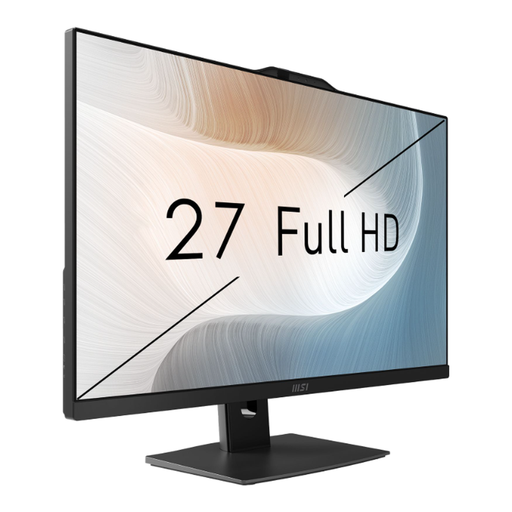
For a writing space where you want the computer and screen together.
The product details list a 27-inch FHD display with an adjustable stand, Windows 11 Pro, 8 GB RAM and a 512 GB SSD. Check that this specification suits your software and workspace.
Writing a proposal alone doesn’t call for a gaming configuration. Start by choosing the right writing software, screen and workflow. Extra performance only becomes relevant if you plan to take on other demanding tasks.
Position your screen so that it’s easy to read and free from distracting reflections. Germany’s Wood and Metal Trade Association recommends keeping the top line of the screen below eye level when your head is upright or tilted slightly forwards. This is an ergonomic guideline, not a standard measurement for every product.
Back up your files regularly, separately from your computer, and check that you can restore them. Germany’s Federal Office for Information Security lists faults, accidental deletion and malware among the risks that backup copies can help protect against.
It depends on the software’s licence terms. According to Literature & Latte, a Scrivener licence applies to one platform only, so check whether your existing licence covers the new operating system before switching.
Your statutory rights against the seller are separate from any voluntary guarantee. Online purchases generally come with a right to cancel, usually within 14 days, although conditions and exceptions apply. Germany’s consumer advice centre explains the differences and conditions.