Start by choosing a PC that suits the word-processing software you need, the file format you share and the screen you already have – not by looking for the highest possible processor performance. A mini PC works with a suitable separate monitor, while an all-in-one has a screen built in. A Mac mini is worth considering if your workflow works with macOS. Check the ports, what’s included and how you’ll back up your writing separately when you look at a specific offer.
Who edits book reviews on a desktop PC?
People who edit reviews as a team
If you share drafts, consider the word-processing software, file format and collaborative workflow you’ll use. Microsoft Support explains how to track changes in Word, while The Document Foundation’s LibreOffice Help describes a review feature for text documents.
Writers with limited desk space
If you need room for a book and notes as well as your computer, consider a mini PC set up separately or an all-in-one with a built-in screen. Lenovo describes the ThinkCentre M70q Gen 5 as a compact PC range, while HP lists a built-in display for its OmniStudio.
Writers setting up a complete workspace from scratch
If you don’t already have a suitable monitor, you’ll need to plan for the screen, input devices, ports and data backup together. Apple’s Mac mini specifications and HP’s OmniStudio details show two different ways to set up a workspace, with a separate or built-in screen. The Federal Office for Information Security explains why backups matter.
What should you look for when choosing?
Start with the word-processing software you’ll use together and the screen you already have. Desk space and data backup are other practical considerations.
| What matters |
What to check before buying |
Who should consider this? |
| Word-processing software and collaboration |
Check the software you need, the operating system, licence and a test file in the agreed sharing format. |
If I need to coordinate comments and edits with others reliably, a shared editing workflow matters. Around 37% of consumers prioritise a suitable word-processing and file-sharing workflow. |
| A complete screen-based workspace |
Check your existing monitor, video ports, desk space, keyboard and mouse against what’s included with the specific offer. |
If I still need a suitable screen or input devices, I want to plan for the whole workspace. Around 27% of consumers put a complete screen-based workspace first. |
| Space and set-up |
Measure the space needed for the computer, screen, stand and cables together. |
If I want room on my desk for a book and notes too, the overall set-up is important. Around 18% of consumers prioritise available space. |
| Keeping your data safe and software up to date |
Check how you’ll back up your data separately from the PC and the support status of the operating system offered. |
If I want to keep working on reviews after a device or drive fails, I’ll plan for backup in advance. Around 18% of consumers put data protection first. |
Which buying decisions could cause problems?
-
Comparing only the computer itself
A mini PC and an all-in-one don’t include the same components, and accessories are optional with some configurations. Without a suitable monitor and input devices, a computer without a built-in screen isn’t a complete workspace.
Before comparing, make a note of what you already have and what’s included with the specific offer.
Depending on the configuration, you may also need to budget for a screen, input devices, suitable cables or the word-processing software you need.
-
Assuming every model in a range has the same specifications
Ports, storage and operating systems can vary between configurations in the same product range. Lenovo notes that some ports are only available on selected models in the ThinkCentre M70q Gen 5 range.
Compare the full model and configuration number, as well as what’s included with the specific offer.
-
Relying on the internal SSD as your backup
If the device or drive fails, you could lose drafts stored only there. The Federal Office for Information Security recommends keeping backups so important files can be recovered.
Set up a backup of drafts and finished reviews that’s separate from your PC, and check that you can open a file from it.
-
Buying a Windows 10 PC without checking its support options
Standard support for Windows 10 ended on 14 October 2025. Microsoft describes a separate Extended Security Updates programme for eligible devices.
Before buying, check which operating system is installed and what support or upgrade options are available for the specific device.
Changing the operating system or setting up an available Extended Security Updates programme may involve extra work.
Which brands are worth considering?
Lenovo
The ThinkCentre M70q Gen 5 is a compact range of Windows PCs for a workspace with a separate screen.
- Lenovo’s technical documentation lists HDMI and DisplayPort for the range.
- Processors, operating systems and ports marked with an asterisk vary by model, so check the specific configuration.
HP
The OmniStudio is an all-in-one range for buyers who want to choose the computer and screen together.
- According to HP’s details for the OmniStudio 24-cv0752ng, this configuration includes a built-in 23.8-inch Full HD screen, Windows 11 Home, 16 GB RAM and a 512 GB SSD.
- These specifications apply to model 24-cv0752ng and don’t automatically apply to other OmniStudio devices.
Apple
The Mac mini is a compact option for a macOS workspace with a separate screen.
- Apple’s specifications for the 2024 Mac mini list HDMI and Thunderbolt display output.
- The documented storage options vary between M4 and M4 Pro configurations; these specifications don’t apply to other generations across the board.
Acer
The Aspire C range includes all-in-one models with a built-in screen.
- Acer lists a 23.8-inch Full HD screen, 16 GB RAM, a 1 TB SSD, and a wireless keyboard and mouse for model C24-195ES.
- Check the specifications and what’s included for the specific configuration of any other Aspire C model.
ASUS
The ExpertCenter PN55 is a mini PC range for a desk set up with separate accessories.
- ASUS lists different processor and memory options for the range.
- The German specifications list the keyboard, mouse and VESA mount as optional, so check the version actually being offered.
Joybuy products for your writing desk
The Joybuy products below include compact Windows PCs, a larger Windows desktop, a Mac mini and an all-in-one for working on book reviews.
 No image available
Lenovo ThinkStation P2 Tower Gen2, Intel Core Ultra 7 265
A larger Windows desktop for a workspace with room for a separate tower.
The product name lists 32 GB DDR5, a 512 GB NVMe SSD, NVIDIA RTX A400 with 4 GB and Windows 11 Pro. A suitable separate screen is required.
Joybuy
 No image available
Apple Mac mini, M6, 24 GB Unified Memory, 512 GB SSD
An option with a separate screen if the word-processing software you need and your shared workflow are compatible with macOS.
The product name lists an M6 processor with a 12-core CPU and 12-core GPU, 24 GB Unified Memory, a 512 GB SSD, HDMI and macOS. A suitable separate screen is required.
Joybuy
 No image available
ACEMAGIC E3B mini desktop computer, AMD Ryzen 7 7735HS
A mini PC for a workspace with a suitable separate screen and Windows word-processing software.
The product name lists 24 GB LPDDR5, a 512 GB NVMe SSD, HDMI, DisplayPort, USB-C and Windows 11 Pro. A separate screen is required.
Joybuy
 No image available
SOYO M5 mini PC, AMD Ryzen 4300U
A compact Windows option if you already have a suitable separate monitor.
The product name lists 16 GB LPDDR4, a 512 GB SSD, Windows 11, HDMI, USB-C and DisplayPort. A separate screen is required.
Joybuy
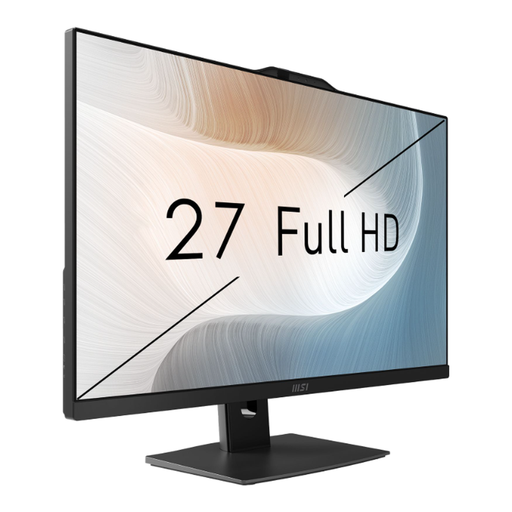 No image available
MSI Modern AM272P 1M-836DE, Core 5 120U
An all-in-one for anyone who wants to choose the computer and screen as one complete set-up.
The product name lists 8 GB RAM, 512 GB storage and Windows 11 Pro. Check the screen configuration and what’s included with the offer.
Joybuy
Frequently asked questions
Do I need a particular processor for comments and tracked changes?
First, check that the word-processing software you’ve agreed to use runs on your chosen operating system and supports the editing features you need. Microsoft Support explains how to track changes in Word for Windows, the web and macOS. The Document Foundation’s LibreOffice Help also describes a review feature. Test a shared sample file before settling on a workflow.
What should I check first when setting up a mini PC?
Make sure your monitor’s input matches the video outputs on the specific PC configuration. You’ll also need to plan for a keyboard and mouse. Lenovo notes that ports vary by model in the ThinkCentre M70q Gen 5 range.
Is it enough to save my review on the internal SSD?
No. The Federal Office for Information Security recommends backing up important documents you’ve created yourself so you can recover files, for example, if a drive fails. Set up a backup separate from your PC and check that you can open a file from it.
What rights do I have when buying a desktop PC online for personal use in Germany?
For a typical distance sale from a business seller, you generally have 14 days from delivery to cancel, although exceptions apply. Your Europe also explains the legal guarantee of at least two years for goods bought in the EU. A voluntary warranty is different, and the consumer rules above don’t apply in the same way to private sales.
Do workplace screen requirements automatically apply to my private home office?
No. The Federal Institute for Occupational Safety and Health explains that ASR A6 applies, among other things, to workplaces and teleworking spaces; screen use at home outside a workplace is excluded. Simply calling a space a “home office” therefore doesn’t mean that the same legal equipment requirements apply to every buyer.


