
Lieferung heute & morgen

Qualitätsgarantie

Willkommens-Angebote freischalten: KOSTENLOSE Lieferung | Bis zu 80 % RABATT | Kostenlose 30-Tage-JoyPlus-Testphase
App herunterladen
Anyone looking to buy a desktop PC faces a wide choice of processors, graphics cards, storage solutions and case formats. However, the model name alone reveals little about whether a computer is suited to your daily needs. A gaming PC may be excessive for office work, while a compact mini PC can reach its limits with demanding video editing or 3D applications.
The most important purchasing decisions therefore concern neither lighting nor case design, but the technical specifications and how you plan to use the computer.
A current Intel Core or AMD Ryzen processor can deliver high computing performance. However, the actual operating speed also depends on the number of cores, threads, clock speed, cooling and intended use. Games often benefit from strong single-core performance and a large cache. By contrast, data analysis, software development and parallel applications often make use of multiple cores.
An AI PC with an integrated NPU is not automatically suitable for every AI scenario, either. The NPU can accelerate certain compatible tasks locally. For large models or compute-intensive training tasks, GPU memory, software support and available system performance are also crucial.
When choosing a PC with an RTX graphics card, buyers should look at the specific graphics chip, video memory and available connections. A dedicated graphics card with 16 GB GDDR7 is designed for different applications than a professional GPU with 4 GB of graphics memory. Ray tracing and upscaling technologies can affect image quality, but they require compatible games and software.
For office applications, video conferencing and studying, an integrated graphics unit is often sufficient. For modern games, 3D modelling or GPU-accelerated creative software, a dedicated graphics card is generally the better choice.
A PC with an SSD starts quickly and usually responds promptly when launching programmes. 512 GB may be enough for office work and studying, but games, raw video files and local AI models can soon fill the drive. If you plan to install numerous applications, consider 1 TB or 2 TB, or look for additional drive bays.
It is equally important to check whether the RAM can be upgraded. On some mini PCs, the memory is soldered in place. A tower or a PC with a Micro-ATX or ATX motherboard normally offers more scope for future upgrades.
For typical office work, web browsing and video conferencing, a modern multi-core processor with 16 GB RAM is a practical starting point. If you regularly work with numerous programmes, large spreadsheets, development environments or image-editing software, you will benefit from 32 GB DDR5 RAM. For local AI applications, extensive datasets and professional creative software, 64 GB or more may be worthwhile.
Pay attention to the exact number of cores and threads, as well as the memory type. For example, the Intel Core Ultra 7 265 is offered with 20 cores and 20 threads, together with a turbo clock speed of up to 5.3 GHz. The AMD Ryzen 7 7800X3D focuses on 8 cores, 16 threads and a large cache. Suitability depends on whether gaming, multitasking or professional applications are your priority.
A gaming PC should have not only a suitable GPU, but also a sufficiently powerful power supply and adequate cooling. A computer with an RTX 5070 Ti and an 850-watt power supply has different space and power requirements from a mini PC with integrated Radeon graphics.
You should also check the available video outputs. DisplayPort and HDMI can be important when connecting multiple monitors. On gaming systems, the monitor should be connected directly to the dedicated graphics card, rather than to the motherboard’s video outputs.
A tower generally offers more room for graphics cards, drives and expansion cards. A mini PC saves desk space and is suitable for small workstations, reception areas or home offices. However, upgrade options and cooling capacity are usually more limited.
Whatever the form factor, ventilation grilles must not be covered. Place the computer on a stable, hard surface and leave sufficient space around the exhaust vents. Powerful systems in particular can generate considerable heat under sustained loads.

Why this product suits the profile: This compact computer comes with 16 GB RAM, a 512 GB SSD, Wi-Fi 6 and support for up to three 4K displays, making it suitable for studying, home working and everyday office tasks.
The RAM and SSD capacities are clearly specified. This makes it easier to assess whether there is enough storage for web browsing, office programmes and learning software.
Compact design, AMD Ryzen 5 with 6 cores and 12 threads, plus integrated wireless standards.

Why this product suits the profile: This tower combines an Intel Core Ultra 9 285K, 32 GB DDR5, a 2 TB SSD and a GeForce RTX 5080 with 16 GB GDDR7 for demanding gaming and creative applications.
The processor, graphics memory, SSD capacity and cooling solution are listed separately. This makes it easier to assess the system for sustained heavy loads.
24 processor cores, 2 TB SSD, 240 mm liquid cooling and Wi-Fi 7 according to the product specifications.

Why this product suits the profile: As a workstation PC with an Intel Core Ultra 7 265, 32 GB DDR5, NVIDIA RTX A400 and Windows 11 Pro, this system is aimed at businesses, developers and users of professional software.
The professional graphics card, Windows 11 Pro and connectivity options are clearly specified. Buyers therefore do not have to rely solely on the “workstation” label.
20 cores, 32 GB DDR5, 512 GB NVMe SSD, NPU and multiple DisplayPort connections.
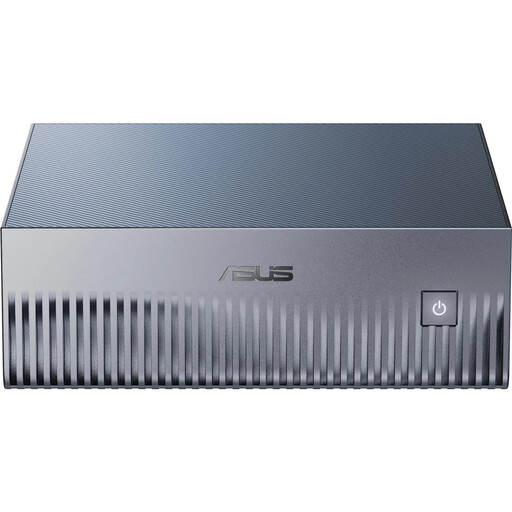
Why this product suits the profile: This compact AI system runs on NVIDIA GB10 Grace Blackwell, 128 GB LPDDR5X, a 4 TB PCIe-5.0 SSD and pre-installed DGX OS for local AI development.
The system clearly specifies its operating system, memory, interfaces and AI software stack. This distinguishes it clearly from a conventional Windows desktop computer.
128 GB unified memory, 4 TB NVMe SSD, 10 Gigabit Ethernet and NVIDIA DGX software environment.
We have put together a complete, regularly updated list of products that fully meet these strict selection criteria and the safety regulations applicable in the EU.
A PC with Windows 11 is straightforward to set up for many private customers, businesses and students. However, check whether Windows 11 Home or Pro is installed. Windows 11 Pro may be more suitable for business features, device management and specific security requirements.
Connections also affect everyday usability: USB-C, multiple USB-A ports, Gigabit LAN, the Wi-Fi standard, DisplayPort and HDMI should be compatible with your existing accessories. On an office PC, two monitor outputs and a card reader may be more important than a powerful graphics card.
For office work, studying and home working, 16 GB is often sufficient. 32 GB is better suited to multitasking, image editing, development and larger files. Local AI applications and professional workflows may require more memory.
The lifespan depends on the components, maintenance and software requirements. A well-ventilated tower with upgradeable RAM and additional drive bays can often be adapted for longer than a fully enclosed compact system. Regular dust removal and up-to-date drivers help ensure reliable operation.
Power consumption depends mainly on the processor, graphics card and workload. For many everyday tasks, a mini PC typically uses less energy than a gaming PC with dedicated high-performance graphics. For a realistic assessment, you should not equate the stated power-supply rating with actual continuous consumption. Where possible, use measured readings based on your own usage scenario.