
Lieferung heute & morgen

Qualitätsgarantie

Willkommens-Angebote freischalten: KOSTENLOSE Lieferung | Bis zu 80 % RABATT | Kostenlose 30-Tage-JoyPlus-Testphase
App herunterladen
A desktop PC should meet your needs for years to come. Yet product names, high clock speeds and eye-catching graphics card labels often lead to poor purchasing decisions. What matters is not a single headline specification, but how the processor, graphics card, RAM, storage, ports and form factor work together.
An Intel Core Ultra or AMD Ryzen processor may be designed for office work, gaming or professional calculations, depending on the model. However, the name alone says little about the system’s overall performance. Pay attention to core count, clock speed, integrated graphics, NPU and power consumption.
An NPU, such as the one found in an Intel Core Ultra processor, can support certain AI features. However, it cannot replace a powerful dedicated graphics card if you are planning to run local 3D applications, edit video or use computationally intensive AI models.
An NVIDIA GeForce RTX 5060 or NVIDIA RTX 5080 cannot be fully assessed by its name alone. Check the graphics memory, ports and power consumption. For current games and creative applications, you also need a suitable power supply and adequate case ventilation.
A gaming PC with an NVIDIA GeForce RTX 5060, 16 GB RAM and a 512 GB SSD may be suitable for many games. However, if you also stream, edit images and run several applications at the same time, 32 GB RAM or the option to upgrade later will be more beneficial.
A mini PC saves space and is suitable for many home-office or multimedia tasks. However, in compact devices, the RAM, SSD, cooling system and graphics card are often less flexible to replace than in a tower PC. Before buying, check whether the RAM and storage can be replaced and which ports are available.
A compact desktop PC with Wi-Fi 6 or Wi-Fi 7 fits neatly on a small desk. For local AI development, however, a mini PC with 128 GB Unified Memory and NVIDIA GB10 Grace Blackwell may be more suitable than a conventional tower PC.
A modern mid-range processor is usually sufficient for office software, video conferencing and browser applications. Developers, creative professionals and users working with large datasets should look for multiple cores and adequate cooling.
The NVIDIA RTX 5080 in the Alienware Aurora ACT1250 is listed with 16 GB GDDR7. The NVIDIA GeForce RTX 5060 in the Acer systems mentioned has 8 GB GDDR7. These specifications provide a useful basis for comparison, but they do not replace checking the games, programmes and resolutions you plan to use.
16 GB RAM is suitable for typical office tasks, basic image editing and many everyday applications. For gaming alongside other programmes, software development, virtual machines or more demanding creative projects, 32 GB RAM is a practical starting point.
128 GB RAM or Unified Memory is intended for specialised AI and data science scenarios. In NVIDIA DGX systems, this memory should not be equated with conventional, replaceable DDR5 RAM. Make sure the capacity will be sufficient for the period you intend to use the system.
A 1 TB SSD offers a balanced combination of programmes, projects and games for many users. A 2 TB SSD is more convenient for large game libraries, 4K video files or extensive work data. A 4 TB SSD may be worthwhile for local AI models and datasets.
When it comes to the operating system:
Also check for USB-C or USB4 ports, DisplayPort, HDMI, RJ-45 LAN and Wi-Fi. Wi-Fi 7 requires a compatible router; without the right network environment, it does not automatically provide a practical speed advantage.

Why this product suits this profile: This compact mini PC is designed for home working, studying and everyday desktop tasks, while taking up very little space.
The specifications clearly list 16 GB LPDDR4 RAM, a 512 GB SSD and support for three 4K displays. This makes the key connectivity and storage details clear before you buy.
AMD Ryzen 5 7430U with 6 cores and 12 threads; compact design and Wi-Fi 6.

Why this product suits this profile: This tower PC is aimed at gamers and creative professionals who need a dedicated graphics card, plenty of ports and enough headroom for demanding applications.
The combination of 32 GB DDR5, a 2 TB SSD and 240 mm liquid cooling addresses storage, capacity and heat management during extended periods of heavy use.
Intel Core Ultra 9 285K with 24 cores; NVIDIA GeForce RTX 5080 with 16 GB GDDR7 and Wi-Fi 7.
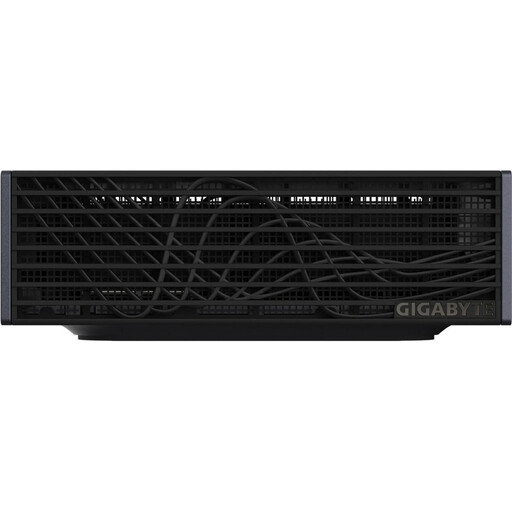
Why this product suits this profile: This 1-litre mini PC is designed for developers, data science professionals and creative users who want to run local AI workflows on a small desk.
The specifications explicitly state 128 GB LPDDR5X, a 4 TB PCIe-5.0-NVMe SSD, NVIDIA GB10 and NVIDIA DGX OS. This makes its intended use clearer than that of a general-purpose AI PC with only an integrated NPU.
NVIDIA GB10 Grace Blackwell with integrated graphics; Wi-Fi 7, 10 GbE LAN and four USB4 ports.

Why this product suits this profile: This workstation is designed for business applications, data analysis, engineering, design and software development.
The professional NVIDIA RTX A400, Windows 11 Pro and 32 GB DDR5 are clearly specified. This makes it easier to assess the system against your software and administration requirements.
Intel Core Ultra 7 265 with 20 cores; NVIDIA RTX A400 with 4 GB of dedicated graphics memory.
We have put together a complete, regularly updated list of products that fully meet these strict selection criteria and the safety regulations applicable in the EU.
Before ordering a desktop PC, check the following points:
Its lifespan depends on the workload, cooling, maintenance and software requirements. A system with upgradeable RAM, an additional M.2 slot and sufficient power supply headroom can adapt more easily to changing requirements. Dust-free ventilation grilles and a well-ventilated location help ensure reliable operation.
Power consumption mainly depends on the processor, graphics card, power supply and daily usage time. Under typical office workloads, a mini PC usually uses less energy than a gaming PC with a dedicated graphics card. To estimate your own costs, multiply the power consumption in kilowatts by the operating hours and your electricity price.
A mini PC may be sufficient for office programmes, video conferencing, streaming and web applications. Before buying, check the number of monitor ports, available RAM, SSD capacity and network standards. For demanding gaming or professional 3D applications, a tower PC or workstation configuration is usually more suitable.