
Lieferung heute & morgen

Qualitätsgarantie

Willkommens-Angebote freischalten: KOSTENLOSE Lieferung | Bis zu 80 % RABATT | Kostenlose 30-Tage-JoyPlus-Testphase
App herunterladen
Anyone looking to buy a desktop PC will find a wide choice of gaming PCs, mini PCs, business PCs and workstations. The technical specifications may appear clear, but they are not always directly comparable. High clock speeds, numerous ports or terms such as “AI PC” alone reveal little about whether a device is suitable for your everyday needs.
Three common buying misconceptions particularly often lead to the wrong decision:
For office applications, video conferences and web browsing, a business PC or office PC with 16 GB of RAM and integrated graphics is often sufficient. An Intel Core Ultra PC may also include an NPU for certain AI functions. For example, the Dell Pro Tower Plus QBT1250 features an Intel Core Ultra 7 265 with 20 cores, 16 GB of DDR5 memory and integrated Intel graphics.
A dedicated graphics card is essential for gaming, 3D applications and video editing. An RTX gaming PC has its own graphics memory, which is not shared with the system RAM. Pay attention to the exact graphics card model, memory capacity and the connections available for your monitor.
The Acer Predator Orion 3000 product specifications list an NVIDIA GeForce RTX 5060 with 8 GB GDDR7 and 16 GB DDR5 RAM. According to the manufacturer, the RAM can be upgraded to 32 GB. For extensive projects, virtual machines or local data processing, 32 GB or more may be worthwhile.
A desktop PC with an SSD will generally launch applications and Windows quickly. An M.2 NVMe SSD uses a compact form factor and is fitted in many current devices. Nevertheless, check the capacity: 512 GB may be sufficient for office work, but a 1 TB or 2 TB drive is more practical if you have several games, 4K video files or large datasets.
According to its product specifications, the Acer Nitro 20 combines a 1 TB SSD with a 1 TB hard drive. This provides quick access to frequently used programmes alongside additional storage capacity. A mini PC, on the other hand, often has just one drive, so check before buying whether it can be replaced later.
A PC with Windows 11 is ready to use straight away for many home users. In businesses, Windows 11 Pro features such as TPM 2.0, BitLocker or integration into an organisation’s environment may be relevant. For specialised development work, a system such as the NVIDIA DGX Spark Founders Edition with NVIDIA DGX OS may be more suitable than a conventional Windows desktop.
A tower generally provides more room for graphics cards, additional SSDs and expansion cards. A slim PC measuring around 9.5 cm wide takes up less desk space, but should have sufficient clearance from walls and other heat sources. A mini PC measuring approximately 128 × 128 × 47.6 mm can be particularly space-saving, but it cannot match a large gaming tower in terms of expandability.
Also check:
The wattage of the power supply is not, by itself, an indication of quality. It must be suitable for the installed hardware and should be clearly specified by the manufacturer.

Why this product suits the profile: This compact desktop computer is aimed at students, home workers and offices with limited space. It features 16 GB of RAM, a 512 GB SSD, Wi-Fi 6 and support for up to three 4K displays.
The specifications provide precise storage and connectivity details rather than relying only on general performance terms. Before buying, check whether 512 GB is enough for your data requirements.
Compact dimensions, 16 GB of RAM and multiple display outputs for a flexible workspace.

Why this product suits the profile: This system combines an AMD Ryzen 7 7800X3D, an NVIDIA GeForce RTX 5070 Ti with 16 GB GDDR7, 32 GB of DDR5 and a 2 TB NVMe SSD.
The graphics card, graphics memory, RAM and SSD are listed separately. An 850 W power supply is also specified, making it easier to assess the system configuration.
32 GB DDR5, a 2 TB NVMe SSD and dedicated graphics with 16 GB GDDR7.

Why this product suits the profile: This workstation is designed for design work, data analysis, technical applications and AI development. It offers 128 GB of RAM, a 2 TB SSD, Windows 11 Professional and several modern interfaces.
The generous memory and clearly specified connections make its intended use easier to understand than a label such as “professional PC” alone. You should still check compatibility with the software you use.
128 GB DDR5 RAM, a 2 TB SSD, 2.5 GbE LAN and a compact form factor.
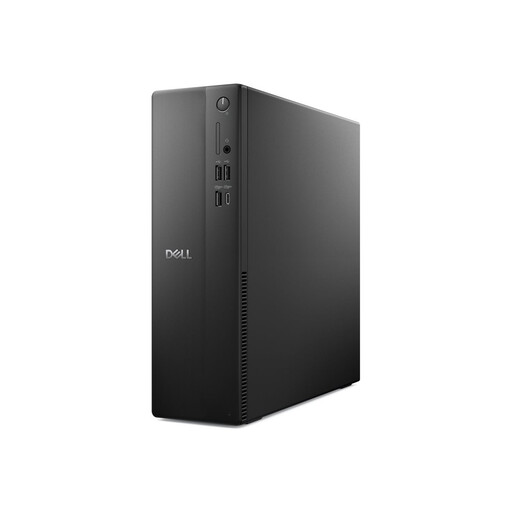
Why this product suits the profile: This slim PC is 9.5 cm wide and features an Intel Core i5-14400, 16 GB DDR5, a 512 GB SSD, Windows 11 Pro, Wi-Fi 6E and Gigabit LAN.
The compact form factor is described with precise dimensions, connections and components. For demanding 3D games, however, the integrated Intel UHD Graphics 730 should not be considered a dedicated gaming graphics solution.
Space-saving case, Windows 11 Pro, 16 GB DDR5 and a 512 GB SSD.
We have put together a complete, regularly updated list of products that fully meet these strict selection criteria and the safety regulations applicable in the EU.
For word processing, spreadsheets, video conferences and several browser tabs, 16 GB of RAM is a practical starting point. If you regularly use photo and video editing software, virtual machines or large amounts of data, you should plan for 32 GB or more.
Its lifespan depends on workload, maintenance and upgradeability. A PC with replaceable RAM, additional drive bays and suitable expansion slots can be adapted to changing requirements for longer. Regular dust removal and sufficient ventilation also help ensure reliable operation.
Power consumption is determined by the processor, graphics card, power supply and length of use. A mini PC or office PC with integrated graphics will generally use less energy during typical office tasks than a powerful gaming PC under load. For a realistic assessment, do not equate the specified power supply capacity with actual consumption. Instead, check the manufacturer’s measurements or independent power usage tests.