Choose your desktop based first on the design software you use, then on the screen, connections and space available. A mini PC is a good fit if you want to use or choose a suitable monitor separately; an all-in-one makes sense if you want to buy the screen and computer together. A tower is worth considering if you have the space and specific upgrades in mind. For printed calendars, colour accuracy and PDF output also depend on your print workflow, not just the computer.
Who should consider this buying decision?
Calendar designers using layout software
If you want to use a particular programme, the operating system and specification need to meet its requirements. Adobe lists the requirements for InDesign, while Canva’s Help Centre sets out its own requirements for browser use.
Designers creating printed calendars
For print-ready files, the screen, colour management and PDF output matter just as much as the computer. Adobe explains that the ICC profile should match the output device.
Designers with a small desk
If you want to keep using your existing devices or set up a complete workstation in a small space, compare the form factor, connections and what’s included. Apple and Lenovo offer different options for building a workstation with separate components or choosing an integrated setup.
What should you look for when buying?
Mini PC with a separate monitor
A good fit if: you already have a suitable monitor, or want to choose one separately, and have limited desk space.
Things to consider: the monitor, connections and, where needed, input devices must all be compatible with the specific configuration.
All-in-one
A good fit if: you want to buy the computer and screen together and are happy with a fixed screen size. Apple lists the iMac as having an integrated 24-inch display.
Things to consider: you’re tied to the screen included with the device. Also check software compatibility and the connections available on the specific configuration.
Larger desktop or tower
A good fit if: you have room for the case and plan to make specific hardware upgrades later.
Things to consider: check the slots and upgrade options on the complete model. The case design alone doesn’t tell you what’s possible.
| Buying priority |
What to look for |
Who will find this most important? |
| Software compatibility |
Choose your programme and version, then compare its operating system, processor and memory requirements with the specific PC configuration. Adobe lists a minimum of 8 GB RAM and recommends 16 GB for InDesign; Canva has its own browser requirements. |
If I want to use a particular layout programme reliably, I’ll check its requirements first rather than choosing based only on general processing power. Software compatibility is the top priority for around 36% of consumers. |
| Screen and print output |
Choose a screen and connections that suit your workspace. For printing, Adobe advises taking the output device’s ICC profile and the required PDF and bleed settings into account. |
If my calendar is going to be printed, I want to match the screen and output to the print job’s requirements. Around 29% of consumers prioritise print quality and output. |
| Space and equipment |
Check that your existing monitor and its connection, as well as your keyboard, mouse and any required cables, are compatible with what’s included in the specific configuration. |
If I have limited desk space, the form factor needs to suit my existing screen and complete workstation. Desk space and equipment are the main priority for around 21% of consumers. |
| Upgrades and data backup |
Check planned hardware upgrades against the available slots and access to storage. The BSI lists an external hard drive as one option for keeping a separate backup. |
If I want to upgrade my computer in a specific way later, I’ll check the options on the particular model and plan a separate backup of my designs. Upgradeability is the top priority for around 14% of consumers. |
Common buying mistakes
-
Comparing the computer alone instead of the complete workstation
A mini PC isn’t ready for layout work without a suitable screen, whereas an all-in-one has an integrated display.
Make a note of the devices you already own, then check the monitor connections, input devices, cables and included accessories against the specific configuration.
-
Treating a minimum requirement as a general recommendation
For InDesign, Adobe distinguishes between a minimum of 8 GB and a recommended 16 GB RAM. These figures apply to InDesign and aren’t a blanket recommendation for every design programme.
Check the requirements for your specific software version and workflow rather than assuming one figure applies to every calendar project.
-
Assuming a powerful PC will automatically produce print-ready files
For print projects, the colour profile and PDF settings also depend on the output device and the print job’s requirements.
Confirm the file format, bleed and colour profile with your print provider before sending your work to print.
-
Confusing a large internal SSD with a backup
A fault or malware could make calendar designs stored locally inaccessible. The BSI describes keeping separate backups, for example on an external hard drive.
Set up a regular, separate backup of your project files as well.
Brands to consider
Apple
The Mac mini and iMac offer different screen setups: a separately chosen monitor or an all-in-one device.
- Apple lists Thunderbolt and HDMI display connections for the Mac mini M6; the iMac has an integrated 24-inch display.
- You’ll need to add a monitor and possibly other accessories to the Mac mini. With the iMac, your screen choice is tied to the device. Apple’s information is based on manufacturer specifications, not independent colour testing.
Lenovo
The ThinkCentre M75q range is an option if you’re looking for a compact Windows desktop with a separately configured workstation.
- Lenovo describes how to access the SSD and memory modules on the M75q Gen 5.
- For the M75q Gen 6, the monitor, wireless keyboard and mouse are optional extras and sold separately. The specification and what’s included depend on the specific configuration.
HP
Pro Tower and OmniDesk models are different options to consider for a dedicated Windows workstation.
- The specific model variant can be a starting point when choosing a desktop workstation.
- Check the specification, connections and upgrade options for the complete model. Features of individual models don’t necessarily apply to all HP desktops.
GEEKOM
The A5 Pro 2026 Edition is a mini PC for a workstation with a separately chosen monitor.
- GEEKOM offers a configuration with Ryzen 5 7530U, 16 GB RAM and a 1 TB SSD.
- Before buying, check that the exact generation and configuration on offer meet your software needs.
MSI
The PRO DP80 A14G and Cubi NUC 1M are different desktop and mini PC models to consider.
- The two model names represent different form factors in the desktop range.
- Check the connections, upgrade options and SSD specification for the exact model variant.
Joybuy products for designing calendars at home
The Joybuy products below include tower and mini PC options for a home workstation. If you choose a mini PC, remember to allow for a separately connected monitor.
 No image available
Acer Predator Orion 3000 Desktop i5 Ultra, 16 GB, 512 GB, RTX 5060
The tower design suits a workstation put together separately; according to the product details, a monitor, keyboard and mouse aren’t included.
Windows 11 Home; 16 GB DDR5 RAM; 512 GB SSD; RTX 5060. According to the product description, the memory can be upgraded to 32 GB.
Joybuy
 No image available
Dell Alienware Aurora ACT1250 1J3N5, Core Ultra 9-285K, 32 GB, 2 TB SSD
This tower is designed for a workstation where the monitor and other peripherals are chosen separately.
Windows 11 Home; 32 GB DDR5 RAM; 2 TB SSD; RTX 5080. The product description lists HDMI, DisplayPort and USB connections.
Joybuy
 No image available
Lenovo ThinkStation P2 Tower Gen2, Core Ultra 7 265, 32 GB, 512 GB SSD
This tower suits a workstation set up separately; the listed box contents don’t include a monitor.
Windows 11 Pro; 32 GB DDR5 RAM; 512 GB NVMe SSD; NVIDIA RTX A400 with 4 GB. A keyboard and mouse are listed in the box contents.
Joybuy
 No image available
ACEMAGIC AK1PLUS Mini-PC, Intel Celeron N5095, 16 GB, 256 GB SSD
The compact mini PC design suits a workstation with a separately connected monitor.
Windows 11 Pro; 16 GB LPDDR4X; 256 GB M.2 2280 SATA SSD; two HDMI 2.0 outputs. The product description also lists a VESA mount and an HDMI cable.
Joybuy
 No image available
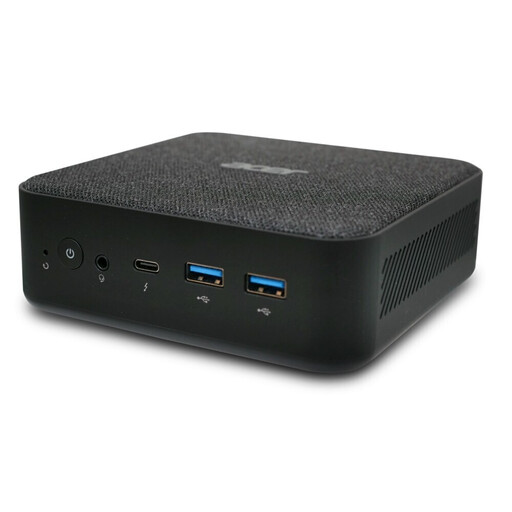
Acer Revo RB102 Mini-PC, Core Ultra 5 125U, 16 GB, 512 GB SSD
This mini PC is designed for a workstation where the monitor connects separately.
Windows 11 Pro; 16 GB RAM; 512 GB SSD. The product description lists four USB 3.0 connections.
Joybuy
Frequently asked questions
Do I need a dedicated graphics card to design an event calendar?
Designing a calendar doesn’t automatically mean you need a dedicated graphics card. Check the requirements of your specific design software and workflow; InDesign and Canva have different software requirements.
What do I need to connect and set up before using my new mini PC?
Connect a monitor that’s compatible with the video output, along with a keyboard and mouse. Then install your design software and back up your project files separately as well; the BSI lists an external hard drive as one option.
Is a good monitor enough to create a print-ready calendar?
No, a monitor alone won’t ensure your file is print-ready. For an InDesign print workflow, the ICC profile needs to match the output device; PDF settings may also cover compression and bleed. Check the required files and settings with your print provider.
What marking must a new desktop PC sold in Germany carry?
Devices covered by relevant EU harmonisation legislation must carry a CE marking where that legislation requires one. Check the requirements for the specific device; a CE marking is not an independent quality test.
How can I back up my event calendar designs?
As well as saving files locally, make regular backups in a separate location. The BSI describes using an external hard drive as one option.


