Choose a desktop PC for choir rehearsals with multiple video tracks based on your editing software, resolution, codec and number of camera angles. Then compare the processor, graphics, memory and drives. For Premiere on Windows, Adobe recommends 32 GB RAM or more for 4K and higher resolutions as a performance recommendation, not as a general minimum requirement. Proxies can make high-resolution footage easier to edit, but they need extra storage and a planned workflow. A tower is a good choice if internal upgrades matter, while a compact computer may suit you if space is limited.
Which editing setup is right for you?
Multi-camera editing
If you edit the same choir rehearsal from several angles, you’ll want to review and synchronise the footage without unnecessary interruptions. Adobe describes a multi-camera source sequence in Premiere, with several synchronisation methods.
Managing a rehearsal archive
If you keep long original recordings, make room not only for your editing setup but also for working files and separate backups. Adobe describes proxy and ingest workflows that can create additional working files.
An editing setup for a small space
If you need to work with multiple tracks at a compact workstation, the exact specification and suitable ports matter. Apple lists different storage and port options for the Mac mini (2024).
What should you look for when buying?
Configurable Windows tower
A good fit if: you use Windows and plan to upgrade internal components later.
Consider: specifications and upgrade options vary depending on the configuration you order.
Mac mini
A good fit if: macOS and your editing software suit your existing workflow, and you have limited desk space.
Consider: decide which storage and ports you need before you buy; external drives will need to fit into your setup.
Compact Windows desktop
A good fit if: space matters more than internal upgrades, and the exact specification suits your software and footage.
Consider: a compact design alone doesn’t tell you whether a computer is suitable for your multi-track workflow.
| What you need |
What to check before buying |
Who it matters most to |
| Reviewing multiple video tracks |
Check that the editing software, operating system, resolution, codec and number of camera angles match the exact processor, graphics and RAM specification. |
If I want to synchronise several angles of a rehearsal and minimise interruptions while reviewing footage, the whole preview workflow matters. Around 33 % of consumers put smooth multi-camera editing first. |
| Storing footage and backups |
Estimate how much footage you’ll have and how long you plan to keep it; consider drive capacity, ports and a separate backup option. |
If you want to keep original footage and working files, with backups stored separately, plan your storage needs early. Around 27 % of consumers prioritise media storage and backups. |
| Effects and export |
Check that the effects you plan to use and your export resolution match the exact graphics card and memory in the configuration on offer. |
If I mainly want to work with effects or export at high resolution, I check the specification relevant to those tasks rather than relying on the model name alone. Around 20 % of consumers put this need first. |
| Desk space and ports |
List the monitors, drives and audio equipment you need; check the ports on the exact configuration. |
For a small editing setup, I want to connect drives and peripherals as needed without losing sight of how much desk space I have. Around 20 % of consumers prioritise a compact workstation. |
For Premiere on Windows, Adobe recommends 32 GB RAM or more for 4K and higher resolutions. This recommendation applies to the software and resolution range mentioned; it isn’t a blanket minimum requirement for every editing programme or project. Adobe also recommends a fast drive for the application and cache, plus an additional fast drive for media. Proxies can make editing easier by using lighter copies of your files; you’ll still need access to the originals, as well as extra storage.
Avoid common buying mistakes
-
Assuming the word “workstation” proves it’s powerful
Specifications can vary considerably, even within the same product range. A product name doesn’t confirm which graphics, RAM or storage a particular configuration includes.
Compare the full product number, operating system, memory, graphics card and drives with the requirements of your editing software.
-
Confusing proxy files with a backup
Proxies are easier-to-edit working copies; they don’t replace the original footage you keep. You may need access to the original media for the final export.
Plan for originals, working files and separate backups as distinct requirements before deciding on drive capacity.
Brands to consider
HP
The Z2 Tower G1i range offers configurable Windows towers for different editing setups.
- HP lists options for graphics, memory and drives.
- Specifications vary by configuration, so check the full product number.
Apple
The Mac mini (2024) is a compact macOS option if its editing software and media formats suit your existing workflow.
- Apple lists various M4 and M4 Pro configurations, with different storage and port options.
- The media features listed don’t confirm how many video tracks will play back smoothly.
Lenovo
The ThinkStation P3 Tower Gen 2 is a configurable range of Windows towers.
- Lenovo lists configurations ranging from integrated to dedicated professional graphics.
- Check the exact graphics card and the rest of the specification rather than assuming the model range will deliver the editing performance you need.
Dell
The Precision 5860 Tower workstation is available as a configurable desktop.
- Dell lists a range of configuration options for this product line.
- Specifications and options depend on the configuration, so compare the exact model with your workflow.
Joybuy products for video editing
This selection includes compact Windows desktops and towers for editing multiple video tracks, as well as a Mac mini for a space-saving macOS setup.
 No image available
HP Z2 SFF G1i A40M2ET#ABD, Core Ultra 7 265K
A compact Windows configuration for an editing setup with limited space and multiple video tracks.
Core Ultra 7 265K, 32 GB DDR5 at 5,600 MHz, 1 TB M.2 SSD, RTX A400 with 4 GB and Windows 11 Pro.
View at Joybuy
 No image available
HP Z2 Tower G1i A40MMET, Core Ultra 7 265
A Windows tower for an editing setup where a tower design and the exact specification you order are the right fit.
Core Ultra 7 265, 32 GB DDR5 at 5,600 MHz and Windows 11 Pro. Check the SSD capacity against the details of the specific offer.
View at Joybuy
 No image available
HP Z1 Tower G1i A40T1ET#ABD, Core Ultra 9 285
A Windows tower for projects where the stated memory and processor configuration suits your editing software.
Core Ultra 9 285, 64 GB DDR5 at 5,600 MHz, 1 TB M.2 SSD and Intel Graphics.
View at Joybuy
 No image available
Dell Alienware Aurora ACT1250 1J3N5, Core Ultra 9-285K
A Windows tower for anyone looking to check this specific processor, graphics and storage configuration against their editing software.
Core Ultra 9-285K, 32 GB DDR5, 2 TB SSD and RTX 5080.
View at Joybuy
 No image available
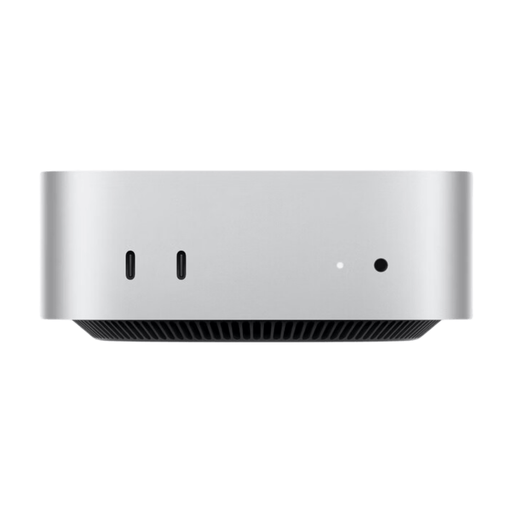
Apple Mac mini MHQM4 CTO 2, M6
A compact macOS desktop for a space-saving editing setup, provided its editing software and media formats suit your needs.
Apple M6 with 12-core CPU and 12-core GPU, 24 GB unified memory, 1 TB SSD, Thunderbolt 4 and HDMI.
View at Joybuy
Frequently asked questions
Can I automatically synchronise multiple camera angles of a choir rehearsal?
Premiere offers a multi-camera source sequence with several synchronisation methods. Adobe lists timecode, shared audio tracks and markers, among others; the right method depends on your footage and its metadata. This feature isn’t specific to any particular PC.
Can proxies let me use a less powerful computer?
In Premiere, proxies can make high-resolution or processor-intensive files easier to edit. You’ll still need access to the originals and extra space for working files; they don’t guarantee a particular level of multi-camera editing performance.
Does the SSD only need to store the editing software?
No. Adobe recommends a fast internal drive for Premiere and its cache, plus an additional fast drive for media. Also allow for original footage, any proxies and a separate backup.
What should I look for in the graphics card and memory?
Check the requirements of your editing software against the full specification of the exact configuration. For Premiere on Windows, Adobe recommends 32 GB RAM or more for 4K and higher resolutions; this isn’t a blanket recommendation for other software or resolutions.
How can I check that a device meets the requirements for use in Germany?
The German Federal Network Agency lists points to check, including correct CE marking, manufacturer details and a declaration of conformity. This general guidance doesn’t confirm that a specific offer is compliant, so check the details for the device you’re considering.


