Handbook creators
If you’re bringing text and images together in a layout programme, check the requirements of your software and the PDF export specifications before buying a PC. Adobe explains the requirements and export options for InDesign.


For creating a club handbook on a small desk, a ready-to-use mini PC with a separate monitor is a sensible starting point if your layout software runs on Windows. A Mac mini is an option if your software and files are compatible with macOS. First check the operating system and software requirements, then the memory, storage and monitor connections. The size of the case alone won’t tell you whether the finished print file meets your printer’s specifications.
If you’re bringing text and images together in a layout programme, check the requirements of your software and the PDF export specifications before buying a PC. Adobe explains the requirements and export options for InDesign.
If you want to leave room for documents as well as your screen and peripherals, consider a compact case. You should also check which display outputs you need and, if applicable, whether it’s compatible with a monitor mount. MSI gives the Cubi NUC 1M series a VESA specification of 100 × 100 mm.
If several people work on the handbook files, regular backups should be part of your routine. Germany’s Federal Office for Information Security recommends backing up data regularly.
A good fit if: you use Windows layout software or already have a suitable monitor, and have limited space to spare.
Bear in mind: specifications and what’s included vary by configuration. You may need to buy a monitor and peripherals separately.
A good fit if: your layout software and the files you share work with macOS.
Bear in mind: check the connections and specifications of the exact configuration. Workflows tied to Windows need a compatibility check.
A good fit if: you want to choose the components yourself and are happy to handle the additional setup.
Bear in mind: a barebone may be supplied without RAM, an SSD or an operating system.
For InDesign version 21.3 and later, Adobe specifies a minimum of 8 GB RAM on Windows, recommends 16 GB and recommends using an SSD. These requirements apply to the software mentioned and aren’t a general recommendation for every handbook project.
| Priority | What to check before buying | Who should consider this? |
|---|---|---|
| Layout software and editing | Operating system and software version; RAM and SSD capacity based on the requirements of the specific programme. | If I use InDesign or another layout programme, it needs to run on the operating system I choose. Around 33% of consumers would put software compatibility first when making this purchase. |
| Desk space and monitor | Case dimensions, suitable display outputs and, if you plan to mount the PC, VESA compatibility for both the PC and monitor. MSI specifies 100 × 100 mm for the Cubi NUC 1M series. | If you want room to work on a small desk alongside your monitor and peripherals, desk space is a key consideration. Around 27% of consumers would prioritise keeping desk space clear above all else. |
| Files and backups | Space and a connection for an additional backup device, as well as a regular backup routine. Germany’s Federal Office for Information Security recommends backing up data regularly. | If several club members edit handbook files, I want to be able to recover them after a fault or accidental deletion. Around 20% of consumers would put file backups first. |
| Complete workspace | What’s included with the exact version: operating system, RAM, SSD, monitor, keyboard and mouse. | If you want to keep extra purchases and setup to a minimum, check the full contents of the package rather than just the PC case. Around 20% of consumers would prioritise having everything included above all else. |
A compact case doesn’t make a complete workspace. For the ThinkCentre M70q Gen 6 configuration described by Lenovo Germany, the monitor, keyboard and mouse are sold separately.
Check what’s included with the exact configuration and consider which devices you already have that you can use.
Depending on what you already own, you may need to add a monitor, peripherals, cables or a suitable mount.
GMKtec also explicitly offers the NucBox M6 Ultra without RAM, an SSD or an operating system. This version needs additional components and setup.
Before comparing prices, check the exact version and which parts are actually included.
You’ll need to add missing RAM, storage and an operating system during setup.
PDF format, colour conversion, bleed and printer’s marks depend on the export options and your printer’s specifications, not just your choice of computer.
Ask your printer which settings you need and check the PDF export before sending it over.
The A5 Pro 2026 Edition is a specific range of Windows mini PCs for compact workspaces.
The Cubi NUC 1M series is worth considering if you need several monitor connections or are looking into VESA mounting.
The NucBox M6 Ultra is worth considering if you want to choose between a fully equipped version and one you can customise yourself.
The Mac mini is an option for a compact macOS workspace if your layout software and files work with macOS.
The ThinkCentre M70q Gen 6 Tiny is a configurable compact business desktop.
The product options below include compact Windows mini PCs with a separate monitor, as well as Mac mini configurations for a macOS workflow.
 No image available
Could suit a compact Windows workspace if the version you choose is compatible with your layout software.
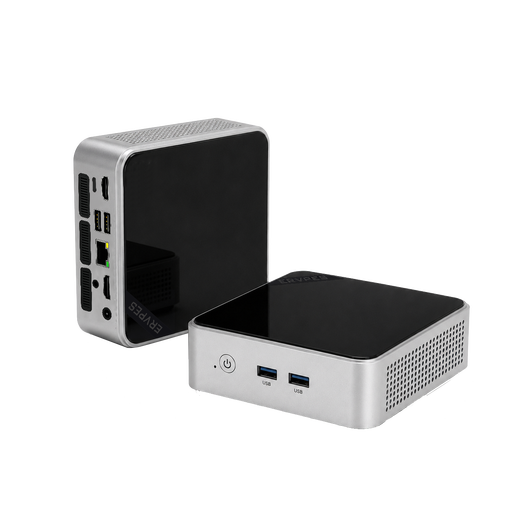
Windows 11, 8 GB DDR4 RAM and a 256 GB SATA SSD are listed. The product title also specifies two HDMI outputs and a Type-C port.
 No image available
A compact Windows option, provided your layout software works with the operating system and specifications of this version.
Windows 11, 16 GB DDR4 RAM and a 512 GB SSD are listed. The product title specifies HDMI and 4K output at 60 Hz.
 No image available
A good fit for a compact macOS workspace if your layout software supports macOS.
This version lists macOS, 16 GB Unified Memory, a 256 GB SSD, HDMI and Thunderbolt 4.
 No image available
A macOS option for a small workspace, provided your layout software works with macOS.
This version lists 24 GB Unified Memory, a 512 GB SSD, HDMI and Thunderbolt 4. The description states that the keyboard and mouse are sold separately.
 No image available
Could suit a compact Windows workspace if your layout software is compatible with Windows 11 Pro.
This version is listed with 24 GB LPDDR5 RAM and a 512 GB NVMe SSD. The product title specifies HDMI, DisplayPort and USB-C display outputs.
Not necessarily. What matters is the requirements of the layout and image-editing software you actually use. Adobe lists RAM, display and graphics processor requirements for certain InDesign features; this doesn’t mean every handbook project needs a dedicated graphics card.
Ask your printer which PDF format they prefer and what they require for bleed and printer’s marks. Adobe lists PDF export options for these separately and recommends agreeing the required printer’s marks with your print provider.
Back up your handbook files regularly to a suitable additional storage device. Germany’s Federal Office for Information Security recommends regular backups so that data can be recovered if it’s lost.
For consumers, a distance purchase covered by the right of withdrawal generally comes with a 14-day period starting from delivery; exceptions apply. The European Union’s Your Europe website also explains that purchases covered by EU consumer rules have a legal guarantee of at least two years from receipt of the goods. If the club makes the purchase itself, you’ll first need to establish whether it is acting as a consumer under the specific contract; these consumer rights can’t be assumed to apply without checking.