Poster designers working with lots of references
If you switch between layouts, photos, text and several open templates, compare your design software’s requirements with the memory and storage in the specific PC configuration.


Choose a desktop PC based on your design software, file sizes and preferred screen space. For Photoshop, Adobe recommends 16 GB of RAM or more, but this is no guarantee for every poster file or other programme. With compact PCs and towers, check the exact configuration, monitor connections and what’s included.
If you switch between layouts, photos, text and several open templates, compare your design software’s requirements with the memory and storage in the specific PC configuration.
If you check details and prepare files for sharing, you’ll need to think about more than just the computer. A suitable monitor and enough space for project files also matter.
If you want to keep using your monitor and input devices, check that the connections are compatible and see what’s included with the configuration you choose.
For poster projects with several open references, consider your software requirements, screen space, the needs of your complete workstation and potential future upgrades separately.
| What matters | What to check before buying | Who should pay particular attention? |
|---|---|---|
| Smooth performance with several programmes | Compare the RAM in the exact configuration with the requirements of your programmes. Adobe recommends 16 GB of RAM or more for Photoshop. | If I keep layouts, images and several references open at the same time, I want a configuration that suits the mix of software I use. Around 36% of consumers prioritise smooth multitasking. |
| Screen space and checking print files | Check the monitor resolution and compatible video connections. Adobe recommends a resolution of 1920 × 1080 or higher for Photoshop; this says nothing about the colour accuracy of a particular monitor. | If I want to view my design and templates side by side and check details before sending files to print, a suitable screen matters. Around 29% of consumers focus mainly on screen space and checking print files. |
| Total cost of the workstation | Check whether a monitor and input devices are included, and which software you actually need. With the Lenovo offer reviewed, the monitor, keyboard and mouse are optional and sold separately. | If I’m working to a club budget, I want to factor in the necessary devices and software from the outset. Around 21% of consumers prioritise total cost. |
| Future upgrades | Check whether the RAM or SSD can be accessed and upgraded on the exact model; details for a product range don’t automatically apply to every configuration. | If I want to use the computer for ongoing projects and upgrade the storage later, the specific maintenance and upgrade options are crucial. Around 14% of consumers make this their main priority. |
Adobe distinguishes between 8 GB as the minimum requirement for Photoshop and 16 GB or more as the recommendation. Working with several references open at once and larger image files can place different demands on your PC than simply installing the software.
Compare the recommendations for the programmes you actually use with the RAM in the specific PC configuration.
If the configuration you choose doesn’t suit your programmes and projects, you may need a memory upgrade or a different computer later on.
A compact computer doesn’t automatically come with a monitor, keyboard and mouse. With the Lenovo offer reviewed, these devices are optional and sold separately.
Before you buy, make a note of the devices and cables you already have, the connections you need and anything else required for your workstation.
If you’re missing suitable accessories, you’ll need to budget for them separately. Whether you need to do so depends on your existing workstation.
RAM, SSDs and connections can vary between configurations. The name of a product family alone isn’t enough to tell you what’s included with the PC you order.
Check the full model name and product number against the RAM, SSD and monitor connections you need for the specific offer.
The ThinkCentre M70q Gen 6 is a compact Windows desktop for workspaces with limited desk space and a separate monitor.
The Pro Slim Plus QBS1250 is a configurable, compact Windows desktop.
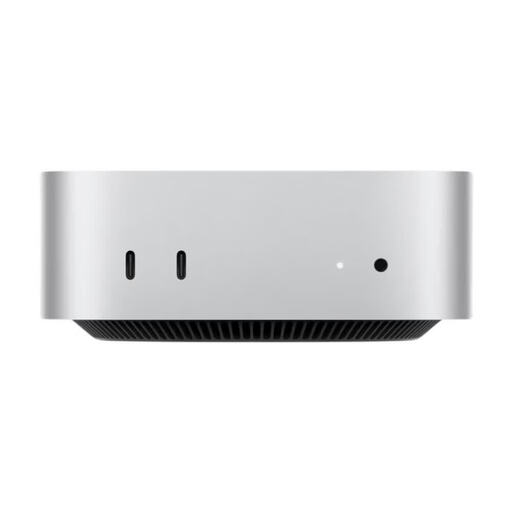
The Mac mini is a compact macOS desktop designed for use with an external monitor.
The Pro Mini 400 G9 is a compact Windows option.
The NUC-15-Pro+ range is aimed at buyers looking for a compact PC with accessible RAM and storage.
The Joybuy products below include compact mini PCs, a Mac mini and tower desktops for a workstation with several open references. For each model, check that your software is compatible, along with the monitor connections and exact specifications.
 No image available
If you work with several references and larger project files at the same time, check this configuration against its listed specifications.
32 GB RAM, 2 TB SSD, NVIDIA RTX 5080 and Windows 11. The description lists HDMI and three DisplayPort outputs.
 No image available
If you’re looking for a tower for poster projects and several monitors, check that the connections work with your screens.
32 GB DDR5 RAM, 512 GB NVMe SSD, NVIDIA RTX A400 with 4 GB and Windows 11 Pro. HDMI and DisplayPort are listed.
 No image available
If your design software runs on macOS, you can use this Mac mini with a monitor chosen separately.
32 GB unified memory and 1 TB SSD. The specifications list support for up to three external displays and HDMI. Check whether a monitor, keyboard and mouse are included in your workstation setup.
 No image available
If desk space is limited in your club’s workspace, check that the connections and specifications suit your monitor and mix of software.
16 GB DDR5 RAM, 1 TB SSD and AMD Ryzen 7 8745HS. The listed dimensions are 130 × 127,5 × 52 mm, and the operating system is Windows 10/11.
 No image available
If you want a compact Windows PC that can run several monitors, check its display support and the exact SSD configuration.
16 GB RAM and Windows 11. The product name lists a choice of 512 GB or 1 TB SSD, as well as support for three 4K displays; confirm which configuration you’re choosing.
Not necessarily. For traditional 2D graphic design, the CPU, RAM, SSD and monitor are often considered key factors. If you use Photoshop, also check the GPU requirements for your specific hardware; the balance may be different for video, 3D or other workflows.
Compare your monitor’s video input with the outputs on the exact PC configuration you’re ordering, and check the cables and what’s included. The monitor is sold separately with the Lenovo offer reviewed.
Allow enough SSD storage for your project files, and check the maintenance guidance for the exact configuration before replacing the RAM or drive. Lenovo and ASUS list upgrade options for certain ranges; that doesn’t mean every model can be upgraded in the same way.
No. For a consumer purchase, statutory claims relating to defects are generally made against the seller; a manufacturer’s warranty is an optional extra with its own terms. The Verbraucherzentrale states that new goods generally have a two-year statutory warranty period. Whether a purchase made by a club counts as a consumer purchase depends on the contracting party and the purpose of the purchase.
For a qualifying distance-selling contract with a consumer, there is generally a 14-day right to cancel. According to the Verbraucherzentrale, you must notify the seller that you’re cancelling; simply sending the item back isn’t enough. Whether this rule applies to an order made in the club’s name depends on the contracting party and the purpose of the purchase.