A mini PC is a good fit for transcribing interviews at a shared desk, provided it runs your software and has enough ports for your headphones, peripherals and monitors. The exact operating system and device configuration matter, as do separate user accounts for everyone who uses it. A larger desktop case is worth considering if space and upgrade options matter more to you than a compact design.
Who is this PC for?
Transcribers sharing a PC
If several people use the same computer or desk, plan for separate user accounts and consider who can access recordings and transcripts. Germany’s Federal Office for Information Security recommends setting up separate, password-protected accounts on shared devices.
Editors working with audio
If you repeatedly listen to recordings while correcting the text, check the software requirements and make sure the ports work with your existing headphones, peripherals and monitors.
Buyers short on desk space
If your computer, screen and peripherals all need to fit into a limited area, consider not just the size of the case but also the ports and space for cables.
What should you look for when buying?
Compact Windows mini PC
A good fit if: your transcription software supports Windows, you have limited room for a computer and the ports on the specific configuration suit your workspace.
Things to consider: Specifications and what’s included vary by model. A compact design doesn’t tell you how noisy a PC will be.
Apple Mac mini
A good fit if: your software supports macOS and your existing devices are suitable for this workspace.
Things to consider: Check the storage capacity and ports on your chosen configuration, and whether you’ll need any additional workspace accessories.
Larger desktop PC
A good fit if: you have the space and need internal upgrade options or easily accessible ports for your setup.
Things to consider: A larger case takes up more room and isn’t automatically necessary for editing text and audio.
For a shared computer, access permissions and device setup are part of the decision. Germany’s Federal Office for Information Security recommends separate, password-protected accounts for different users.
| Priority |
What to check when buying |
Who should consider this? |
| Access protection |
Check whether you can set up separate user accounts and suitable access permissions, and how confidential files will be stored. |
If several people use the same computer, you’ll want to control who can access interview files. Around 28% of consumers put the protection of shared files first. |
| Listening and editing |
Check that the audio output, USB and monitor ports are suitable for your headphones, peripherals and screens. |
If you repeatedly listen to audio while correcting and editing text, your existing devices should work without the need to swap connections unexpectedly. Around 22% of consumers prioritise this audio workflow. |
| Desk space and working environment |
Measure the space available for the case and cables. If relevant, check for a suitable monitor mount and model-specific noise-level information. |
If you share a desk, you won’t want an oversized case to take up space needed for your screen and work materials. Around 22% of consumers pay particular attention to available space. |
| Software and workload |
Check your software’s system requirements, as well as the operating system, memory and SSD in the complete product configuration. |
If you need to run a particular transcription programme or several applications at once, check compatibility and choose a suitable configuration in advance. Around 17% of consumers put software and workload first. |
| Total cost and support |
Check which accessories are included and what support services apply to the specific configuration. |
If you still need a monitor or peripherals, plan for the complete workspace and the support you want. Around 11% of consumers prioritise these overall costs. |
Common mistakes to avoid
-
Assuming a security label means you have the right protection in place
On a shared computer, protection also depends on user accounts, permissions and how files are stored. A single feature of the device can’t replace this setup.
Set up separate accounts and appropriate permissions for everyone who will use the computer. When handling personal data, you should also consider suitable technical and organisational measures.
-
Assuming the specifications from the product range name
Memory, SSD, operating system and included accessories can vary between configurations in the same product range.
Before buying, compare the full model number and the details of the specific configuration. If the information conflicts, don’t assume you’re looking at the same product.
-
Choosing AI or graphics performance for straightforward transcript correction
The requirements of your software alone don’t demonstrate any extra benefit from a more powerful GPU or NPU when manually correcting transcripts.
First, check the programme, audio and monitor ports, and any applications you’ll use at the same time. Consider extra computing power only if it’s relevant to other tasks you plan to do.
Key brands at a glance
Lenovo
The ThinkCentre Neo 50q Gen 5 range includes compact Windows business PCs for workspaces with limited room.
- Lenovo Germany lists different combinations of Windows 11 Home or Pro, memory and SSD for specific configurations.
- Check the specifications and whether a keyboard, mouse and monitor are included in the offer.
HP
The ProDesk 4 Mini G1i is a compact Windows business PC.
- For the CP9G5EA#ABD configuration, HP specifies Windows 11 Pro, 16 GB RAM and a 1 TB SSD. HP also says this configuration can be mounted behind a monitor.
- These details apply to the configuration listed and don’t confirm the noise level or the specifications of every ProDesk model.
Dell
The Pro Micro QCM1250 is a compact desktop PC. Check its specific configuration and service options.
- Dell Germany lists a configuration with Windows 11 Pro, 16 GB DDR5 and a 512 GB SSD.
- Service options and what they include depend on the level of service and duration you choose.
Apple
The Mac mini is a compact macOS alternative, provided your transcription software supports macOS.
- Apple Germany lists Mac mini configurations with M6 or M5 Pro chips and different storage capacities.
- Check the specific configuration and its ports for your existing devices.
ASUS
The ExpertCenter PN55 and NUC ranges offer mini PC options with different specifications.
- ASUS distinguishes between ready-to-use mini PCs and customisable NUC kits.
- Check whether the specific offer includes the equipment you need. Details for a product range don’t necessarily apply to every configuration.
Joybuy products for compact workspaces
The Joybuy products below include compact mini PCs and a Mac mini. Check that the operating system, ports and specifications suit your transcription software and existing devices.
 No image available
SOYO Y5Pro mini PC, Intel Core i5 8250U/8350U, 8 GB DDR4, 256 GB SATA SSD
Could suit a Windows workspace with limited room. Check that the ports work with your audio and display devices.
The product title lists Windows 11, 8 GB DDR4 and a 256 GB SATA SSD, as well as the Intel Core i5 8250U/8350U processor options.
The product description lists two HDMI outputs, four USB ports, an audio output and dimensions of 105 × 113 × 45 mm.
Joybuy
 No image available
Apple Mac mini, M6, 24 GB Unified Memory, 512 GB SSD
It can fit into a macOS workflow if your transcription software supports this operating system. The supplier lists macOS 12 or later for f4.
The product name lists the M6 chip, 24 GB Unified Memory and a 512 GB SSD.
Listed ports include Thunderbolt 4, HDMI and a headphone jack.
Joybuy
 No image available
BMAX B7A Plus mini PC, AMD Ryzen 5 6600H, 12 GB LPDDR5, 512 GB NVMe SSD
The listed audio and display ports may suit a setup with headphones and multiple screens. Check your software’s operating system requirements first.
The product details list 12 GB LPDDR5, a 512 GB NVMe SSD and an AMD Ryzen 5 6600H.
Listed ports include two HDMI outputs, five USB ports and an audio port. The dimensions are given as 113 × 113 × 44.5 mm.
Joybuy
 No image available
SOYO S5Air mini PC, AMD Ryzen 5 7535HS, 16 GB LPDDR5, 512 GB NVMe SSD
Could suit a compact Windows workspace. Check whether the ports work with your audio and display devices.
The product title lists Windows 11 Pro, 16 GB LPDDR5 and a 512 GB NVMe SSD.
The product description lists audio, USB and HDMI ports, as well as DisplayPort and Type-C video outputs. The dimensions are given as 128 × 128 × 47.6 mm.
Joybuy
 No image available
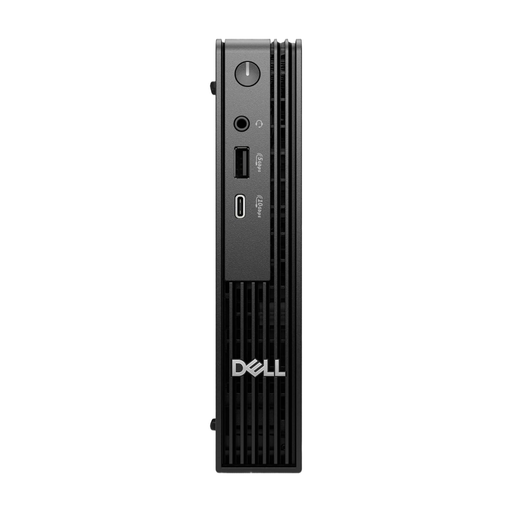
Dell Pro Micro QCM1250 MJ5TK TPM, Intel Core i7-14700T, 16 GB DDR5, 512 GB NVMe SSD
The micro desktop design is made for a compact workspace. Check that the specific specifications and ports meet your needs.
The product title lists Windows 11 Pro, an Intel Core i7-14700T, 16 GB DDR5 and a 512 GB NVMe SSD.
The product description lists four USB ports.
Joybuy
Frequently asked questions
Do I need a particular operating system to correct interview transcripts?
It depends on the software you use. For f4, the supplier lists Windows 10 or later, or macOS 12 or later. The Linux version is marked as untested and without official support. These requirements don’t automatically apply to other programmes.
How should I set up a computer used by several people?
Set up separate user accounts with appropriate permissions, and decide who can access each interview file. Germany’s Federal Office for Information Security recommends separate, password-protected accounts for multiple users. When handling personal data, you should also consider suitable technical and organisational measures.
Which ports should I check for listening to audio and working with a screen?
Check the ports on the specific computer against your headphones, any foot pedal you use and your existing monitors. For workplace display screen equipment, ASR A6 sets out requirements within its scope.
What extra costs or support services should I allow for?
Check whether a monitor and peripherals are included in the specific offer, and what support is actually promised. Dell lists optional service plans for the Pro Micro; what they cover depends on the option you choose.
Does buying a PC cover the legal requirements for recording and editing an interview?
No. The computer itself doesn’t provide a legal basis for recording or processing an interview. Those responsible must decide on appropriate safeguards. Germany’s Data Protection Conference considers recording telephone conversations generally permissible only with the consent of the external participant as well. Whether this view applies to a particular interview depends on how it is recorded and the circumstances.


