A compact desktop is a sensible starting point for writing an interview profile at a shared desk, provided its operating system and connections are compatible with your existing monitors, input devices and writing software. A pre-configured Windows mini PC could suit workflows that depend on Windows; a Mac mini is an option if the applications you need and your workplace IT are compatible with macOS. If you choose a kit, allow for the extra components and set-up involved.
Which option is right for you?
Writers working with research materials
If you switch between text, sources and possibly interview recordings while writing an interview profile, make sure the software and monitor connections suit your needs. Configurations from Lenovo Germany and HP Germany show that operating systems and specifications vary between offers.
Teams sharing a PC
When several people use the same computer, separate working environments and a screen lock are important. The Federal Office for Information Security recommends locking access even when you step away briefly.
Buyers short on desk space
If you want to keep your computer out of the way, consider its connections and your existing peripherals as well as its form factor. Mini PC configurations from GEEKOM Germany, Lenovo Germany and HP Germany illustrate the different specifications available.
What should you look for when buying?
First, check your software and connections, then consider privacy and space. Finally, compare the components and set-up still needed to create a usable writing space.
| Consideration |
What to check before buying |
Who needs to consider this? |
| Writing and research workflow |
Check that the operating system and monitor connections support the software and file formats you need. |
When I switch between text, sources and interview recordings while writing, I need compatible software and connections, not unnecessary extra performance. Around 28% of consumers focus primarily on this writing and research workflow when buying. |
| Keeping confidential work separate |
Speak to your IT team about personal accounts, screen locks and approved storage. |
When using a shared computer, I want to be able to keep my notes and work separate from those of other people. Around 28% of consumers pay particular attention to separate working environments and access protection. |
| Desk space and existing devices |
Check the case position and ventilation space against your desk, and make sure the connections work with your existing devices. |
When desk space is limited, I want a computer that takes up little room and still works with my monitor and input devices. That is why around 22% of consumers prioritise desk space and their existing devices. |
| What’s included and set-up |
Check whether the operating system, storage drive and input devices you need are included. |
I want to know in advance whether I can create a usable workstation with the computer and my existing peripherals, or whether I’ll need to set up additional components. Around 22% of consumers put what’s included and the set-up involved first. |
Common buying mistakes
-
Assuming everything included means you have a ready-to-use writing space
Mini PCs and kits can differ in whether they include an operating system, a storage drive and input devices. A kit without essential components won’t work like a fully equipped computer without extra choices and set-up.
With a kit, you’ll also need to choose, buy and set up RAM, an SSD and an operating system; other offers may not include a keyboard or mouse.
Check the full specification against the devices you already own before comparing offers.
-
Assuming a review applies to a different model in the same product range
The D6B240EA model in the COMPUTER BILD review is not the same as HP variant 937U0EA#ABD. You can’t assume they have the same specifications or review verdict just because they belong to the same product family.
Compare the full model number and the review’s specifications with the exact configuration you’re considering.
-
Assuming a compact design offers enough privacy
A small case doesn’t separate user accounts or lock away interview notes left open on screen. The Federal Office for Information Security recommends locking access even when you step away briefly.
Include personal accounts, a screen lock and agreed storage arrangements as part of the set-up.
Brands to consider
The examples below refer to specific product lines and configurations, not every variant from each brand.
GEEKOM
The A5 Pro 2026 Edition is an example of a pre-configured Windows mini PC for a compact writing space.
- GEEKOM Germany lists 16 GB RAM, a 1-TB SSD and Windows 11 Pro for the R5-7530U variant.
- Details for this configuration don’t necessarily apply to A5 Pro variants with a different processor or storage. Check what’s included in the specific configuration too.
HP
The Pro Mini 400 G9 range includes mini PCs for compact workspaces; the exact model number matters when comparing specifications.
- HP Germany lists Windows 11 Pro, 16 GB RAM, a 512-GB SSD and a wired mouse for variant 937U0EA#ABD.
- Model 937U0EA#ABD is not the D6B240EA variant featured in the COMPUTER BILD review, so you can’t assume the review verdict applies to it.
Lenovo
The ThinkCentre Neo 50q Gen 5 Tiny is a configurable Windows option for workspaces with existing peripherals.
- Lenovo Germany lists 24 GB RAM, a 512-GB SSD and Windows 11 Home for configuration 13B9CTO1WWDE1.
- Neither a keyboard nor a mouse is listed for this configuration. Lenovo’s productivity claims are manufacturer statements, not independent measurements for interview work.
Apple
The Mac mini is a compact macOS option if the applications you need and your existing workplace IT are compatible.
- Apple Germany lists Mac mini configurations with M6 and M5 Pro on its specifications page.
- Specifications vary by configuration. Details for the older Mac mini with M4 from 2024 are not specifications for an M6 model.
ASUS
The NUC 14 Pro AI illustrates the difference between a pre-configured mini PC and a kit that you equip yourself.
- ASUS Germany distinguishes between the mini PC and kit on its specifications page.
- According to ASUS, the kit doesn’t come with an operating system or storage drive pre-installed. ASUS notes that product specifications may vary by country.
Joybuy products for your desk
The Joybuy products below include compact Windows mini PCs and a Mac mini for your writing space. Check that each one’s operating system and connections suit your existing set-up, and see which peripherals are included.
 No image available
ACEMAGIC E3B Mini Desktop Computer, AMD Ryzen 7 7735HS, 24 GB RAM, 512 GB SSD
For a Windows workstation with multiple screens, provided your existing devices are compatible with the listed video outputs.
Windows 11 Pro, 24 GB LPDDR5, 512 GB NVMe SSD; HDMI, DisplayPort and USB-C video outputs. Two M.2-2280 slots, with support for up to 4 TB according to the product name.
View at Joybuy
 No image available
BMAX B6 Mini PC, Intel Core i3-8109U, 12 GB RAM, 256 GB SSD
A compact Windows option if your existing screens can connect via HDMI or DisplayPort.
Windows 11 Pro, 12 GB RAM and a 256 GB SSD; HDMI and DisplayPort outputs. The case is listed as measuring 125 × 112 × 34 mm.
View at Joybuy
 No image available
SOYO S5Air Mini PC, AMD Ryzen 5 7535HS, 16 GB RAM, 512 GB SSD
For a Windows writing space where you want to connect existing monitors using the listed connections.
Windows 11 Pro, 16 GB LPDDR5 and a 512 GB NVMe SSD; HDMI 2.0, DisplayPort 1.4, USB-C and six USB 3.0 ports. The case is listed as measuring 128 × 128 × 47,6 mm.
View at Joybuy
 No image available
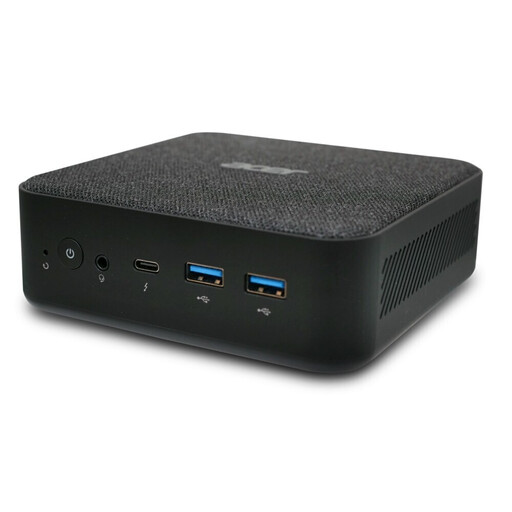
ACER Revo RB102 Mini PC, Core Ultra 5 125U, 16 GB RAM, 512 GB SSD, Windows 11 Pro, DT.BMCEG.002
A compact Windows option for a writing space, where you can check your existing connections and peripherals in advance.
Windows 11 Pro, 16 GB RAM and a 512 GB SSD are listed for this model variant.
View at Joybuy
 No image available
Apple Mac mini, M6 12-Core CPU, 24 GB Unified Memory, 512 GB SSD
An option if the writing software you need and your workplace IT are compatible with macOS, and you can connect your existing screens.
24 GB unified memory, 512 GB SSD, HDMI and three Thunderbolt 4 ports; macOS. The product description says that a keyboard and mouse are not included.
View at Joybuy
Frequently asked questions
What should you check before connecting a PC at a shared desk?
Check the connections on the exact PC variant against your existing monitors, keyboard, mouse and, if needed, recording equipment. Also check whether the operating system is pre-installed and who will set up personal accounts, as a mini PC and a kit may include different components.
How can you protect interview notes when leaving your desk?
The Federal Office for Information Security recommends locking access to your computer even when you step away briefly. Separate user accounts make sense when a computer is shared; for workplace devices, agree on storage and software with the relevant IT team.
Is a barebone ready for writing straight away, without any extra set-up?
Not necessarily. COMPUTER BILD notes that the Intel NUC 13 doesn’t include RAM, storage or an operating system. ASUS also distinguishes between an equipped mini PC and a kit without a pre-installed operating system or storage drive.
Are a manufacturer’s warranty and statutory rights the same thing?
No. The consumer advice centre distinguishes your statutory rights against the seller from a voluntary guarantee offered by the manufacturer or retailer. Also check the specific guarantee and service terms for the offer.
What rules apply to workplace computer workstations and electrical equipment?
The Workplace Ordinance places responsibility on employers for setting up and operating workplaces; simply describing a desk as “shared” doesn’t establish that an individual workstation has been assessed. For electrical and electronic products, the Federal Network Agency checks aspects including CE marking, product identifiability and required documentation. A place on a review list does not prove that a specific product on offer complies with the rules.


