For browser-based landing page design, if you already have a suitable monitor, a pre-configured mini PC can be a space-saving choice. A Mac mini is worth considering if your software and devices are compatible with macOS. The key factors are the specific software you use, the installed memory, the monitor connections and the total cost of your setup. If local image editing or future component upgrades are important, an upgradeable desktop may better suit your needs. There’s no evidence that a gaming graphics card is essential for Figma alone.
Who’s looking for a desktop PC for landing page design?
Designers working in a browser
If you mainly design in Figma and compare your designs with a browser preview, a suitable browser and a practical amount of screen space are important factors. Figma describes its application as primarily browser-based.
Students on a tight overall budget
When budgeting for a complete workspace, factor in any monitors and input devices you already own, and check what’s included with the specific PC configuration. In 2022, the Federal Statistical Office cited price as an important factor when buying digital devices. This data isn’t specific to students or desktop PCs for landing page design.
Designers who edit images locally
If you edit images locally as well as designing pages, check the requirements for the specific software version you use, along with the memory and storage. Adobe lists 8 GB RAM as the minimum for Photoshop 27.x and recommends at least 16 GB.
What to look for when buying
Compare computers based on your workflow, your total workspace budget, the space available and the connections you need.
| Priority |
What to check when buying |
Who it matters most to |
| Performance for your workflow |
The software and versions you use, plus browser and WebGL support; for Photoshop, check the relevant RAM and GPU requirements too. |
If I mainly design in a browser, I don’t want to pay for features my workflow doesn’t need. Around 29% of consumers say suitability for their software is their top priority. |
| Overall budget |
Check what’s included, the operating system, and whether you already have or need to buy a monitor, keyboard and mouse. |
When planning my budget, I’m interested in the cost of the whole workspace, not just the computer. Around 29% of consumers put this first. |
| Space and set-up |
Measure the available space and plan your cable routing; compare the dimensions of the device and the display outputs required for the specific model. |
On a small desk, I want to keep enough room for my computer, monitor and work materials. Around 24% of consumers prioritise space and set-up. |
| System and monitor compatibility |
Check that the software you need, the operating system and your monitor’s input match the outputs on the configuration you choose. |
If I want to keep using my existing devices or specific software, my new computer needs to work with them. Around 18% of consumers put compatibility first. |
Avoiding common buying mistakes
-
Assuming the computer price is the cost of a complete workspace
You may still need a monitor, keyboard, mouse and adapters, depending on what you already own. A barebone system may also require you to buy RAM, a drive and an operating system separately.
First, make a note of the devices you already have, then compare what’s included with each specific configuration.
A barebone system may require additional purchases of RAM, a drive and an operating system.
-
Applying test results to a similarly named configuration
Similar model names don’t prove that the specifications and the tested version are the same. For example, the HP Pro Mini 400 G9 has different identifiers, including D6B240EA and 938A5EA#ABD.
Check the full model identifier and specifications before applying a test result to an offer.
-
Assuming you need a gaming graphics card just for Figma
Figma describes its graphics requirements as low; other applications, such as Photoshop, have their own requirements, which vary by version. A dedicated gaming GPU could therefore mean unnecessary extra expense for a workflow that uses only browser-based tools.
First, decide which applications you’ll actually use, then check their documented requirements.
Brands to consider
Apple
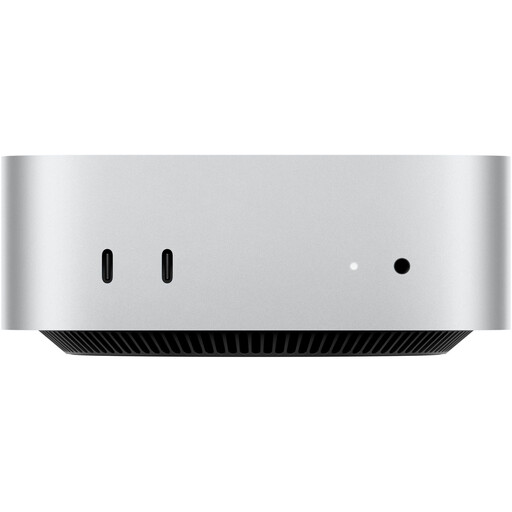
The Mac mini is a compact macOS desktop for buyers whose required applications are compatible with macOS.
- For the M6 configuration described, Apple Germany lists options starting with 16 GB of unified memory and connections for external displays.
- The chip, RAM and SSD vary by configuration. Test results for an older M4 model don’t demonstrate the performance of an M6 model.
HP
The Pro Mini 400 G9 range includes compact Windows desktop configurations.
- For the 938A5EA#ABD model, the HP Store Germany lists Windows 11 Pro, 8 GB RAM and a 256 GB SSD.
- Check the specifications and model identifier of the specific version. Details for a different configuration don’t necessarily apply to this offer.
Lenovo
The ThinkCentre Neo 50q Gen 5 is a range of compact Windows desktops.
- For the 13B9CTO1WWDE1 model, Lenovo Germany lists 24 GB RAM and a 512 GB SSD.
- A keyboard and mouse aren’t listed for this model. Check what’s included with the specific version.
Dell
Dell Pro Micro is a configurable range of ultra-compact Windows desktops.
- For the QCM1250 configuration shown, Dell lists 16 GB DDR5 RAM and a 512 GB SSD.
- Other configurations and optional services may differ. Details for the model shown don’t necessarily apply to every order.
ASUS
The NUC 14 Pro is a range of compact PCs for buyers comparing configurations and future upgrade options.
- ASUS describes access to the case as tool-free.
- Check the specifications of the specific version before buying. Manufacturer claims about performance or reliability aren’t an independent comparison.
Joybuy products for your workspace
The models below include Mac mini versions running macOS and a Windows mini PC for compatible design workflows.
 No image available
Apple Mac mini M6, 12-Core CPU, 12-Core GPU, 16 GB Unified Memory, 256 GB SSD
A good fit for a design workflow using macOS-compatible software and a separate monitor you already own.
With 16 GB unified memory, a 256 GB SSD, and HDMI and Thunderbolt 4 ports. A monitor, keyboard and mouse aren’t listed as included.
View at Joybuy
 No image available
Apple Mac mini M6, 12-Core CPU, 12-Core GPU, 24 GB Unified Memory, 512 GB SSD
Worth considering if your required applications run on macOS and you can connect an external monitor.
With 24 GB unified memory, a 512 GB SSD, and HDMI and Thunderbolt 4 ports. Check whether a monitor and input devices are included with the specific version on sale.
View at Joybuy
 No image available
ACEMAGIC E3B Mini Desktop Computer, AMD Ryzen 7 7735HS, 24 GB LPDDR5, 512 GB NVMe SSD
A good fit for a Windows-based design workflow, provided your applications are compatible with Windows 11 Pro.
With Windows 11 Pro and HDMI, DisplayPort and USB-C display output. The product description lists two M.2 2280 slots.
View at Joybuy
 No image available
Apple Mac mini MHQK4ZD/A_CTO, M6, 12-Core CPU, 12-Core GPU, 32 GB Unified Memory, 512 GB SSD
An option for a macOS-compatible workflow with an external monitor.
With 32 GB unified memory, a 512 GB SSD, and HDMI and Thunderbolt 4 ports. A display, keyboard and mouse are included only if they’re listed for the specific version on sale.
View at Joybuy
 No image available
Apple Mac mini MHQK4ZD/A_CTO, M6, 12-Core CPU, 12-Core GPU, 24 GB Unified Memory, 512 GB SSD, 10 Gbps Ethernet
Suitable if your applications are compatible with macOS and you want to connect an external monitor.
With 24 GB unified memory, a 512 GB SSD, and HDMI and Thunderbolt 4 ports. The listed contents are the Mac mini and power cable; a display, keyboard and mouse aren’t mentioned.
View at Joybuy
Frequently asked questions
Do I need a separate gaming graphics card for a landing page in Figma?
Not for Figma alone: the provider describes its graphics requirements as low and lists browser and WebGL requirements. Check the requirements for any additional software separately; Adobe publishes its own GPU requirements for Photoshop 27.x.
What should I check first with my existing monitor?
Check that the monitor’s input matches the display outputs on the exact PC configuration you’ve chosen. Also confirm whether a keyboard and mouse are included; neither is supplied with the 13B9CTO1WWDE1 version described by Lenovo.
Is 16 GB RAM essential for every landing page project?
No. Adobe lists 8 GB as the minimum and recommends at least 16 GB for Photoshop 27.x. This applies to a specific application and isn’t a general minimum requirement for Figma or desktop PCs.
What are my rights if a PC bought online is faulty?
According to consumer advice centres, consumers in Germany can claim statutory warranty rights from the seller for new goods within two years of receiving them; this is separate from a manufacturer’s guarantee. Online purchases generally also come with a 14-day right to cancel, starting from receipt of the goods. Specific exceptions and the terms of the contract should be checked separately. The right to cancel because you’ve changed your mind is different from claims relating to faulty goods.
What should I check on the labelling of a PC sold in Germany?
As part of its market surveillance, the Federal Network Agency checks factors including correct CE marking, identifiable manufacturer details, a German-language user manual and a declaration of conformity. Check these details for the specific device; a brand name or shop listing doesn’t guarantee that they’re present.


