What to look for when buying
First, check whether your editing software can sync separate audio and video files in the way you need. Then choose a specification to suit your resolution, effects, connections and project storage requirements.
| Consideration |
What to check before buying |
Who it matters to |
| Syncing separate audio |
Does the editing software support your preferred syncing workflow? Check the file formats and audio connections you’ll need, too. |
If I need to combine separately recorded speech with the video, I’ll check the workflow and connections first; around 33% of consumers prioritise syncing. |
| Resolution and effects |
Compare the RAM and GPU memory with the recommendations for your editing software, resolution and effects. For Premiere on Windows, Adobe specifies 16 GB RAM for HD and at least 32 GB for 4K. |
Anyone editing 4K footage or using effects will want a specification suited to their own projects; around 27% of consumers prioritise this. |
| Storage for projects and cache |
Estimate the space you’ll need for raw recordings, projects and cache. For the Premiere cache, Adobe recommends a fast SSD or NVMe SSD, ideally on a dedicated drive. |
When recording courses regularly, I’ll need room for raw files and working projects as well as finished videos; around 20% of consumers prioritise storage planning. |
| Desk space and workstation |
Compare the case size and connections with your available space and existing devices. Also check whether a monitor and input devices are included. |
If space is limited or you still need equipment for a complete workstation, the whole setup matters; around 20% of consumers prioritise this. |
Joybuy products for video editing
The Joybuy desktop PCs and mini PCs below are options to compare for Windows-based video-editing workstations. Before deciding, check the specific specifications and your editing software’s requirements.
 No image available
HP Z2 SFF G1i A40M2ET#ABD, Ultra 7 265K, 32 GB, RTX A400 with 4 GB
Could suit a compact Windows editing workstation, if the specification meets your project’s needs.
The product title lists 32 GB DDR5 RAM, a 1 TB M.2 SSD and an RTX A400 with 4 GB. The description lists USB-C and USB ports, as well as a headphone/microphone socket.
View at Joybuy
 No image available
HP Z2 Tower G1i A40MMET, Ultra 7 265, 32 GB
Compare this tower with other case styles if you’re looking for a Windows PC for your editing workstation.
The product title lists 32 GB DDR5 RAM, integrated Intel graphics and Windows 11 Pro. Check the exact SSD specification of the configuration on offer.
View at Joybuy
 No image available
HP Z1 Tower G1i A40T1ET#ABD, Ultra 9 285, 64 GB, 1 TB
A tower configuration to compare if you’re planning to use more RAM for your editing software.
The product title lists 64 GB DDR5 RAM, a 1 TB M.2 SSD, integrated Intel graphics and Windows 11 Pro. Check whether this specific graphics setup suits your effects and source files.
View at Joybuy
No image available
HP Z1 Tower G1i A40SYET, Ultra 7 265 vPro, 32 GB, 1 TB
Could suit a Windows editing workstation with 32 GB RAM, provided the integrated graphics can handle your footage.
The product title lists 32 GB DDR5 RAM, a 1 TB M.2 SSD and integrated Intel graphics. The description lists USB-C, USB and audio ports, as well as DisplayPort and HDMI connections.
View at Joybuy
 No image available
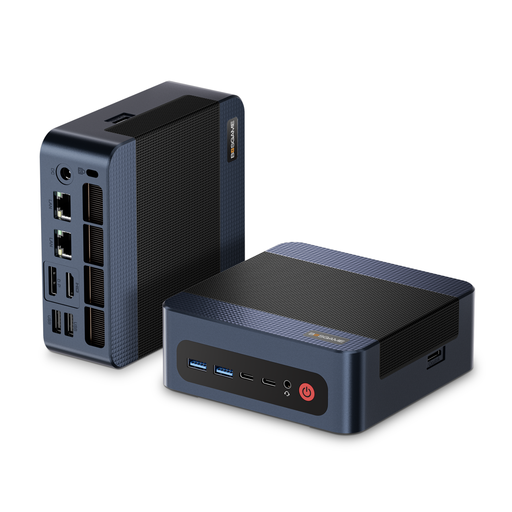
BOSGAME M4 Plus mini PC, Ryzen 9 7940HS, 32 GB, 1 TB
Its compact size could suit a space-saving editing workstation, provided the connections and specification meet your workflow’s needs.
The product title lists an AMD Ryzen 9 7940HS running at up to 5.2 GHz, 32 GB DDR5 RAM, a 1 TB PCIe 4.0 SSD and Windows 11 Pro. The description lists integrated Radeon 780M graphics, two USB 4.0 ports and the option to install a second PCIe SSD.
View at Joybuy
Frequently asked questions
Do I need a particular graphics card for separately recorded speech?
No. Recording the audio separately doesn’t, by itself, mean you need a particular graphics card. Adobe Premiere has a workflow for combining audio and video clips; the rest of the specification depends on your editing software and footage.
How should I plan storage for the Premiere media cache?
Adobe recommends a fast SSD or NVMe SSD for the Premiere media cache, ideally on a dedicated drive. If needed, you can also store the cache on the same SSD as your media; any cache files you delete will need to be recreated later.
What are my rights if a PC bought online is faulty?
Your statutory rights against the seller are separate from any voluntary guarantee. According to the Verbraucherzentrale, if a product is faulty, the first step may be to request that the seller puts it right by repairing or replacing it. Many online purchases also generally come with a 14-day right to cancel; check the terms and deadlines for your specific purchase.
Can I record someone else’s voice for a learning video?
Under § 201 of the German Criminal Code (StGB), recording someone else’s non-public speech without authorisation is a criminal offence. Whether recording, editing and publishing are permitted in a particular case depends on the circumstances and the relevant legal basis. If consent under data protection law is the legal basis you choose, the Datenschutzkonferenz says it must be freely given, informed and specific to the situation.


