Which workspace is right for you?

Illustrators working with lots of scans

If you work with drawing templates and several image files, start by checking your software requirements, as well as the memory and storage in the specific PC configuration. Adobe recommends at least 16 GB of RAM for Photoshop; the right specification also depends on your projects and software.

People responsible for print layouts

If you combine edited images with a page layout, factor in the monitor and colour management as well as the computer. Fogra describes colour as a relevant factor in image capture, processing, on-screen evaluation and output.

Volunteers with limited workspace

A compact device could work well for recurring booklet projects at a dedicated workstation. Before buying, check the scanner, monitor, connections and data backup against the full specification of the version you’ve chosen.

What should you look for when buying?

What matters What to check before buying Who is it important to?
Software and scan editing Check the operating system, processor and graphics requirements for your software, as well as the RAM and available SSD storage in the exact configuration. If I edit large scans and use several design programmes, I want to check their requirements in advance. Around 33% of consumers give scan editing their highest priority.
Print layout and colour Check the monitor connection and ask the printer about its file and colour requirements; a PC graphics card alone is no guarantee of accurate print colours. If I prepare images and pages for a printed booklet, I need a suitable screen and a consistent colour workflow. Around 27% of consumers prioritise print layout and colour evaluation.
Space and device connections Check the scanner model, supported operating system, USB and video connections, and planned desk space against the specific version. If I want to keep using my existing scanner and monitor at my current workstation, I need to make sure the devices and computer have compatible connections. Around 20% of consumers focus on space and device connections.
Storage and data backup Estimate how much space your scans and layout files will need, and plan to back them up separately from your working drive. If I want to keep templates and finished layouts for longer, I need to consider storage and backup as well as the PC. Around 20% of consumers prioritise purchase and archiving.

Avoiding buying and usage pitfalls

  • Confusing graphics performance with print-ready colour reproduction

    Colour evaluation is part of the whole process, from image capture to output. It isn’t a feature of the PC’s graphics card alone.

    Ask the printer about its requirements, and check the monitor and colour management separately from the computer’s graphics specification.

  • Planning to use the smallest SSD as an archive for all your scans

    A small internal SSD can quickly run short of space as your collection of scans grows. A working copy also won’t protect you from data loss.

    Estimate your storage needs based on your files, and plan for additional storage and a separate backup.

  • Assuming similarly named versions have identical specifications

    Memory, SSD, operating system and service can vary within the same model range.

    Compare the full model or part number and the specification of the exact version you’re buying.

  • Assuming that owning a scan means you have permission to publish it

    Having a digital copy doesn’t automatically mean you can publish it in a booklet.

    Check the rights, credit requirements and permitted uses for each drawing with the relevant rights holder or archive.

    Orders and usage fees may apply to publications using images from the Federal Archives’ image database, depending on the use requested.

Suitable brands and product ranges

Lenovo

The ThinkCentre M75q Gen 5 Tiny is an example of a compact Windows workstation.

  • The checked version 12RQ004MEZ is listed with 16 GB of RAM and a 512 GB SSD; Lenovo also specifies on-site service.
  • Check the expansion options and integrated graphics on the specific version, rather than assuming the same specification applies to other configurations.

Dell

The Pro Tower QCT1255 is a configurable Windows option if its footprint and potential for expansion suit your workspace.

  • The checked configuration lists 16 GB of RAM and a 512 GB SSD; higher RAM and SSD options are available to choose from.
  • Before ordering, check the exact specification and the terms for configuration changes.

Apple

The Mac mini with M6 is a compact macOS desktop for a scanning and layout workflow that’s compatible with macOS.

  • The German base configuration is listed with 16 GB of unified memory and a 256 GB SSD.
  • Check that your software and scanner are compatible, and consider the storage needs of your scan archive. Larger storage options cost extra.

HP

The Pro Mini 400 G9 is another example of a compact Windows PC.

  • Version 937U0EA#ABD is listed with Windows 11 Pro, 16 GB of RAM and a 512 GB SSD.
  • Before buying, check the exact part number and specification against your software and connection requirements.

Desktop PCs at Joybuy

This selection includes a Windows tower and compact Mac mini configurations for a dedicated workstation. For the Mac mini models, pay particular attention to whether your software and scanner are compatible with macOS.

Lenovo ThinkStation P2 Tower Gen2 with Intel Core Ultra 7 265, 32 GB DDR5 and 512 GB NVMe SSD

Lenovo ThinkStation P2 Tower Gen2, Intel Core Ultra 7 265

The tower form factor is an option for a dedicated workstation with several connected devices.

32 GB DDR5, 512 GB NVMe SSD, NVIDIA RTX A400 with 4 GB, Windows 11 Pro, HDMI, DisplayPort and several USB ports.

View at Joybuy

Apple Mac mini with M6, 16 GB unified memory and 256 GB SSD

Apple Mac mini M6, 16 GB, 256 GB SSD

This compact configuration is an option if your scanning and layout workflow is compatible with macOS.

12-core CPU, 12-core GPU, 16 GB unified memory, 256 GB SSD, Thunderbolt 4 and HDMI.

View at Joybuy

Apple Mac mini with M6, 16 GB unified memory and 512 GB SSD

Apple Mac mini M6, 16 GB, 512 GB SSD

The compact form factor suits a dedicated workstation, provided your software and scanner work with macOS.

12-core CPU, 12-core GPU, 16 GB unified memory, 512 GB SSD, Thunderbolt 4 and HDMI.

View at Joybuy

Apple Mac mini with M6, 24 GB unified memory and 512 GB SSD

Apple Mac mini M6, 24 GB, 512 GB SSD

Choose this configuration only if the macOS workflow is compatible with your software and scanner.

12-core CPU, 12-core GPU, 24 GB unified memory, 512 GB SSD, Thunderbolt 4 and HDMI.

View at Joybuy
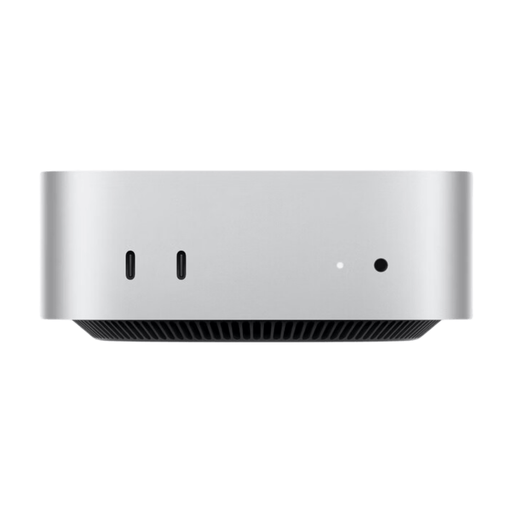
Apple Mac mini MHQM4 CTO 2 with M6, 24 GB unified memory and 1 TB SSD

Apple Mac mini MHQM4 CTO 2, 24 GB, 1 TB SSD

The listed SSD capacity may be useful when choosing a model if you want to keep lots of files stored locally; still, check how much storage you actually need.

12-core CPU, 12-core GPU, 24 GB unified memory, 1 TB SSD, Thunderbolt 4 and HDMI. The scanning and layout workflow must be compatible with macOS.

View at Joybuy

Frequently asked questions

Do I need a particularly powerful dedicated graphics card for scanned drawings?

Not necessarily: what matters is the requirements of your specific software and features. For Photoshop 27.x on Windows, Adobe lists specific GPU requirements and additional GPU memory for 4K displays. Check that your chosen PC’s specification matches your software version and monitor resolution.

How can I check whether my scanner and monitor will work with the PC?

Make a note of your scanner model, required operating system and drivers, and your monitor’s inputs. Compare these with the operating system and connections on the specific PC version; the form factor alone doesn’t guarantee compatibility.

Is a large SSD enough to back up my scans?

No. An internal SSD is your working drive and doesn’t replace a separate backup. Back up important files regularly to another medium; the consumer advice centre explains the 3-2-1 rule.

Can I simply reproduce historical drawings in a booklet?

You can’t assume that just because a drawing is old or you have a scan, you’re free to use it. Check the rights and terms of use for the specific image. For publications using images from the Federal Archives’ image database, follow the permissions and source credit requirements listed there. These rules don’t automatically apply to collections held by other archives.

What if a PC is faulty or I buy one online and it isn’t suitable?

If a product is faulty, your statutory rights against the seller are separate from any voluntary guarantee; the first step may be to ask the seller to repair or replace it. For online consumer purchases, you generally have a 14-day right to cancel, although conditions and exceptions apply. The consumer advice centre explains the differences between these rights and time limits.