Anyone reviewing lots of footage
You import a lot of source footage and want to plan separately for your originals, working files and backups. Adobe recommends storing media and cache on fast drives for Premiere.


For long carnival footage, first make sure you have enough space for your originals, projects, cache and backups, as well as suitable working drives. Then choose your processor, codec support, RAM and graphics card to suit your recording format, resolution, editing software and effects. Adobe’s recommendation of 32 GB or more of RAM for 4K and higher resolutions applies to Premiere; it is not a general minimum requirement for every editing programme.
You import a lot of source footage and want to plan separately for your originals, working files and backups. Adobe recommends storing media and cache on fast drives for Premiere.
You edit high-resolution camera or mobile phone footage and want to match your processor, memory and format support to your editing software. For Premiere, Adobe recommends 32 GB or more of RAM for 4K and higher resolutions.
You use effects or colour correction and check the graphics card in the exact configuration, while keeping memory and storage in mind too.
First plan your storage and workflow for your files, then choose components to suit your format, editing software and effects.
| Buying priority | What to check | Who it matters to |
|---|---|---|
| Space and drives | Check capacity and available drive bays; plan separate storage for working files and backups. | If I import long original recordings, I want to make sure there’s enough space for footage, cache and projects. Around 36% of consumers say storage and media management are their top priority. |
| Preview and codec | Match your editing software, resolution and codec to the relevant software requirements. | If I want to work smoothly with my own recording format, I check the processor, RAM and potential proxy workflows together. Around 29% of consumers prioritise preview and codec support. |
| Effects and colour grading | Check the GPU model and graphics memory against the effects you actually use. | If I use lots of effects or colour correction, I want to choose a graphics card that suits my editing software. Around 21% of consumers prioritise GPU performance for this purpose. |
| Upgrades and ongoing costs | Check drive bays, ports, what’s included and any additional components you may need. | If my projects grow or I want to add drives later, I check the upgrade options and everything I’ll need for my workstation. Around 14% of consumers focus first on upgrades and ongoing costs. |
For Premiere, Adobe recommends 32 GB or more of RAM for 4K and higher resolutions. This is a recommendation for that programme, not a general requirement for every editing project. Adobe also recommends fast media drives. For suitable clips, proxy files let you edit lower-resolution copies, but they need additional storage space.
Original recordings, cache and, where applicable, proxy files all use storage space. So a single SSD capacity figure doesn’t tell you whether there’s enough room for all your working files and backups.
Estimate what you need based on the file size or data rate and the recording length of your own clips. Set up a separate backup method and check which drives and ports the configuration offers.
Components can vary within a product range. The name alone won’t tell you whether the specifications suit your format, software and effects.
Compare the full model number and individual components with your editing software’s requirements.
If a product is faulty, your statutory rights are against the seller; a voluntary guarantee may have different terms. The Verbraucherzentrale explains the difference.
Before buying, check who your contract is with and what terms apply to any voluntary guarantee or repair service.
The HP Z2 Tower G1i is a configurable Windows tower range. For the specific C9MU1ET#ABD configuration, HP lists 32 GB of RAM and a 2 TB SSD.
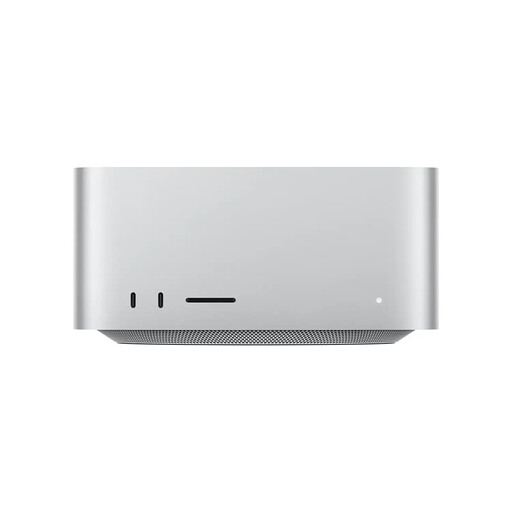
The Mac Studio is a desktop option running macOS. Apple documents hardware features for H.264, HEVC, ProRes and ProRes RAW on the M5 Max.
The ThinkStation P3 Tower is a configurable workstation. Depending on the model, you can check for Windows or Linux and available upgrade options.
The Pro Max Tower T2 is a configurable desktop tower with a choice of processors and power supplies.
The ProArt Station PD5 PD500TE is a creator tower. Its documented features include a card reader and two M.2 connectors.
These desktop PCs offer different starting points for video editing on Windows or macOS. For each offer, check the specifications of the exact configuration, its labelling and the documentation supplied for the specific device.
 No image available
A compact Windows configuration with a card reader, ideal for a workstation where you need to import footage from memory cards.
20-core processor; 32 GB DDR5-5600; 1 TB M.2 SSD; RTX A400 with 4 GB; Windows 11 Pro.
 No image available
A Windows tower configuration with a specified graphics card and SSD. Check that these components work well with the software you use.
Core Ultra 9 285K; 32 GB DDR5; 2 TB SSD; RTX 5080 with 16 GB of graphics memory.
 No image available
A macOS desktop configuration with unified memory and ports for external working drives.
96 GB unified memory; 1 TB SSD; Thunderbolt 5; 10GbE; Wi-Fi 7; Bluetooth 6.
 No image available
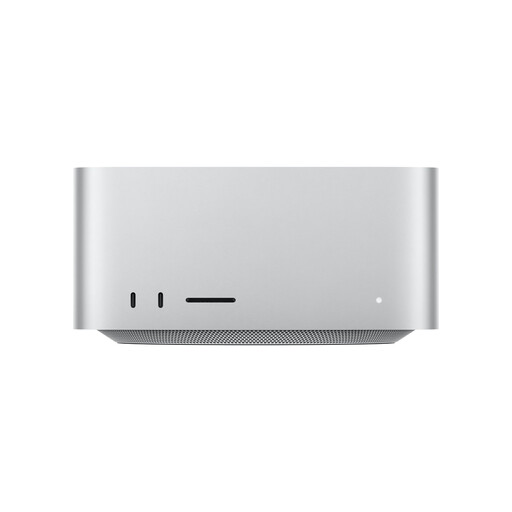
A macOS desktop configuration with a card reader and ports for additional working drives.
64 GB unified memory; 1 TB SSD; SDXC UHS-II card reader; four Thunderbolt 5 ports; 10GbE; Wi-Fi 7; Bluetooth 6.
 No image available
A Windows tower with specified memory, SSD and graphics card. Check that they’re suitable for your editing software.
64 GB DDR5; 2 TB SSD; GeForce RTX 5070 Ti with 16 GB of graphics memory; Windows 11.
The length of your recordings alone doesn’t determine how much RAM you need. For Premiere, Adobe recommends 32 GB or more for 4K and higher resolutions. Also check your editing software, resolution, codec and the applications you use at the same time. Plan storage space for files and drives separately.
For suitable video clips, you can create proxies in Premiere and edit lower-resolution copies. Adobe notes some limitations for the proxy command: among other things, the media must be online, and clips with captions and growing files aren’t suitable.
For Premiere, Adobe recommends fast SSD or NVMe drives for media and cache; separate drives can help with your workflow. If you only have two drives, Adobe says you can store cache and media on the same drive. Also back up your originals using a separate storage method.
If a new product is faulty, you can generally exercise your statutory rights against the seller; these are separate from any voluntary guarantee. Many online purchases come with a 14-day right to cancel, subject to statutory conditions. You may have to pay return postage when cancelling unless the seller covers it.
For the specific offer, check that the labelling and documents match the configuration actually being sold. For relevant electrical and electronic products, the Bundesnetzagentur lists points to check including the CE mark, product and manufacturer details, and the declaration of conformity.