What should you look for when buying?
First, work out which programmes and documents you want to use. Then choose a form factor that suits your desk and the equipment you already have.
| Buying priority |
What to check |
Who it matters to most |
| Equations, graphs and documents |
Check that the equation editor and graphics workflow work with your chosen operating system and a typical finished worksheet. |
If I want to turn equations, fractions or graphs into print-ready exercises, the software workflow needs to suit me. Shoppers whose main priority is mathematical typesetting account for around 33 %. |
| Space, display and connections |
Compare the inputs on your existing monitor with the video outputs on the exact PC configuration, and consider how much room the whole workstation will need. |
If my desk is short on space, I want to know whether a separate monitor will fit or whether I should choose a computer and display together. Shoppers whose main priority is space and display needs account for approximately 27 %. |
| Complete set-up |
Check the computer, monitor, keyboard, mouse, operating system and any components you may still need. |
If I’m putting together a workstation that’s ready to use, what’s included in the whole system matters to me—not just the PC case. Shoppers whose main priority is buying a complete set-up account for around 20 %. |
| System and long-term use |
Consider the exact operating system version, its support status, software requirements and keeping a separate backup of your work files. |
If I want to edit my worksheets again later, I need an operating system and programmes that suit how I plan to use the PC. Shoppers whose main priority is system maintenance account for approximately 20 %. |
Desktop PCs on Joybuy
The models below include tower and mini PC form factors for a Windows workstation at home. For each one, compare the exact specifications with your monitor, programmes and planned workflow.
 No image available
Lenovo ThinkStation P2 Tower Gen2, Intel Core Ultra 7 265, 32 GB DDR5, 512 GB NVMe SSD, Windows 11 Pro
A tower is worth considering if you’re looking for a separate desktop computer running Windows 11 Pro.
32 GB DDR5; 512 GB NVMe SSD; NVIDIA RTX A400 with 4 GB.
Joybuy
 No image available
ACEMAGIC AK1PLUS Mini PC, Intel Celeron N5095, 16 GB LPDDR4X, 256 GB M.2 2280 SATA SSD, Windows 11 Pro
A mini PC is an option if you’re looking for a compact computer with a monitor chosen separately.
16 GB LPDDR4X; 256 GB M.2 2280 SATA SSD.
Joybuy
 No image available
ACEMAGIC E3B Mini Desktop Computer, AMD Ryzen 7 7735HS, 24 GB LPDDR5, 512 GB NVMe SSD, Windows 11 Pro
This compact mini PC is designed for a workstation with a monitor chosen separately.
24 GB LPDDR5; 512 GB NVMe SSD; two M.2 2280 slots, expandable to up to 4 TB according to the product name.
Joybuy
 No image available
SOYO S5Air Mini PC, AMD Ryzen 5 7535HS, 16 GB LPDDR5, 512 GB NVMe SSD, Windows 11 Pro
This compact form factor is a good starting point if you’re looking for a mini PC with a monitor chosen separately.
16 GB LPDDR5; 512 GB NVMe SSD.
Joybuy
 No image available
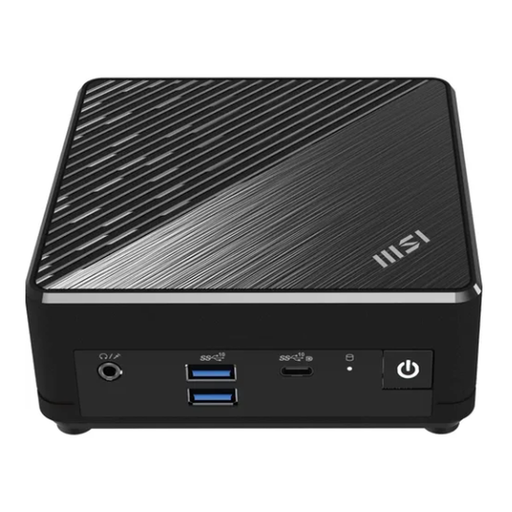
MSI Cubi N ADL S-217DE N200, 8 GB RAM, 256 GB SSD, Windows 11 Pro
This mini PC is an option if you’re looking for a compact computer for a workstation with a separate monitor.
8 GB RAM; 256 GB SSD.
Joybuy
Frequently asked questions
Do I need a particularly powerful PC for equations?
First, check that your equation editor and any graphics tools cover the types of exercises you need to create. LibreOffice’s published minimum requirements for Windows are lower than the specifications of the desktop examples described here. However, that doesn’t tell you how quickly they’ll handle your particular workflow.
What should I check when connecting an existing monitor?
Compare your monitor’s input with the video outputs on the exact PC configuration you’re considering. MSI lists HDMI and Thunderbolt for the Cubi NUC 1M range, while the Acer Aspire C24-195ES DQ.BM4EG.001 has a built-in display.
What are my rights if a desktop PC is faulty in Germany?
When you buy goods as a consumer in the EU, you’re generally entitled to a two-year legal guarantee from the seller. If a product is faulty, you may be entitled to a repair or replacement, subject to the legal requirements. This is separate from any additional manufacturer’s warranty.
What should I check to make sure a product complies with regulations?
Devices covered by relevant EU rules requiring CE marking must carry the CE mark. This is a declaration by the manufacturer, not an independent quality mark. Before buying, check the marking and product identity of the exact configuration, as well as any relevant conformity documents.
What should I do with an old desktop PC?
Waste electrical equipment must be collected separately. Retailers are required to take it back under certain conditions set out in the German Electrical and Electronic Equipment Act (ElektroG). Ask your retailer which return option applies to your device. Amendments to the law that came into force on 1 January 2026 included changes to the information provided about return points.


