iPhone Safari debugging
If you want to investigate a layout issue directly in Safari on a connected iPhone, Apple’s Mac workflow is relevant. Apple Developer explains how to inspect web content on connected iPhones and iPads using a Mac.


If you need to inspect websites in Safari on a connected iPhone, a Mac is the right choice for Apple’s documented Web Inspector workflow. For Chrome remote debugging on Android, Google supports Windows, Mac and Linux computers, so choose based on the ports, displays and applications you need to use at the same time. Chrome DevTools Device Mode is useful for an initial layout check, but Google says it doesn’t replace testing on a real mobile device.
If you want to investigate a layout issue directly in Safari on a connected iPhone, Apple’s Mac workflow is relevant. Apple Developer explains how to inspect web content on connected iPhones and iPads using a Mac.
If you want to check Chrome content on a real Android device, you can use a range of desktop operating systems. Google’s Chrome for Developers explains how to debug remotely from Windows, Mac and Linux.
If you’ll be running Android Studio, emulators or several displays alongside your browser and editor, make sure the RAM, storage and ports match your setup. Google’s Android Developers guidance notes that larger projects need more resources.
First, decide whether you want to inspect an iPhone in Safari, a real Android device or mainly simulated views. This determines the operating system, connection and specifications you’ll need.
A good fit if: you want to inspect web content on a connected iPhone or iPad using Apple’s Web Inspector.
Things to consider: Check the specific memory and port configuration, along with the displays and input devices you need.
A good fit if: you mainly test Chrome on a connected Android device or check responsive views, and the ports suit your workspace.
Things to consider: Apple’s documented method for inspecting a connected iPhone uses a Mac; specifications and accessories vary by model.
A good fit if: you want to choose and set up the RAM, SSD and operating system yourself.
Things to consider: A kit may arrive without a pre-installed operating system or storage, so check exactly what’s included.
| Priority | What to check before buying | Who is it most relevant to? |
|---|---|---|
| iPhone Safari | Whether the Mac workflow and specific configuration suit your iPhone or iPad, displays and available ports. Apple Developer explains how to inspect a device using a connected Mac. | If I need to inspect pages directly in Safari on a connected iPhone, this workflow is essential for me. Around 36% of consumers prioritise the iPhone Safari workflow. |
| Real Android device | A USB connection and compatible desktop operating system; Google explains how to debug Chrome remotely from Windows, Mac and Linux. | If I want to reproduce an issue on my Android phone, testing on the actual device matters more than choosing between the supported desktop systems. Around 29% of consumers prioritise debugging on an Android device. |
| Development tools running in parallel | Match the RAM, SSD and display ports to the applications you actually use. Google notes that larger Android Studio projects have higher requirements and that additional virtual devices need more storage. | If I’m running a browser, editor and possibly Android Studio or emulators at the same time, I’ll choose specifications to suit those applications and my displays. Around 21% of consumers put running development tools in parallel first. |
| Compact workspace | Check the full model code, operating system, RAM, SSD and ports. For kits, also check which components and accessories are included. | If space is limited on my home office desk and I want to add as little as possible myself, a compact setup with the right items included is important to me. Around 14% of consumers prioritise a compact, fully planned workspace. |
Google describes Device Mode as an initial approximation of a mobile device. It may not reliably reproduce an issue that only occurs on a particular phone.
Use the simulation to narrow down the cause, then test device-specific issues on the affected device as well.
RAM, SSD, operating system and included items can vary within a product family. The series name alone won’t tell you whether a particular version suits your setup.
Compare the full model code and check the installed RAM, SSD, operating system, ports and included devices.
Your statutory rights if a product is faulty and a voluntary warranty are different. The Verbraucherzentrale explains the distinction.
When buying as a consumer, check who you’re contracting with, and read the warranty terms separately from your statutory rights.
The details below relate to the specific product lines and configurations mentioned; they aren’t a general assessment of each brand as a whole.
Mac desktops are relevant if you need Apple’s documented workflow for inspecting a connected iPhone or iPad.
The ThinkCentre M70q Gen 5 Tiny is a compact Windows business desktop for a fixed workspace.
The Pro Mini 400 G9 range includes compact Windows desktop configurations.
The Pro Micro QCM1250 is a configurable micro desktop for compact workspaces.
The NUC 14 Pro is available as ready-to-use mini PCs and as kits for choosing your own components.
This selection includes Mac mini configurations for Apple’s iPhone Safari workflow, as well as compact mini PCs that may suit Android and browser debugging, depending on their specifications. Check the operating system, ports and included items for the specific offer.
 No image available
This compact desktop may suit you if you run several development tools at once and debug Android remotely, provided the specific version includes the operating system you need.
The product name lists 128 GB of memory and a 2 TB SSD.
 No image available
As a Mac desktop, this configuration suits Apple’s described workflow for inspecting a connected iPhone or iPad.
The product name lists 32 GB Unified Memory and a 512 GB SSD. A display, keyboard and mouse are included only if they’re explicitly listed for the specific version on sale.
 No image available
If you need Apple’s Web Inspector for a connected iPhone, a Mac is part of the documented workflow.
The product name lists 32 GB Unified Memory and a 1 TB SSD for this version. Check whether a display and input devices are included in the offer.
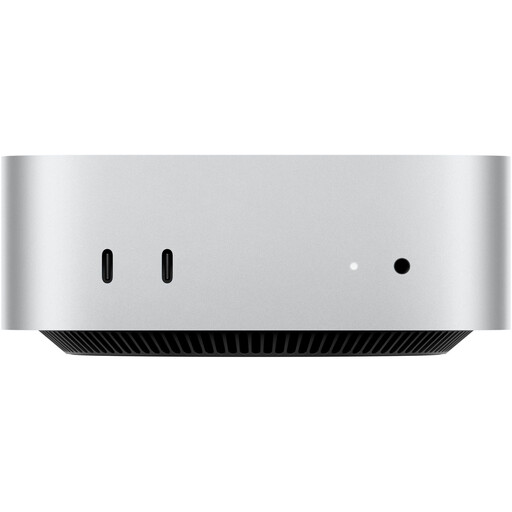 No image available
This Mac mini configuration may suit you if you want to use the documented Mac workflow to inspect a connected iPhone.
The product name lists 24 GB Unified Memory and a 512 GB SSD. Before buying, check what’s included with the specific version.
 No image available
This compact mini PC may suit Android and browser debugging if the operating system you choose and the connection to your device are suitable.
The product name lists 16 GB DDR4, a 1 TB SSD, USB 4.0 and compatibility with Windows 10/11 and Ubuntu.
It’s useful for an initial check of viewport and layout issues. Google describes Device Mode as an approximation; if the issue only occurs on a particular device, you should test it on that device too.
Enable Developer options and USB debugging on your Android device, then set up device detection in Chrome. Google explains this process for remote debugging. Also check that your computer and cable support a suitable USB connection.
Apple’s documented method for inspecting web content on a connected iPhone or iPad uses a Mac. This applies to the Web Inspector workflow, not as a general requirement for every mobile layout test.
Compare the requirements for your version of Android Studio, both with and without an emulator. Google sets out minimum and recommended specifications, and notes that larger projects and additional virtual devices may need more resources.
When you buy as a consumer, statutory rights if a product is faulty and a voluntary warranty are separate; the Verbraucherzentrale points this out. Distance contracts generally come with a right to cancel, although statutory exceptions may apply (§ 312g BGB). Check the terms of your specific contract. If you’re buying for business, don’t assume consumer rights apply without checking.