Choose a desktop PC based on your editing software, resolution and the number of camera angles you’ll actually edit at the same time. Multi-camera editing with 4K files or effects has different requirements from a straightforward HD edit. Then check the memory, graphics and drives you need for your specific workflow. A tower may offer more scope for upgrades, while a compact PC takes up less space. Adobe’s requirements apply to Premiere and don’t indicate how well a particular computer will perform.
Who edits training videos?
Multi-camera demo editors
If you synchronise footage of the same demonstration and switch between camera angles, check whether your editing software supports a multi-camera workflow and how it plays back your specific files. Adobe explains how to synchronise and edit footage from multiple cameras in Premiere.
Editors managing long recordings
If you keep large amounts of original footage, projects and cache files, plan your drive capacity, make sure you have the right connections and arrange a separate backup. Adobe describes the different roles of media and cache in Premiere.
Editors planning for changing projects
If you switch between simple demos and projects with higher resolutions or effects, compare the specific RAM and graphics configuration, as well as the upgrade options. A manufacturer’s specifications for a product range don’t automatically describe the configuration of the device you’ve selected.
What should you look for when buying?
First decide on your editing software, resolution and the camera angles you need. Then plan your media and project storage, and finally check the graphics and upgrade options for your specific workflow. In the requirements for Premiere published on 7 October 2026, Adobe specifies 16 GB RAM for HD footage and at least 32 GB for 4K and higher resolutions. These figures don’t guarantee performance for any particular multi-camera setup.
| Buying priority |
What to check before buying |
Who is this important to? |
| Multiple camera angles |
Check the editing software, the number of angles you need to use at the same time, resolution and codec. Also consider multi-camera and proxy features. |
If I need to synchronise multiple angles of a demonstration and switch between them while editing, the preview of my own files is crucial. Around 33% of consumers prioritise multi-camera preview. |
| Media and projects |
Plan capacity for original files and projects, as well as cache, spare connections and a separate backup. |
Anyone who needs to keep long recordings and multiple project files needs a well-planned storage setup. Around 27% of consumers put media and project storage first. |
| Graphics and effects |
Compare the GPU model, graphics memory, drivers, and software and codec requirements. |
If I use GPU-accelerated effects or exports, I check that my editing software supports them. Around 20% of consumers prioritise graphics performance for effects. |
| Cost and upgrades |
Check the specific part number, installed components and upgrade options that are actually available. |
Anyone looking to choose the right specification to start with and upgrade selectively later should compare the configuration supplied, not the maximum specifications for the product range. Around 20% of consumers prioritise cost planning and upgrade options. |
Common misconceptions when buying a desktop PC
-
Assuming a product range’s maximum specification is what you’ll receive
HP’s Z2 Tower range is available with different RAM and SSD configurations. So a figure showing the maximum possible specification doesn’t tell you which components are installed in a particular device.
Compare the full part number and the components actually listed with the needs of your project.
-
Assuming a large SSD is all you need for storage and backups
Original footage, projects and cache all serve different purposes. Adobe recommends fast drives for media in Premiere and also describes using a separate SSD for cache. If you have only two drives, media and cache can share one.
Allow space for original footage, working files and cache, as well as a separate backup. You may need additional drives, depending on your needs.
-
Assuming a similarly named configuration has the manufacturer’s SKU you want
A Joybuy product page for an HP Z2 Tower G1i configuration lists a 1 TB SSD in the title and 2 TB in the description. This doesn’t clearly establish which capacity applies to the version you want.
Before buying, check the manufacturer’s part number and the key specifications rather than relying on a similar product name alone.
Key workstation brands at a glance
HP
The Z2 Tower range is aimed at buyers who want to compare internal configurations and upgrade options; the Z2 Mini is a more compact range.
- HP describes upgrade and storage options for the Z2 Tower.
- Z2 Tower configurations vary. Range-wide specifications don’t confirm the configuration of a specific SKU or how well it will edit your own training videos.
Lenovo
The ThinkStation P3 Tower Gen 2 is a configurable Windows workstation, so the specific configuration matters.
- Lenovo lists different configurations that can be compared by processor, graphics, memory and storage.
- One configuration listed by Lenovo has 16 GB RAM and integrated graphics. The model name alone doesn’t confirm a dedicated GPU or suitability for 4K editing.
Dell
The Precision 5860 Tower offers configurable options for buyers who specifically need extensive upgrade potential.
- Dell lists various options for expanding drive capacity and professional graphics.
- Dell notes that changing your selection can also change the specifications. This doesn’t mean it will be better for simple training demos or deliver a particular editing speed.
Joybuy products for multi-camera training videos
This selection includes compact and traditional desktop systems with a range of processor, storage and graphics configurations. Before buying, check that the operating system and specification are compatible with your editing software and the files you use.
 No image available
Acer Nitro 20 N20-100 desktop PC, i5, 32 GB, 1 TB, RTX 5060
Consider this desktop PC if you want to compare a listed dedicated graphics card and separate SSD and hard drive capacity for your workflow.
Specifications listed: i5, 32 GB RAM, 1 TB SSD, 1 TB hard drive, RTX 5060 and Windows 11 Home.
View at Joybuy
 No image available
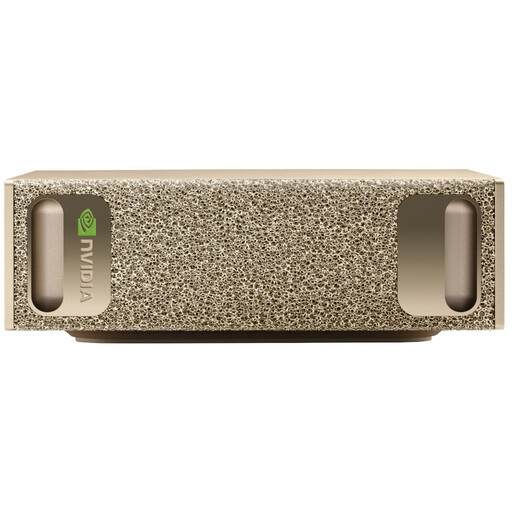
NVIDIA DGX Spark Founders Edition, GB10, 128 GB, 4 TB
Consider this system if you want to compare its compact design and listed storage with the requirements of your editing software.
Specifications listed: NVIDIA GB10, 128 GB RAM, 4 TB SSD and NVIDIA DGX OS. Check that your editing software is compatible with the listed operating system before buying.
View at Joybuy
 No image available
HP Z2 SFF G1i A40M2ET#ABD, Core Ultra 7 265K
Consider this SFF configuration if you’re looking for a more compact case and its specific graphics and connections suit your workflow.
Specifications listed: 32 GB DDR5 RAM, 1 TB M.2 SSD, RTX A400 with 4 GB and Windows 11 Pro.
View at Joybuy
 No image available
HP Z2 Tower G1i A40MMET, Core Ultra 7 265, 32 GB
Consider this tower if you want to compare a traditional case with the specific configuration listed.
Specifications listed: 32 GB DDR5 RAM, Intel Graphics and Windows 11 Pro. The product page gives conflicting SSD capacities: 1 TB in the title and 2 TB in the description. Check this before buying.
View at Joybuy
 No image available
HP Z1 Tower G1i A40T1ET#ABD, Core Ultra 9 285
Compare this tower configuration if you want to see how 64 GB of memory matches your project requirements.
Specifications listed: 64 GB DDR5 RAM, 1 TB M.2 SSD, Intel Graphics and Windows 11 Pro. No dedicated graphics card is listed for this configuration.
View at Joybuy
Frequently asked questions
Do I need to buy a new desktop PC straight away to edit multiple camera angles?
Not necessarily. If you use Premiere and editing is slowed down mainly by high-resolution original files, you can try using proxies as lighter working copies. Still, check your software’s requirements and allow space for media and cache.
How do I set up a workflow for video and audio tracks?
In Premiere, you can synchronise clips from multiple cameras into a multi-camera sequence, using timecode or audio, among other methods. Adobe also recommends fast media drives and describes using a separate SSD for cache. If you have only two drives, media and cache can share one.
Are a manufacturer’s warranty and your statutory rights for faulty goods the same thing?
No. For consumer purchases in the EU, faulty goods are generally covered by a statutory claim against the seller for at least two years; an additional manufacturer’s warranty doesn’t replace this. If an organisation buys the equipment for training, check the contract and service terms separately, as the same consumer rights may not automatically apply. This summary reflects information from the European Union’s Your Europe service.
What should I consider when filming identifiable trainees?
If footage or audio contains employees’ personal data, the processing must be assessed under data protection law. The German Federal Commissioner for Data Protection and Freedom of Information explains that, in an employment context, Section 26 of the BDSG and specific requirements around freely given consent may be relevant. The legal basis for recording and publishing specific footage depends on the circumstances.
Can an old desktop PC go in the household rubbish?
No. Germany’s Federal Ministry for the Environment explains that electrical and electronic waste must be handed over to an authorised collection body, such as a local authority collection point. Additional conditions apply if you return it to a retailer.


