For a practice log with notes and spreadsheets stored locally, make sure the operating system is compatible with your chosen application. Graphics performance is not a priority for this task. If space is limited, a mini PC could be a good option; for occasional recordings, check the ports on the specific device and the recording equipment you already have. Whichever form factor you choose, plan to back up your data separately.
Who is this solution for?
Musicians keeping a practice log
If you want to record practice times, goals and observations without needing a constant internet connection, your chosen application should run on the operating system installed on the PC. The Document Foundation lists .ods among the formats you can save locally in Calc.
Musicians who want to keep an archive
If you want to keep your entries for a long time and restore them if your device fails, include regular backups to a separate storage device in your plans. The German Federal Office for Information Security recommends backing up data regularly.
Musicians who make recordings
If you sometimes want to record audio examples as well as taking notes, check how your microphone or audio interface connects and make sure you can access local storage. Audacity Support describes different connection options for USB, 3.5 mm and XLR microphones.
What should you look for when buying?
For a record-keeping setup, compatible software and reliable backups come first. The form factor and audio connections matter depending on your workspace and whether you plan to make recordings.
| Priority |
What to check before buying |
Who this matters most to |
| Keeping records offline |
Check that the installed operating system meets the requirements of your chosen application. The Document Foundation lists .ods among the spreadsheet formats you can save in Calc. |
I want to edit entries without an internet connection and open them again later. Around 36% of consumers are likely to prioritise offline use. |
| Backing up entries |
Plan to use a separate storage device for backups, and check that you can open a restored file. The German Federal Office for Information Security recommends backing up data regularly. |
I want to keep my practice records even if my device fails, so being able to restore them is essential. Around 29% of consumers are likely to prioritise this. |
| Space at your practice area |
Compare the dimensions of the case, the ports you need and what’s included with the specific model. MSI lists a VESA 100 × 100 mm mount for the Cubi-NUC-1M series. |
If space is limited or I share my practice area, I want to plan the setup carefully. Around 21% of consumers are likely to prioritise space or noise levels. |
| Recording audio examples |
Check how your specific microphone connects. Audacity describes connecting an XLR microphone via an XLR-to-USB audio interface. |
If I want to add recordings to my log, my recording equipment needs to be compatible with the PC. Around 14% of consumers are likely to prioritise this. |
Common buying mistakes
-
Treating the internal SSD as a backup
A fault or accidental deletion could affect practice entries stored locally. More internal storage is no substitute for a separate backup.
Set up regular copies on a separate storage device and test that you can restore them.
-
Comparing case size alone
A compact design doesn’t necessarily tell you what’s included, which ports it has or how the specific version is configured. COMPUTER BILD notes that the GEEKOM A5 Pro it tested didn’t include a keyboard or mouse.
Check the full model code, what’s included and the ports you need for your screen, backup device and, if required, recording equipment.
-
Assuming Windows 10 is still supported as standard
Microsoft ended standard support for Windows 10 on 14 October 2025. A separate Extended Security Updates programme may apply to certain devices.
If you’re considering a Windows 10 PC, check its specific support or upgrade options instead of assuming that being able to run writing software means it will be supported in the long term.
Key brands to consider
HP
The OmniDesk-M03 series is a larger desktop option if you have other tasks or specific requirements in mind as well as keeping a practice log.
- HP lists various processor, RAM and SSD configurations for the series. The exact specification depends on the model.
- COMPUTER BILD rated the performance of a tested M03 positively, but noted its limited upgrade options. You don’t necessarily need extra processing power just to keep a practice log.
MSI
The Cubi-NUC-1M series is designed for workspaces with limited room, while the PRO DP80 A14G is another desktop series aimed at office use.
- MSI lists features such as VESA mounting and different drive positions for the Cubi-NUC-1M series.
- Specifications vary across the PRO DP80 A14G models; MSI doesn’t list an operating system for one version. Check the specific listing rather than assuming what’s included based on the series description.
GEEKOM
The A5 Pro 2026 with Ryzen 5 7530U is a compact mini PC option.
- GEEKOM lists 16 GB RAM and a 1 TB SSD for this edition.
- COMPUTER BILD notes that the A5 Pro it tested didn’t include a keyboard or mouse. Check the specification and what’s included with the specific version you’re considering.
Lenovo
The ThinkCentre neo 50q Gen 4 is a small desktop designed for a dedicated record-keeping space.
- Lenovo’s PSREF lists various processor options for the series.
- These details describe possible configurations, not necessarily the specification of a particular listing. Also, make sure you distinguish the standard desktop from the separate thin client.
Joybuy products for your record-keeping setup
The Joybuy options below are compact mini PCs for a dedicated record-keeping space. Check the operating system, ports and what’s included with the specific configuration. If you plan to make occasional recordings, make sure you can connect the microphone or audio interface you already have.
 No image available
SOYO Y5Pro mini PC, Intel Core i5 8250U/8350U, 8 GB DDR4, 256 GB SATA SSD, Windows 11
This mini PC could be a good fit for a dedicated record-keeping space where room is limited. Check the ports if you might want to connect recording equipment later.
- Windows 11
- 8 GB DDR4
- 256 GB SATA SSD
- Bluetooth 5.2 and Wi-Fi 5
View at Joybuy
 No image available
ACEMAGIC AK1PLUS mini PC, Intel Celeron N5095 (4C/4T), 16 GB LPDDR4X, 256 GB M.2 2280 SATA SSD, Windows 11 Pro
This compact configuration could work for locally stored notes. Check the system requirements for your application, along with the screen and audio connections you need.
- 16 GB LPDDR4X
- 256 GB M.2 2280 SATA SSD
- HDMI 2.0
- Wi-Fi 5
View at Joybuy
 No image available
SOYO S5Air mini PC, AMD Ryzen 5 7535HS, 16 GB LPDDR5, 512 GB NVMe SSD, Windows 11 Pro
This mini PC is a compact option for keeping a log locally. If you plan to make recordings, check that the ports on the specific version work with your recording equipment.
- 16 GB LPDDR5
- 512 GB NVMe SSD
- Bluetooth 5.2 and Wi-Fi 6E
View at Joybuy
 No image available
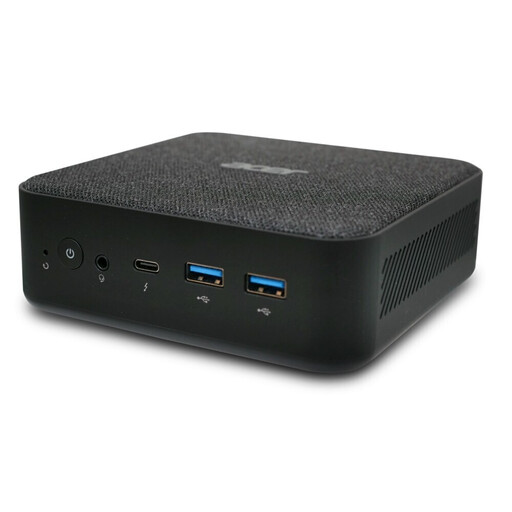
ACER Revo RB102 mini PC, Core Ultra 5 125U, 16 GB/512 GB SSD, Windows 11 Pro, DT.BMCEG.002
This mini PC could be an option for a dedicated space to keep records locally. Check that the specific configuration works with your software and connection needs.
- Core Ultra 5 125U
- 16 GB RAM
- 512 GB SSD
- Windows 11 Pro
View at Joybuy
 No image available
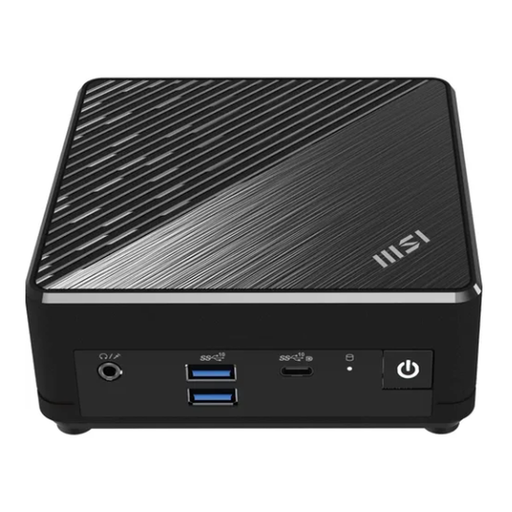
MSI Cubi N ADL S-217DE, N200, 8 GB/256 GB SSD, Windows 11 Pro
This mini PC could be a good choice for a space-saving record-keeping setup. Before buying, check that its specific ports are suitable for your screen, backup device and any recording equipment you plan to use.
- N200
- 8 GB RAM
- 256 GB SSD
- Windows 11 Pro
View at Joybuy
Frequently asked questions
Can I keep a practice log without a constant internet connection?
Yes, as long as you use a locally installed programme on a compatible operating system and save your entries locally. Calc can save spreadsheets in the OpenDocument .ods format and export them as PDFs. Before using it regularly, check that you can save and reopen files as expected.
How do I back up entries saved offline?
The German Federal Office for Information Security recommends regularly backing up documents you’ve created, for example to a separate USB drive or external hard drive. Also check that you can restore and open a backed-up file.
Do I need an audio interface for audio examples?
Not always. According to Audacity Support, you can connect a USB microphone via USB, and a suitable 3.5 mm microphone via a compatible microphone input. To use the connection method described for an XLR microphone, you’ll need an XLR-to-USB audio interface. Check the equipment you already have and test your recording setup.
What are my rights when buying a desktop PC online from a retailer?
For new goods bought from a business seller, European Union consumer information generally states that you have a minimum two-year legal guarantee for faulty goods. This is separate from any voluntary manufacturer’s warranty. Online purchases from a retailer also generally come with a 14-day right to cancel, subject to the relevant conditions and exceptions.


