What should you look for when buying?
First, work out whether you’ll mainly be running OCR locally, checking for duplicate records, backing up a growing archive or setting up a workstation in a limited space.
| Buying priority |
What to check |
Who it matters most to |
| RAM and local OCR |
Compare the RAM and upgrade options with the pixel dimensions of a large page and the number of jobs running at once. OCRmyPDF notes that peak memory use depends on page size and concurrency. |
If I process large scans locally and in parallel, I want to choose RAM and a processor suited to the page dimensions and number of jobs. Around 36% of consumers put OCR throughput first. |
| Duplicate checking |
Decide whether you want to find identical files, duplicate metadata records or issues with similar content. The hash check documented in Paperless-ngx identifies identical files; it doesn’t automatically find similar content. |
If issues have been captured more than once or pages have been digitised differently, I need a verifiable way to check similar records as well as match files. Around 29% of consumers prioritise duplicate checking. |
| Storage and backups |
Estimate the size of your scan archive, any additional versions and the free space you’ll need. Check drive options and plan a backup kept separately from the computer, including a recovery test; an internal SSD alone isn’t a separate copy. |
As my archive of scans, OCR versions and metadata grows, I want to plan for enough space and a recoverable backup. Around 21% of consumers focus on protecting their archive. |
| Case and workspace |
Check the available desk space, the monitor and scanner connections you need, and your existing peripherals against the full model number. Also check whether a keyboard, mouse and monitor are included. |
If I have limited space on my desk, I want to find a suitable case without overlooking the connections and equipment I need. Around 14% of consumers prioritise desk space and workspace connections. |
Desktop PCs at Joybuy
The models below include tower and compact desktop formats for local OCR and managing a scan archive. Match memory and storage to your page dimensions, number of simultaneous jobs and backup plan.
 Image unavailable
HP Workstation Z4 G5 Tower 4U
If you’re comparing tower PCs for local OCR and storing an archive locally, check that the specific configuration suits your workflow.
Xeon W3-2535 at 3.5 GHz, 64 GB RAM and 1 TB Z Turbo Drive SSD (NVMe, TLC); RTX 4000 Ada, 1GbE and Windows 11 Pro.
The product description states that at least 10 cm of clearance is required on all sides for ventilation.
View at Joybuy
 Image unavailable
HP Z1 Tower G1i A40T1ET#ABD
If you’re comparing tower PCs for local processing and a dedicated workstation, take the full specification into account.
Core Ultra 9 285 with 24 cores, 64 GB DDR5-5600MHz and 1 TB M.2 SSD; Intel Graphics and Windows 11 Pro.
The product description states that at least 10 cm of clearance is required on all sides for ventilation.
View at Joybuy
 Image unavailable
Dell Pro Max Micro FCM2250 TPM
If desk space is a priority, compare this Micro configuration with your local storage and memory requirements.
Core Ultra 7 with 14 cores and NPU, 16 GB DDR5-6400MHz and 512 GB M.2 PCIe SSD; Intel Graphics and Windows 11 Pro.
View at Joybuy
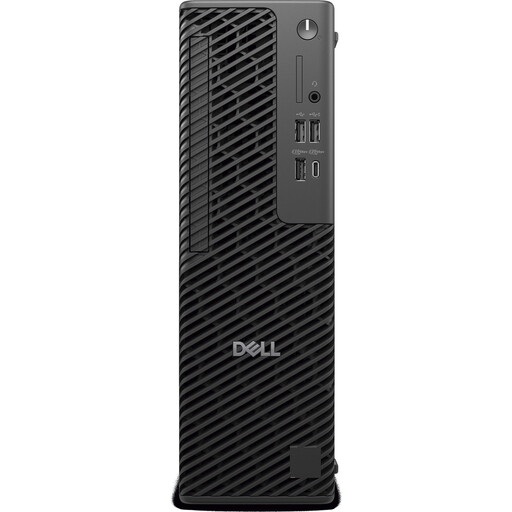 Image unavailable
Dell Pro Max Slim FCS1250, 21RGG
If you’re comparing desktops for local document processing, consider this configuration alongside your storage needs and workspace requirements.
Core Ultra 5 245, 16 GB DDR5 and 512 GB SSD; Windows 11 Pro.
View at Joybuy
 Image unavailable
Lenovo ThinkStation P2 Tower Gen2
If you’re considering a tower for a dedicated workstation, check that the memory and storage suit your scan archive and OCR workflow.
Intel Core Ultra 7 265, 32 GB DDR5 and 512 GB NVMe SSD; NVIDIA RTX A400 4GB and Windows 11 Pro.
The product description states that at least 10 cm of clearance is required on all sides for ventilation.
View at Joybuy
Frequently asked questions about desktop PCs for newspaper archives
Do I need a more powerful PC to find duplicate newspaper records?
Not for duplicate checking alone. First, work out whether you need to find identical files using hashes, duplicate metadata records or issues that have been digitised differently. The hash check documented in Paperless-ngx doesn’t automatically handle all three tasks.
How can I stop parallel OCR jobs from using too much memory?
Set the number of simultaneous jobs to suit the available memory. OCRmyPDF’s rule of thumb is around 15 bytes per pixel of the largest page for each simultaneous job. Limiting the OCR image size can save memory, but may affect recognition if the text is very small.
Is a second internal SSD enough for a backup?
To protect against the whole computer failing, plan to keep a separate copy elsewhere. The German Federal Office for Information Security recommends backing up your data. Depending on your Paperless-ngx installation, you may also need to back up the database and other application data as well as your documents.
What are my rights if I buy a faulty PC in Germany?
For a consumer purchase, the seller is responsible for statutory liability for defects; the Verbraucherzentrale (German consumer advice centre) says this generally lasts for two years. Consumers usually have a 14-day right to cancel an online purchase. Voluntary manufacturer warranties are separate; other types of contract or exceptions depend on the specific circumstances.
Can I reproduce historical newspapers to create my own index and publish the results?
There isn’t a blanket yes or no. Under certain conditions, § 60e UrhG allows certain publicly accessible, non-commercial libraries to make reproductions for purposes including indexing; this doesn’t automatically apply to every buyer. § 44b UrhG covers reproductions for text and data mining of lawfully accessible works, subject to further conditions. Whether you can index a particular newspaper collection or publish the results online depends, among other things, on the usage rights, the purpose of the project and the material involved.


