For a flashcard trainer, first check whether the operating system and development tools suit your project, and whether you can store documentation locally. A compact mini PC is a better fit when desk space is limited, while a small form factor PC may be more suitable if you’re planning internal upgrades. In either case, the specific configuration and what’s included are what matter. The need for offline documentation alone is no reason to choose a powerful graphics card.
Who this computer is for
Developers who work offline
You want to keep your source code, tools and relevant language or library documentation available locally, rather than relying on web access while you work. For example, the Python Software Foundation provides HTML documentation archives.
Developers with lots of tools open
You switch between your editor, test runs, browser and documentation, so you compare the memory and SSD in the specific configurations you’re considering.
Developers with limited desk space
You weigh up a small case against the listed expansion slots of a larger small form factor PC.
What to consider when buying
Compact Windows mini PC
A good fit if: desk space is limited and your chosen Windows tools run on the specific configuration.
Consider: the ports, upgrade options and included peripherals need to suit your workspace.
Windows PC in a small form factor case
A good fit if: listed internal slots are important for planned upgrades.
Consider: a listed slot doesn’t guarantee that every planned upgrade component will be compatible.
Mac mini with macOS
A good fit if: your development tools run on macOS and you want a compact workspace.
Consider: before choosing a configuration, check that the software and local storage suit your project.
| Buying consideration |
What to check before buying |
Who it matters most to |
| Offline documentation |
Check that your chosen tools are compatible with the operating system and that you can store documentation and project files locally. |
If I want to look things up without web access, I need documentation and tools available locally. Around 33% of consumers put offline preparation first. |
| Memory and SSD |
Compare the RAM and SSD in the specific model, and allow for additional environments running at the same time, such as WSL. |
If you keep your editor, tests and documentation open at the same time, pay particular attention to the specification of the model you order. Around 27% of consumers prioritise running development tasks in parallel. |
| Desk space and ports |
Check the ports on the specific configuration against your monitor and input devices. Also check what’s included. |
If my desk is short on space, I want a small case without losing sight of how I’ll connect my existing devices. Around 20% of consumers put a compact workspace first. |
| Upgrade options and included equipment |
Check the listed slots, the compatibility of any planned component and what’s included with the specific offer. |
If you’re planning future internal upgrades and still need peripherals, compare the slots and what you’ll need for a complete workspace. Around 20% of consumers prioritise upgrade options and the overall setup. |
Avoiding buying pitfalls
-
Assuming offline documentation comes with the PC
A suitable desktop PC won’t automatically store language and library documentation on the device.
First decide on your language and tools, then check which documentation you can download for them.
Preparing everything locally takes time and uses storage space for the files you need.
-
Assuming a mini PC is a complete workspace
With the Lenovo configuration reviewed, the monitor, keyboard and mouse are optional and sold separately.
Check what’s included with the specific configuration against the peripherals you already own.
You’ll need to arrange a monitor or input devices separately if you don’t already have them.
-
Assuming a desktop PC is upgradeable
The HP Pro 400 G9 SFF reviewed has certain internal slots listed, but that doesn’t mean a planned component will fit.
Before buying, check the slots and the requirements of the specific upgrade you want to install.
Relevant brands at a glance
Lenovo
The ThinkCentre Neo 50q Gen 5 is a compact Windows option if desk space and ports are important to you.
- Lenovo Germany lists 24 GB RAM and a 512 GB SSD for configuration 13B9CTO1WWDE1.
- According to Lenovo, the monitor, keyboard and mouse are optional; these specifications apply to this configuration.
HP
The Pro 400 G9 SFF may appeal to buyers looking for listed internal expansion slots.
- HP Germany lists 16 GB RAM, a 512 GB SSD, and PCIe x16 and PCIe x1 slots for CP9J4EA#ABD.
- Check that your specific upgrade component is compatible with the configuration.
Apple
The Mac mini is a compact macOS option, provided your chosen development tools are compatible with macOS.
- Apple Germany lists several memory and SSD options for the Mac mini with M6.
- The available configurations don’t guarantee that every development tool will be suitable for your project.
Dell
The Pro Micro QCM1250 is a compact, configurable Windows option.
- Dell Germany offers a choice of processors and RAM on the product page.
- Compare the configuration you’re actually choosing; the product family alone doesn’t have one standard specification.
Desktop PCs at Joybuy
The Joybuy products below include compact computers, tower PCs and a Mac mini for different development environments. For each model, check that the operating system, ports and specification suit your project.
 No image available
Acer Predator Orion 3000, i5 Ultra, 16 GB RAM, 512 GB SSD
Could suit a project using Windows 11 Home and locally stored files. Check that your development tools are compatible with this configuration.
Listed specifications include 16 GB DDR5 RAM, a 512 GB M.2 SSD and Windows 11 Home. According to the product description, the memory can be upgraded to 32 GB.
View at Joybuy
 No image available
Acer Nitro 20 N20-100, 32 GB RAM, 1 TB SSD and 1 TB HDD
This configuration may suit you if you want to split locally stored project files and documentation between an SSD and HDD. Check your actual storage needs first.
Listed specifications include 32 GB DDR4 RAM, a 1 TB SSD, an additional 1 TB HDD and Windows 11 Home.
View at Joybuy
 No image available
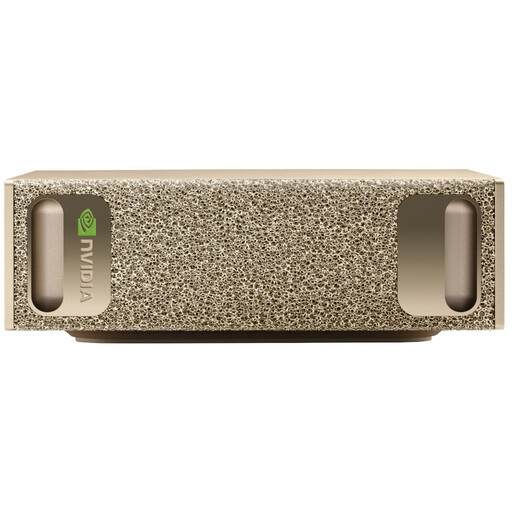
NVIDIA DGX Spark Founders Edition, GB10, 128 GB RAM, 4 TB SSD
Before choosing this model, check that your development tools are available for the stated operating system and suit the work you have planned.
The product description lists 128 GB RAM, a 4 TB M.2 SSD and NVIDIA DGX OS.
View at Joybuy
 No image available
Lenovo ThinkStation P2 Tower Gen2, Core Ultra 7 265, 32 GB RAM
Could be an option for a Windows 11 Pro workstation if the specific specification suits your development tools and local storage needs.
Listed specifications include 32 GB DDR5 RAM, a 512 GB NVMe SSD and an NVIDIA RTX A400 with 4 GB. According to the product description, a keyboard and mouse are included.
View at Joybuy
 No image available
Apple Mac mini M6, 16 GB unified memory, 256 GB SSD
This compact macOS option may suit you if your development tools run on macOS and 256 GB of SSD storage is enough for your local files.
The product details list macOS, 16 GB unified memory and a 256 GB SSD. Check beforehand that the documentation and tools you need are available locally.
View at Joybuy
Frequently asked questions
Is an offline documentation archive enough to work without the internet?
No, an archive on its own isn’t enough. The Python Software Foundation provides downloadable HTML documentation archives. To work offline, you’ll also need the tools and project files you use to be available locally. Git describes bundles as a way to transfer repository data without an active server.
What should I check before setting up Windows with WSL?
Check your Windows version and build before using the documented WSL installation commands. Microsoft specifies Windows 11 or Windows 10 version 2004 or later, build 19041. According to Microsoft, mainstream support for Windows 10 version 22H2 ended on 14 October 2025.
Do mini PCs automatically come with a monitor, keyboard and mouse?
Not necessarily. Lenovo describes these items as optional or sold separately for the ThinkCentre configuration reviewed. Check what’s included with the specific offer you’re considering.
What are my rights when buying a PC online in Germany?
For eligible online purchases from a trader in the EU, you generally have 14 days from delivery to cancel, although exceptions may apply. Your Europe, the European Union’s information portal, also states that faulty goods are covered by a minimum two-year legal guarantee. This is separate from any additional manufacturer’s warranty.


