Quiz creators who work in a browser
If you mainly create and share questions using web-based quiz tools, a straightforward desktop workstation is important. Google Forms and Microsoft Forms describe quiz features for use in a browser.


For quizzes using web-based tools, the right operating system, suitable monitor connections and a complete workstation matter more than a powerful gaming graphics card. A mini PC is a good fit if desk space is limited; an office desktop may be a better choice if you need specific connections or particular upgrade options. Check the exact configuration and what’s included, rather than relying on the model name alone.
If you mainly create and share questions using web-based quiz tools, a straightforward desktop workstation is important. Google Forms and Microsoft Forms describe quiz features for use in a browser.
If you want to leave room on your desk for paperwork and a monitor, you can compare mini PCs with compact office desktops. COMPUTER BILD describes the tested GEEKOM A5 Pro as very compact, although what’s included and how easy it is to upgrade depend on the model.
If you plan to use other software as well as create quizzes, or might want to add components later, check the exact case and specification. COMPUTER BILD rated the upgrade options of the tested MSI PRO DP80 A14G as limited; MSI lists different versions in the range.
A good fit if: Desk space is limited and you already have, or plan to buy, a monitor and input devices.
Consider: A compact design doesn’t tell you which connections or accessories are included.
A good fit if: You’re setting up a permanent workstation and the connections and operating system of the specific version suit your setup.
Consider: A larger case doesn’t automatically mean more upgrade options.
A good fit if: You plan to use other local software or make specific hardware upgrades later, and have room for the case.
Consider: Check the available slots, drive bays and connections on the version you’re ordering, rather than relying on the product family name.
| What matters | What to check when buying | Who this matters most to |
|---|---|---|
| Quiz tool and software | Check the installed operating system, that the browser is up to date, and the requirements of any other software you use. | If I use a quiz tool and additional software, I want to be sure both will run on the computer. That’s why around 33% of consumers prioritise software compatibility. |
| Space, monitor and accessories | Compare the computer’s video outputs with your monitor’s inputs, and check whether a keyboard, mouse and any necessary cables are included. | If I want to keep using the devices I already own and leave room for paperwork, the computer, monitor and input devices need to work together. Around 25% of consumers prioritise their workspace and existing devices. |
| Working with multiple programmes | Compare the processor, RAM and SSD in the full model specification with the requirements of the programmes you actually use. | If I have work materials and other programmes open alongside my browser, the specification of the exact configuration matters to me. Around 17% of consumers prioritise performance when running several programmes at once. |
| Complete workstation and service | Factor in any accessories you need and read the specific warranty and service terms. A voluntary warranty is not the same as your statutory consumer rights against the seller. | If I want to set up a complete workstation and understand the terms after purchase, I compare the accessories and service together. Around 17% of consumers make the total cost and support their main concern. |
| Future upgrades | Check for free memory slots, drive bays and details of the version you’re ordering. | If I want to add specific hardware later, I need details of the expansion slots that are actually available. Around 8% of consumers prioritise specific upgrade plans. |
According to COMPUTER BILD, the tested GEEKOM A5 Pro included neither a keyboard nor a mouse. These input devices are also not listed as included with a specific, documented Lenovo ThinkCentre configuration.
Check what’s included with the specific offer and compare it with the devices you already own.
Depending on the equipment you already have, you may also need to budget for a monitor, keyboard, mouse or suitable connection cables.
Even a compact office desktop may have limited upgrade options. Specifications can also vary within the same model range.
Before buying, check the available slots, drive bays and connections for the full model number.
Microsoft gives 14 October 2025 as the end date for regular free security updates for Windows 10. Windows 11 has its own hardware requirements.
Check the operating system and support status of the specific configuration, as well as whether it is suitable for Windows 11, if relevant.
Switching to a supported operating system or a suitable device may require extra planning.
Office desktops and Pro Mini models for buyers comparing form factor and what’s included.
PRO DP80 office desktops for comparing specific configurations and connections.
Mini PCs for workspaces with limited room, when you’re planning to use a separate monitor and input devices.
ThinkCentre Neo small form factor desktops for a permanent office workstation.
Pro Slim Plus office desktops for buyers comparing configuration, connections and service cover.
These Joybuy products include mini PCs and tower desktops for creating online quizzes at home. Compare their form factors and the features listed in each product name with your workspace.
 No image available
A mini PC could be a good choice if you have limited desk space and plan to use a separate monitor and input devices.
The product name lists Intel Core i5 8250U/8350U, Windows 11, 8 GB DDR4, a 256 GB SATA SSD, BT5.2 and Wi-Fi 5.
 No image available
If you’re looking for a well-equipped tower desktop, compare this configuration with the actual requirements of your quiz and work software.
The product name lists Intel Core Ultra 7 265, 32 GB DDR5, a 512 GB NVMe SSD, NVIDIA RTX A400 4GB and Windows 11 Pro.
The product name lists a keyboard and mouse as accessories.
 No image available
The compact Mac mini could suit you if you have limited desk space and use a separate monitor.
The product name lists M6, a 12-core CPU, a 12-core GPU, 32 GB unified memory and a 1 TB SSD.
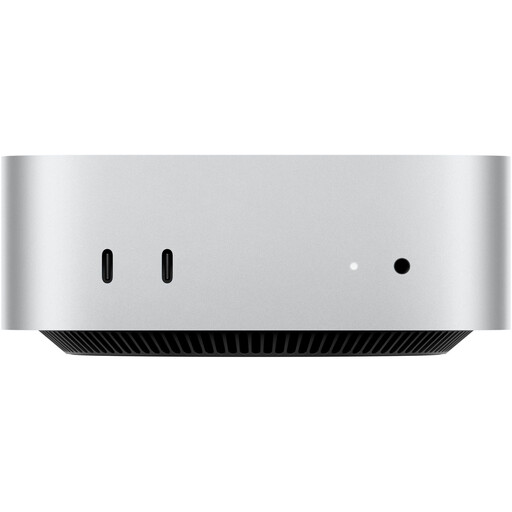 No image available
If you’re looking for a compact desktop for a workspace with limited room, this Mac mini model is worth considering.
The product name lists Apple M6, a 12-core CPU, a 12-core GPU, 24 GB unified memory, a 512 GB SSD and 10 Gbps Ethernet.
 No image available
A mini PC is an option if you’re planning to use a compact device with a separate monitor.
The product name lists Intel N4100 (up to 2.4 GHz), 8 GB LPDDR4, a 256 GB SSD, Dual HDMI, 1000M LAN, 2.4G/5G Wi-Fi and BT 5.0.
No. The descriptions of quiz features in Google Forms and Microsoft Forms don’t indicate that you need a gaming graphics card. Check the requirements of any additional local software separately.
Compare the video outputs on the exact PC version with the inputs on your monitor. Also check whether a keyboard, mouse and any necessary cables are included, as specifications can vary within a product range.
Microsoft gives 14 October 2025 as the end date for regular free security updates for Windows 10. If you’re considering an older device, check support for the operating system you plan to use and, where relevant, whether the specific hardware is suitable for Windows 11. The minimum requirements are not a general recommendation for performance.
Your statutory consumer rights are against the seller and are separate from a voluntary warranty. For consumer contracts made at a distance, you generally have a 14-day right to cancel; exceptions and the terms of the specific purchase should be taken into account.
No. Where the harmonised EU rules that apply to a specific version require the marking, the manufacturer uses it to declare that the relevant requirements have been met. The CE marking is neither an independent quality assessment nor a comparative performance test.