What should you consider when choosing?
Start by checking compatibility with your development tools and existing screen. Then decide whether a compact form factor or carefully planned upgrade options matter more for your workstation.
Compact Windows mini PC
A good fit if: you have limited desk space, want to keep using a screen you already own and can find a specific configuration that suits your needs.
Consider: The GEEKOM A5 Pro tested by COMPUTER BILD did not include a keyboard or mouse. Check what’s included and the upgrade options for the specific product you’re considering.
Separate Windows desktop
A good fit if: you’re setting up a permanent development workstation and want to choose the configuration, ports or drives to suit your needs.
Consider: A larger case doesn’t guarantee any particular upgrade options: COMPUTER BILD rated those of the HP OmniDesk Desktop AI M03 it tested as limited, while MSI offers different versions of the PRO DP80 A14G.
Mac mini
A good fit if: your development tools work with macOS and you prefer a compact computer with a separate screen.
Consider: Apple lists different memory and screen configurations, so check the version you choose and whether your tools are compatible. A Mac won’t automatically make your portal keyboard-accessible.
| What matters |
What to check before buying |
Who is it important to? |
| Keyboard testing |
Check that the PC has the keyboard and screen ports you need, and that your development tools are compatible. The W3C highlights access to functions, visible focus and a logical focus order as aspects to check when testing a website. |
If I regularly need to test form fields, buttons and upload processes without a mouse, the right workstation matters; around 33% of consumers put keyboard testing first. |
| Image files and multitasking |
Match the RAM and storage in the complete configuration to the size of your project and the software you use. Plan a separate backup method for important local files. |
If I use image files and development tools at the same time, I want to choose a specification that suits my project; around 27% of consumers prioritise image files and multitasking. |
| Space and peripherals |
Check the screen and keyboard ports, as well as what’s included with the specific version. The GEEKOM A5 Pro tested did not include a keyboard or mouse; these are also not included with the Lenovo configuration mentioned. |
If I want to keep using a screen and input devices I already own, a compact form factor and suitable ports matter; around 20% of consumers put space and peripherals first. |
| Future upgrades |
Check the slots and drive bays against the full model number and its documentation. Don’t assume that an assessment of one tested version applies to the entire product range. |
If I may want to add memory or other components later, I need clear details about the specific version; around 20% of consumers prioritise upgrade options. |
Desktop PCs for this use
The Joybuy products below include compact Windows computers, tower models and a Mac mini for development workstations with an external screen. Check the exact specification of each product and whether it’s compatible with your tools; the portal’s accessibility depends on how it’s built.
 No image available
HP Z2 Mini G1a Ryzen AI Max+ Pro 395, 128 GB RAM, 2 TB SSD
This compact Windows mini PC may suit a development workstation with an external screen, provided its listed ports work with your peripherals.
The listed configuration includes 128 GB RAM and a 2 TB SSD. The ports specified include USB-C, Thunderbolt 4 and Mini-DisplayPort.
View at Joybuy
 No image available
HP Z2 Tower G1i A40MMET, Core Ultra 7 265, 32 GB DDR5
This tower may suit a permanent development workstation, provided you check that its specific ports work with your screen and peripherals.
This configuration is listed with 32 GB DDR5 and several DisplayPort outputs. An SSD is included; check its exact capacity for the version you order.
View at Joybuy
 No image available
Apple Mac mini M6, 24 GB Unified Memory, 512 GB SSD
This compact Mac mini is an option if your development tools work with macOS and you use a separate screen.
The configuration described includes 24 GB Unified Memory, a 512 GB SSD, HDMI and Thunderbolt 4. According to the description, the keyboard and mouse are sold separately.
View at Joybuy
 No image available
ACEMAGIC E3B Mini Desktop, Ryzen 7 7735HS, 24 GB LPDDR5, 512 GB NVMe SSD
This compact Windows mini PC may suit a workstation with several connected devices, provided its listed screen ports work with your setup.
The specifications list 24 GB LPDDR5, a 512 GB NVMe SSD, HDMI, DP and USB-C. The product name states that it supports three screens at up to 4K at 60 Hz, as well as two M.2-2280 slots.
View at Joybuy
 No image available
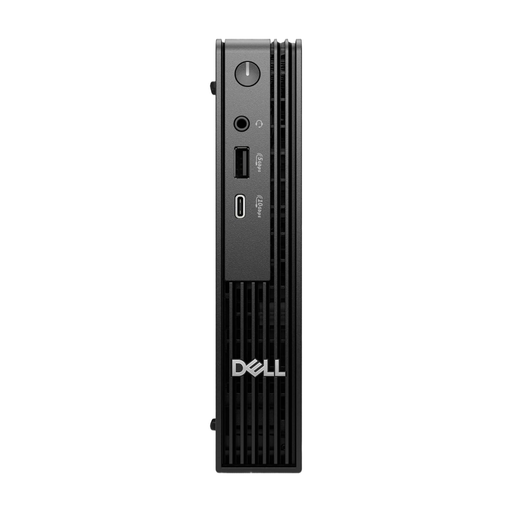
Dell Pro Micro QCM1250, Intel Core i7-14700T, 16 GB DDR5, 512 GB NVMe SSD
This micro desktop may suit a space-saving development workstation if you’re looking for a compact Windows computer with USB ports.
The configuration is listed with Windows 11 Pro, 16 GB DDR5, a 512 GB NVMe SSD and four USB 3.0 ports.
View at Joybuy
Frequently asked questions
Will a particular PC automatically make the submission portal keyboard-accessible?
No. Keyboard accessibility depends on how the website is built. Check that you can reach interactive elements using a keyboard, that focus remains visible, and that you can complete forms and upload processes without a mouse.
What should I connect and test first when setting up my workstation?
First, check that your screen and keyboard are compatible with the ports on the specific PC version. Then complete an entire submission process using only the keyboard, checking that functions are accessible, focus is visible and the focus order is logical.
What should I budget for accessories and backing up my project files?
Check what’s actually included for the screen and input devices, and plan a separate backup method for your project files. Any additional equipment you need will depend on the PC configuration you choose and your workstation.
Does the BFSG automatically apply to every art submission portal in Germany?
No. The name of the portal alone doesn’t determine whether the law applies. The Federal Government Commissioner for Matters relating to Persons with Disabilities describes, among other things, a link between digital services and an individual consumer request concerning a consumer contract. It also notes an exemption for micro-enterprises providing services if they have fewer than ten employees and an annual turnover of no more than 2 million euros. The BFSG has applied since 28 June 2025; whether it applies to a particular operator and submission process depends on the circumstances.
What about personal information submitted through the portal?
If the portal processes personal data, the relevant data protection obligations must be considered separately. The Federal Commissioner for Data Protection and Freedom of Information explains the information obligations under Articles 13 and 14 of the GDPR; choosing a particular desktop PC does not fulfil these obligations.


