Choose a desktop based first on the design software and files you actually use, then plan for your monitor and print workflow separately. A mini PC can save desk space, while a larger desktop may offer more upgrade options, depending on the model. A Mac mini is best suited to an existing macOS workflow. If several people will share the computer too, separate user accounts and the cost of a monitor and accessories should also factor into your decision.
Who is this guide for?
Layout and image designers
If you work on poster layouts with images or vector graphics, compare your software and project file requirements with the specific RAM and storage configuration. For Photoshop 27.x on Windows, Adobe lists 8 GB of RAM as the minimum and 16 GB or more as the recommendation.
Designers preparing work for print
If you need to assess colours for a particular print process, the right monitor and colour profiles for the output device matter just as much as the computer. Adobe explains how to use a suitable ICC profile for the print workflow in InDesign.
Teams sharing a desk
If several people use the same workstation or computer, desk space, connecting existing devices and keeping personal working environments separate are all important considerations. The German Social Accident Insurance describes desk-sharing as sharing an office or computer workstation.
What should you look for when buying?
First work out which software and files the computer needs to handle. Then consider the monitor, space requirements, shared use and the cost of the complete workstation.
| Buying criterion |
What to check before buying |
Who it matters most to |
| Performance for layouts and image files |
Match the software version and operating system to the RAM, internal SSD storage and, where relevant, graphics card requirements. For Photoshop 27.x on Windows, Adobe recommends 16 GB of RAM or more. This is a software recommendation, not a general requirement for every poster-design PC. |
When I work with layouts, vector graphics and larger image files, I want to choose a configuration that suits my actual projects. Around 29% of consumers say that having the right software setup is their top buying priority. |
| Colour assessment for print |
Check your current or planned monitor, its calibration options and the colour profile for the specific output device. Adobe describes using a suitable ICC profile for printing from InDesign; EIZO notes that calibration cannot compensate for a monitor with a colour gamut that is too limited. |
When the colours on my poster need to look right for a particular print process, I want to assess the screen and print settings together. Around 23% of consumers put colour assessment for print first. |
| Desk space and connections |
Compare the dimensions and placement options with the space available at your shared desk. Check the connections on the exact model variant for your existing monitor and any peripherals you need. |
When I share a desk, I want to fit the computer and the devices I need without taking up unnecessary workspace. Around 18% of consumers say that space requirements are their top buying priority. |
| Separate working environments |
Establish whether you will share only the desk or the computer too. If the device will be shared, plan for separate user accounts and a place to store shared projects. |
When several people use the same computer, I want to keep personal files and settings separate and make it easy to hand over shared projects in an organised way. Around 18% of consumers prioritise managing shared use. |
| Complete workstation |
Check what comes with the chosen configuration and what you already have. Include a monitor and accessories if you need them, rather than looking at the computer configuration alone. |
When I’m putting together a complete workstation, I want to know what else I’ll need besides the computer. Around 12% of consumers say the cost of a complete workstation is their top priority. |
Avoid common buying mistakes
-
Assuming a powerful PC means a colour-accurate workstation
The computer alone won’t determine how images look on a particular monitor or how colours are converted for a specific printer. Adobe recommends an ICC profile that matches the output device, while EIZO notes that calibration cannot overcome the limitations of a monitor with a colour gamut that is too small.
Decide on your print workflow before choosing a computer, then check that your current or planned monitor meets your requirements.
-
Assuming every model in a range has the same specification
The Lenovo ThinkCentre Neo 50q Gen 5 and MSI PRO DP80 A14G ranges include different configurations. The model name alone won’t tell you what comes with a specific variant.
Compare the full model or part number, RAM, SSD and connections of the actual device on offer.
-
Setting up a single personal account for everyone
If several people use the same computer, personal files and settings can get mixed together in one shared account.
Set up separate operating system accounts for regular users, and agree where shared poster files should be stored.
Brands to consider
GEEKOM
The A5 Pro 2026 is positioned as a compact Windows mini PC for desks with limited space.
- GEEKOM lists an A5 Pro 2026 variant with Ryzen 5 7530U, 16 GB RAM and a 1 TB SSD.
- Check that the specific configuration suits your projects and your existing monitor.
Lenovo
The ThinkCentre Neo 50q Gen 5 is a compact business desktop available in several configurations.
- Lenovo describes the range as a 1-litre PC.
- RAM and SSD specifications vary by model, so check the exact product or part number against your needs.
MSI
The PRO DP80 A14G is a larger compact Windows desktop whose configuration and upgrade options are worth checking.
- MSI lists different processor and SSD options for the range.
- A graphics option listed for the range won’t necessarily be included in every variant.
Apple
The Mac mini is a compact desktop suited to a compatible macOS design workflow.
- Apple offers different chip, RAM and SSD configurations.
- The monitor and the connections you need still need to be considered separately.
HP
The Z2 Mini G1i range is positioned as a space-saving workstation line for more demanding workflows.
- HP describes a mounting option behind a monitor and, depending on the specification, upgradeable memory and storage.
- These details apply to the product range and don’t replace checking the specific variant. The extra workstation features may be unnecessary for straightforward poster layouts.
Desktop PCs at Joybuy
This selection includes compact Windows mini PCs for workspaces with limited room, as well as a larger desktop for anyone considering a tower case.
 No image available
ACEMAGIC AK1PLUS mini PC, Intel Celeron N5095, 16 GB/256 GB
The mini PC format may suit a desk with limited space. Check that the configuration meets the requirements of your software and files.
Intel Celeron N5095; 16 GB LPDDR4X RAM; 256 GB M.2 2280 SATA SSD; HDMI 2.0; Windows 11 Pro.
Joybuy
 No image available
ACEMAGIC E3B mini desktop computer, AMD Ryzen 7 7735HS, 24 GB/512 GB
The mini case is worth considering if there’s limited room for a computer at your shared desk.
AMD Ryzen 7 7735HS; 24 GB LPDDR5 RAM; 512 GB NVMe SSD; two M.2 2280 slots; HDMI, DisplayPort and USB-C with DisplayPort support.
Joybuy
 No image available
SOYO S4PLUS mini PC, Ryzen 7 H 255, 24 GB/512 GB
The mini PC format can reduce the space the computer takes up at a shared desk. Also check that its connections suit your workspace.
Ryzen 7 H 255 (8C/16T, up to 4.9 GHz); 24 GB LPDDR5 RAM; 512 GB PCIe 3.0 SSD; HDMI, DisplayPort and USB-C.
Joybuy
 No image available
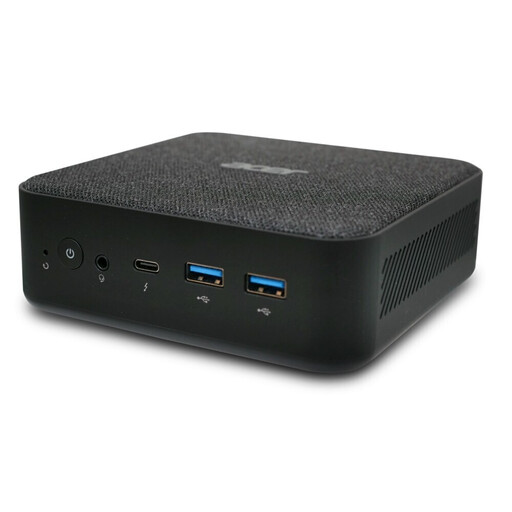
ACER Revo RB102 mini PC, Core Ultra 5 125U, 16 GB/512 GB
This mini PC is an option for a workspace where you want the computer to take up as little room as possible.
Core Ultra 5 125U; 16 GB RAM; 512 GB SSD; Windows 11 Pro.
Joybuy
 No image available
Acer Predator Orion 3000 desktop, i5 Ultra, 16 GB/512 GB, RTX 5060
This tower case is better suited to a desk with plenty of room.
16 GB RAM; 512 GB SSD; RTX 5060; Windows 11 Home. The stated case dimensions are 378 × 190 × 438 mm.
Joybuy
Frequently asked questions
Are Photoshop’s minimum requirements a good buying recommendation?
No. For Photoshop 27.x on Windows, Adobe lists 8 GB of RAM as the minimum and 16 GB or more as the recommendation. Compare the requirements of the software and files you use with the full computer specification.
Will a fast computer automatically give you reliable print colours?
No. For printing from InDesign, Adobe describes using an ICC profile that matches the output device to convert colours. Check your monitor and print settings for the specific job independently of the computer.
How should I set up a computer used by several people?
If the computer will be shared too, set up a separate operating system account for each regular user. Microsoft and Apple describe how separate accounts keep settings individual; also agree where shared poster files should be stored.
Which costs and protections should I consider separately when buying?
Include a monitor and accessories in your budget if you need them, and distinguish your statutory rights against the seller from a voluntary manufacturer’s warranty. The German Federal Government says the seller is generally responsible for goods being free from defects for two years; special repair rules apply only when their specific conditions are met.
Where should you take an old desktop PC in Germany?
Don’t put an old desktop PC in your household rubbish. The German Federal Environment Ministry explains the return options for old electrical equipment and take-back obligations, which depend, among other things, on the retailer’s size and whether you’re buying a replacement. Check which collection point is right for your device.


