Choose a desktop PC to suit your photo-editing software, the size of your projects and your storage needs. A compact Mac or Windows PC won’t automatically suit every workflow. By a bright window, monitor position, an anti-glare screen and adjustable blinds are just as important: more computing power won’t eliminate screen reflections.
Who is this guide for?
Product photographers working by a window
If you edit photos in changing daylight, consider screen reflections before judging colours and details. The German Social Accident Insurance recommends positioning screen-based workstations so that you look parallel to the window.
Editors working with lots of image files
If you work with larger projects or open lots of photos, choose memory and storage to suit your software and files. Adobe explains that when Photoshop runs short of memory, it uses hard drive space as a scratch disk.
Buyers planning to upgrade later
If you may want to change the storage or components later, check the upgrade options for the exact configuration and weigh them against the space required by a compact PC or tower.
What should you consider when buying?
Compact Mac mini
A good fit if: Your software and devices work with macOS and you need to save space.
Things to consider: Your monitor and storage need to suit the version you choose; the listed M6 configuration has a 256 GB SSD.
Compact Windows PC
A good fit if: You need Windows software or existing Windows peripherals and prefer a small computer.
Things to consider: Ports, graphics, operating system and storage vary by configuration.
Configurable Windows tower
A good fit if: You have enough space and want to choose specific components.
Things to consider: The form factor and choice of configuration require more space and a careful comparison of the available options.
| Buying priority |
What should you look for? |
Who is this particularly important to? |
| Screen by a bright window |
Anti-glare finish, monitor position and adjustable blinds; if you’re managing colour, check that you have a suitable monitor profile too. |
If I want to assess image details in changing daylight, I need a screen that’s easy to see. Around 36% of consumers say working at a screen by a window is a top priority. |
| Smooth editing |
Check the RAM, processor, graphics and operating system of the exact version against your software’s requirements. Adobe says Photoshop may use a scratch disk if there isn’t enough RAM. |
If I edit larger photo projects, I want specifications that suit my software and project size. Around 29% of consumers put photo editing first. |
| Storage for image files |
Compare SSD capacity with the amount of data you expect to keep locally, and plan for external storage and backups if needed. |
If my image files and work data are growing locally, I want to make sure there’s enough space. Around 21% of consumers say file storage is their most important buying priority. |
| Space and future upgrades |
Check the dimensions and upgrade options of the exact version, not just the product family. |
If I want to change components later, I check that the form factor and configuration will allow it. Around 14% of consumers prioritise upgrade options. |
Common buying mistakes
-
Upgrading the computer but keeping a reflective screen
Reflections can make the screen harder to see, regardless of your computer’s performance.
First, check the window position, screen finish and blinds. The German Social Accident Insurance recommends looking at your screen parallel to the window wherever possible.
-
Assuming every model in a product family has the same specifications
Versions in the same range can differ in SSD, memory and other features.
Compare the full model or part number, along with the RAM, SSD, ports and operating system of the exact configuration.
-
Overlooking how many files you’ll have in future
Image files, software and work data all need storage. Adobe explains that Photoshop uses hard drive space as a scratch disk when there isn’t enough RAM.
Plan memory and storage separately to suit your workflow, and check the upgrade options for the version you’re considering.
Key brands at a glance
Apple
The Mac mini is a compact macOS option with a monitor chosen separately. The listed M6 configuration includes 16 GB of unified memory and a 256 GB SSD.
- Apple lists display connections and a range of storage configurations for this product line.
- Check your software’s compatibility, how much local storage you need and which monitor to use. Manufacturer specifications are not independent photo-editing test results.
Lenovo
The ThinkCentre M70q Gen 6 is a compact Windows business PC range; one listed version has 16 GB RAM and a 512 GB SSD.
- Lenovo describes the range as having expandable storage.
- Specifications and service vary by configuration, so they don’t tell you how well it performs in Photoshop.
HP
The Pro Mini 400 G9 is a compact Windows desktop range. The CP9G3EA#ABD version is listed with 16 GB RAM and a 512 GB SSD.
- HP lists configurable Flex ports.
- Check the ports and specifications of the exact version you choose. Manufacturer performance claims are not independent comparison results.
Dell
The Pro Max Tower T2 is a larger Windows tower range with a choice of configurations.
- Dell offers processor, operating system and power supply options.
- Compare the exact configuration carefully. Manufacturer speed claims don’t prove an advantage when editing product photos.
Suitable desktop PCs at Joybuy
This selection includes compact Mac and Windows PCs, as well as Windows towers for photo workstations. Whichever computer you choose, also consider your monitor, lighting conditions and editing software requirements.
 No image available
Acer Nitro 20 N20-100 desktop PC
A Windows configuration with storage for local image files and several display connections.
32 GB RAM, 1 TB SSD and 1 TB HDD; NVIDIA graphics with 8 GB GDDR7; Windows 11 Home.
Listed connections include three DisplayPort ports and one HDMI port. At least 10 cm of clearance on all sides is specified for ventilation.
View at Joybuy
 No image available
Dell Alienware Aurora ACT1250 1J3N5
A tower for a fixed Windows workstation, if you can accommodate the listed specifications and space requirements.
Core Ultra 9-285K, 32 GB DDR5, 2 TB SSD and RTX 5080 with 16 GB GDDR7; Windows 11 Home.
The product description mentions tool-free access for upgrades. Keep the vents clear and don’t place the device in direct sunlight.
View at Joybuy
 No image available
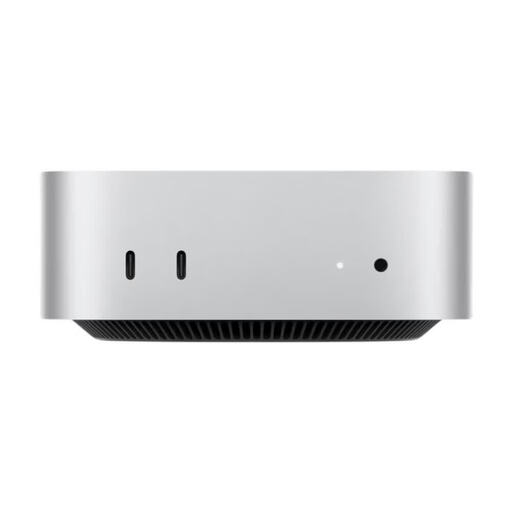
Apple Mac mini MHQM4_CTO_8 M6
A compact macOS option if your editing software is compatible and you’re planning to use a separate monitor.
M6 with 12-core CPU and 12-core GPU, 32 GB Unified Memory and 1 TB SSD.
Listed connections include HDMI and three Thunderbolt 4 ports; dimensions are 12,7 × 12,7 × 5,0 cm. A display is included only if this is explicitly stated for the exact version on sale.
View at Joybuy
 No image available
Ninkear M8 mini PC
A compact Windows PC option when desk space is limited. Before buying, check that the specifications meet your specific needs.
Described as a mini PC measuring 128 × 128 × 41,3 mm, with Windows 11 Pro.
Check the RAM and SSD specifications of the exact version, as well as the connections for your monitor and external drives.
View at Joybuy
 No image available
Captiva Highend Gaming PC R89-503
A Windows tower with listed specifications for a fixed workstation. Check its dimensions and ventilation requirements against the space where you plan to put it.
AMD Ryzen 7 7800X3D, RTX 5070 Ti with 16 GB, 32 GB DDR5 and 2 TB NVMe SSD; Windows 11 Home.
Listed connections include three DisplayPort ports and one HDMI port. The specified setup requirements include a level surface, sufficient airflow and 10–15 cm of clearance from the wall.
View at Joybuy
Frequently asked questions
Can a faster PC compensate for reflections from a window?
No. Position the screen as parallel to the window as possible, and check its anti-glare finish and your adjustable blinds. The German Social Accident Insurance notes that reflections can make the screen harder to see.
How should I set up my screen for photo editing?
Check the monitor’s position in the daylight you usually work in, and set up colour management with a suitable monitor profile. Adobe explains that a monitor profile is important for colour reproduction; a new computer alone won’t ensure consistent colours.
What else should I budget for when buying a mini PC?
Allow for a suitable monitor and, if needed, extra storage. Also check what’s included, the connections and the exact specifications of the version you choose, to make sure it works with your software and drives.
Can you put an old desktop PC in household waste in Germany?
No. The German Environment Agency says that discarded electrical equipment must be disposed of separately from household waste. Back up any files you need and delete personal data before handing the computer in.


