What to consider when buying
Start by deciding which development tools you’ll actually use at the same time. Microsoft describes VS Code as lightweight, while Docker and Google specify their own requirements for containers and Android development.
Compact Windows mini PC
A good fit if: you do most of your programming at a fixed desk and have limited space.
Bear in mind: your screen and connections still need to be suitable. Also check whether the specific version can be upgraded and what’s included in the box.
Larger Windows desktop
A good fit if: you use Windows-specific tools or plan to add internal components, and have room for a larger case.
Bear in mind: a larger case doesn’t guarantee upgrade options. Check the slots and specifications of the specific device.
Mac mini
A good fit if: you need Xcode or your development tools run on macOS.
Bear in mind: a Mac won’t replace a Windows-specific Visual Studio workflow. With the Mac mini (2024), storage and display options depend on whether you choose the M4 or M4 Pro version.
| Purchase priority |
What to check before buying |
Who it matters most to |
| Performance without overspending |
Consider the size of your projects and the tools you use at the same time; check the operating system, RAM and SSD in the specific configuration. |
If I mainly edit code in a lightweight editor, I want the specifications to suit the way I actually work. Around 40% of consumers put suitable everyday performance first. |
| Local test environments |
Check the requirements of the Docker, IDE or emulator version you use, along with its operating system requirements. |
If you use containers, larger builds or emulators in parallel, you need a configuration suited to those tools. Local test environments are a priority for around 30% of consumers. |
| Software compatibility |
Check the programmes you need and the operating system versions they support. For Xcode, make sure the macOS and Xcode versions are compatible with each other. |
If I develop for Apple platforms, a Mac that’s compatible with the tools I need is essential. Around 20% of consumers prioritise Apple development tools. |
| Space and connections |
Check that the monitor connections on the exact device version work with your screens; also check the space it needs and what’s included in the box. |
With a small desk, I want to fit the computer, monitors and peripherals without assuming that everything shown in product photos is included. Around 10% of consumers put a compact workstation first. |
Joybuy products for development workstations
The models below include compact Windows PCs, larger Windows desktops and a Mac mini. For each device, check that its operating system, connections and specifications suit your development tools and workspace.
 No image available
SOYO Y5Pro mini PC, Intel Core i5 8250U/8350U, 8 GB DDR4, 256 GB SATA SSD
A compact Windows option if you have limited space for your development workstation.
Windows 11, 8 GB DDR4 and 256 GB SATA SSD; the product name lists Intel Core i5 8250U/8350U.
View on Joybuy
 No image available
HP Z2 SFF G1i A40M2ET#ABD, Core Ultra 7 265K, 32 GB, 1 TB SSD, RTX A400 4 GB
An SFF desktop configuration for a Windows workstation if you prefer a compact case.
Windows 11 Pro, 32 GB DDR5 5600 MHz, 1 TB M.2 SSD and RTX A400 4 GB.
View on Joybuy
 No image available
HP Z1 Tower G1i A40T1ET#ABD, Core Ultra 9 285, 64 GB, 1 TB SSD
A tower configuration for a Windows workstation if you want to compare the specifications for your local projects.
Windows 11 Pro, 64 GB DDR5 5600 MHz and 1 TB M.2 SSD.
View on Joybuy
 No image available
Apple Mac mini M6, 16 GB Unified Memory, 512 GB SSD
A compact macOS option if your development tools run on the Mac model offered.
The product name lists 16 GB Unified Memory, 512 GB SSD and macOS. According to the product information, a keyboard and mouse need to be connected separately.
View on Joybuy
 No image available
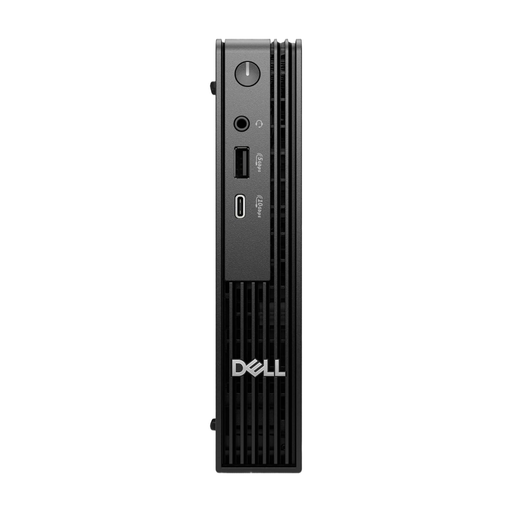
Dell Pro Micro QCM1250 MJ5TK TPM, Core i7-14700T, 16 GB, 512 GB NVMe SSD
A micro desktop configuration for a space-conscious Windows workstation.
Windows 11 Pro, 16 GB DDR5 and 512 GB NVMe SSD.
View on Joybuy
Frequently asked questions
Is a basic desktop PC enough if I only edit source code in VS Code?
A basic configuration may be enough for VS Code alone: Microsoft describes the editor as lightweight. Your operating system, project size and any tools you use at the same time also matter. Don’t assume the editor’s requirements apply to containers or emulators.
What should I check for Docker or an Android emulator?
For Docker Desktop on Windows with WSL 2, check the documented operating system and WSL requirements; Docker specifies WSL 2.1.5 or later. Google notes that larger projects can have higher RAM and CPU requirements for Android Studio. The tools and projects you actually use are what matter.
How can I protect my local projects when moving to a new PC?
Before switching, back up important project files and your own settings to a separate location. Germany’s Federal Office for Information Security recommends regular backups; the new PC’s internal SSD is not a backup in itself.
What statutory rights apply when buying online in Germany?
When you buy as a consumer from a business seller, you’re generally entitled to at least two years of statutory protection against faulty goods; an additional manufacturer’s guarantee does not replace this. For a typical online distance purchase, you generally have a 14-day right to cancel from the day you receive the goods, subject to legal exceptions. These consumer rights do not automatically apply to purchases made for a business. Your Europe, the European Union’s consumer portal, explains these rights and the conditions that apply.


