Which desktop is right for you?

Python beginners who already have a monitor

If you already have a monitor, you can focus on finding a computer that suits your needs. Microsoft points out that the Python interpreter and the Python extension for Visual Studio Code need to be installed separately.

Learners with limited desk space

A mini PC takes up very little room, but check that its video outputs match your monitor’s inputs. An all-in-one has a built-in screen, offering a different way to set up your workspace.

Learners planning to upgrade

If you want to add components later or work on larger local projects, check the hardware actually installed and the upgrade options available on the specific model.

What to look for when buying

Fully equipped mini PC

A good fit if: you have limited space and want to start with Python, an editor and learning materials.

Things to consider: a monitor and peripherals may not be included; specifications and upgrade options vary by model.

Tower desktop

A good fit if: you have room for a larger case and are planning to add components.

Things to consider: check the slots and specifications of the specific model; potential upgrades aren’t automatically included.

All-in-one PC

A good fit if: you don’t yet have a suitable monitor and want to buy the computer and screen together.

Things to consider: the screen and computer come as one complete solution, so you won’t have the freedom to choose a separate monitor.

Barebone mini PC

A good fit if: you want to choose and install the RAM, SSD and operating system yourself.

Things to consider: depending on the model, you’ll need to buy components separately and set up the computer yourself.

What matters when buying What to look for Who prioritises this?
Getting started easily Check the installed operating system and the specific configuration. You’ll need to set up the Python interpreter and editor extension separately. If I want to start my first exercises without having to plan additional hardware and system setup, a clearly configured system matters. Around 36% of consumers prioritise getting started easily.
Space and connections Match the computer’s video outputs to your monitor’s inputs, and allow space for cables and the power supply. If my desk is small, I need a case that fits and can connect to my screen. Around 29% of consumers prioritise space and suitable connections.
Upgrading later Check the installed RAM and storage separately from the upgrade options available on the specific model. If I want to use more local tools or add components later, I want to know what’s already installed and what can actually be upgraded. Around 21% of consumers focus above all on upgrade potential.
A complete workspace For the specific offer, check whether RAM, an SSD, an operating system, a monitor, a keyboard and a mouse are included. If I don’t want to track down missing parts, I care about everything included for the learning setup, not just the computer. Around 14% of consumers focus mainly on the overall specification.

Common buying mistakes

  • Assuming a barebone is a ready-to-use mini PC

    According to GMKtec, a version of the GMKtec NucBox M6 Ultra explicitly sold as a barebone comes without RAM, an SSD or an operating system. Without these components, the computer isn’t ready to use for getting started with learning.

    Before choosing, check the full model variant and what’s included in the box.

    You’ll need to buy and install any missing components separately.

  • Confusing the computer price with the cost of a complete workspace

    A mini PC doesn’t automatically include a monitor, keyboard or mouse. An all-in-one has a built-in screen; with a separate computer, you’ll need to choose a suitable monitor and connections.

    Check what’s included and match the video outputs to your monitor’s inputs.

    Missing devices and suitable connection cables may mean extra purchases.

  • Applying reviews of one product variant to another

    The HP variant 938A5EA#ABD isn’t the same model as the HP Pro Mini 400 G9 with the identifier D6B240EA. The GMKtec NucBox M6 Ultra is also available in both barebone and fully equipped versions.

    Check the full model identifier and what’s included before applying information about a different variant.

Key brands at a glance

GEEKOM

The A5 Pro 2026 is a compact mini PC option for a learning setup with a separately chosen screen.

  • For the version with a Ryzen 5 7530U, GEEKOM lists 16 GB RAM, a 1 TB SSD and Windows 11 Pro.
  • The version described doesn’t include a keyboard or mouse.

MSI

The Cubi NUC 1M range includes compact desktop models with different processor options and configurations.

  • MSI lists HDMI, Thunderbolt 4 and two RAM slots for the range.
  • The processor and included specification depend on the version you choose.

GMKtec

The NucBox M6 Ultra is available as a barebone and in fully equipped versions.

  • Depending on the offer, you can choose between different configurations.
  • GMKtec clearly states that the barebone version comes without RAM, an SSD or an operating system.

HP

The range includes compact mini PCs and all-in-one PCs with a built-in screen.

  • For the Pro Mini 400 G9 variant with identifier 938A5EA#ABD, HP lists 8 GB RAM and a 256 GB SSD.
  • This variant isn’t the same as the separately listed HP Pro Mini 400 G9 D6B240EA; the specifications of all-in-one models also vary by product.

Lenovo

The ThinkCentre range includes the small Neo 50q Gen 5 PC and the Neo 50t Gen 5 tower, with different case designs to choose from.

  • Lenovo lists a case volume of 13,6 litres and upgrade options for the Neo 50t Gen 5.
  • The RAM, SSD and operating system for the Neo 50q Gen 5 vary depending on the configuration you order; range details don’t confirm what’s included.

Mini PCs for learning Python

The selection below focuses on mini PCs for a home learning setup. Check the operating system and what’s included for each specific version.

ACEMAGIC AK1PLUS mini PC with Intel Celeron N5095

ACEMAGIC AK1PLUS mini PC, Intel Celeron N5095, 16 GB LPDDR4X, 256 GB M.2 SATA SSD

A compact configuration for a learning setup with a separately connected screen.

The listed specifications include Windows 11 Pro, 16 GB LPDDR4X and a 256 GB M.2 SATA SSD. The product title mentions HDMI 2.0 and 4K video output at 60 Hz.

View at Joybuy

ACEMAGIC E3B mini desktop with AMD Ryzen 7 7735HS

ACEMAGIC E3B mini desktop, AMD Ryzen 7 7735HS, 24 GB LPDDR5, 512 GB NVMe SSD

A mini PC configuration for learners who also want to consider the listed storage options.

The description lists two M.2 slots and the option to upgrade to up to 4 TB. HDMI, DisplayPort and USB-C are listed as screen connections.

View at Joybuy

SOYO S4PLUS mini PC with Ryzen 7 H 255

SOYO S4PLUS mini PC, Ryzen 7 H 255, 24 GB LPDDR5, 512 GB PCIe 3.0 SSD

A compact option if you’re looking for a mini PC with clearly specified RAM and SSD.

The product title lists Windows 11. The description lists HDMI, DisplayPort and USB-C connections.

View at Joybuy

FIREBAT F1 mini PC with AMD Ryzen 5 7640HS

FIREBAT F1 mini PC, AMD Ryzen 5 7640HS, 24 GB LPDDR5, 512 GB PCIe 4.0 SSD

A compact configuration for a workspace where the listed screen connections are important.

The product title mentions support for output to three 4K screens, as well as USB 4.0 and HDMI 2.1.

View at Joybuy
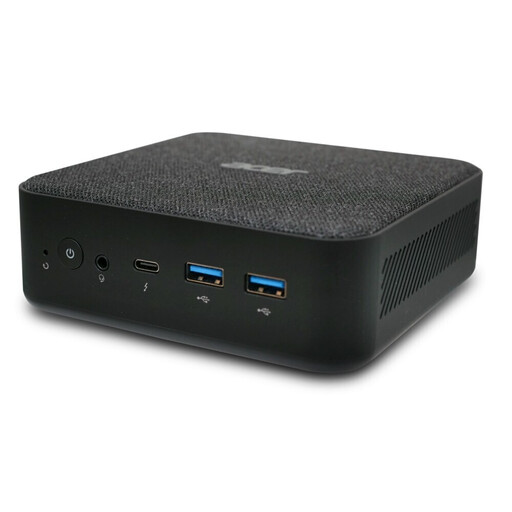
ACER Revo RB102 mini PC Core Ultra 5 125U

ACER Revo RB102 mini PC, Core Ultra 5 125U, 16 GB RAM, 512 GB SSD, W11 Pro, DT.BMCEG.002

A mini PC version with an operating system and RAM and SSD specifications listed in the product title.

The title lists W11 Pro; the description lists four USB 3.0 ports.

View at Joybuy

Frequently asked questions

Do I need a gaming PC for my first Python exercises?

The published requirements for Visual Studio Code don’t justify one. Check the additional requirements for the specific programmes and projects you want to use; the editor’s requirements don’t cover every workload you might take on later.

How do I set up Python in Visual Studio Code?

Install a Python interpreter and the Python extension separately, then select the interpreter in Visual Studio Code. Installing the editor alone won’t install Python. Microsoft explains this separate setup in its documentation.

How can I protect my practice projects from data loss?

Back up your files and check that you can restore them. Germany’s Federal Office for Information Security recommends backing up data, for example, to guard against drive failure or accidental deletion.

What are my rights in Germany if a product is faulty or I cancel an online purchase?

If a product is faulty, you have statutory rights against the seller; for purchases of goods in the EU, Your Europe explains that there is a minimum two-year guarantee period. For distance contracts, Section 312g of the German Civil Code (BGB) generally provides a right of withdrawal; under Section 355 BGB, the period is 14 days. Statutory exceptions apply, for example to certain goods made to the customer’s specific requirements. A voluntary manufacturer’s guarantee doesn’t replace your statutory rights.

Is a cheap Windows 10 PC still a straightforward new purchase?

Not without checking the support arrangements for the specific edition: mainstream support for Windows 10 Home and Pro ended on 14 October 2025. Microsoft gives this date for the end of support, so don’t automatically treat such a device like a computer running a regularly supported operating system.