Choose a desktop based on the size and number of your image files, and the software you use to draw and lay out your work. If you work with lots of layers and several documents open at once, RAM and available SSD space are important things to check. A compact PC saves desk space, while a tower may offer more choice in specifications and upgrades, depending on the exact configuration. For printing, you’ll also need to plan for your display, colour proofing and your printer’s requirements.
Who needs a desktop for recipe book illustrations
Illustrations with lots of layers
If you work on large files with lots of layers or several book pages at once, focus on checking the RAM and the space available for working files. Adobe describes RAM as the workspace for active image data and layers; Krita also notes that files are initially loaded into RAM.
Recipe books for print
If your illustrations, photos and text are going into a printed book, plan for colour proofing and print specifications as well as your computer. Krita explains that the range of colours a device can display depends, among other things, on the paper, ink and printer. Check the specific requirements with your printer.
A compact or adaptable workspace
If you want to save desk space or may want to change your setup later, compare compact PCs and towers based on their exact configurations. The operating system, ports and components actually included must be suitable for your software and existing devices.
What to consider when buying a desktop for illustration
First, compare the requirements of your drawing and layout software with the exact PC configuration. Adobe and Krita describe RAM as an important workspace for image data; for print, you’ll also need to consider colour proofing and your printer’s requirements.
| Consideration |
What to check when buying |
Who should pay particular attention |
| RAM for large files with multiple layers |
Check the RAM in the exact configuration, your typical file size and the number of programmes you have open at once. |
If I work on large files with lots of layers, I need enough headroom for active image data. Around 36% of consumers in this selection say working with layers is their main concern. |
| Colour and print output |
Check that the display connection and colour management software are compatible; ask the printer about the profile, bleed and file format. |
If my recipe book is going to be printed, I want to check the colours and output before exporting. Around 29% of consumers say print quality is their main concern. |
| Space, operating system and devices |
Check software compatibility and make sure the exact model has the monitor and drawing tablet ports you need. |
If I want to keep using my existing devices or have limited desk space, my computer and workspace need to work well together. Around 21% of consumers prioritise workspace and software compatibility. |
| Storage and expandability |
Check the SSD capacity of the exact model and any documented options for additional storage or backup media. |
If I want to keep lots of original files, scans and book versions, I need enough space and a separate backup. Around 14% of consumers say archiving and expandability are their main concerns. |
Avoid these mistakes when buying a desktop for illustration
-
Assuming a graphics card makes up for insufficient RAM
A dedicated graphics card doesn’t mean there’s enough RAM for large files with multiple layers. Adobe describes RAM as the workspace for image and layer data; when memory is tight, Photoshop may use temporary disk storage.
Start by considering your file sizes, number of layers and the programmes you run at the same time. Then check whether your specific software actually needs any specialist GPU features.
-
Comparing product ranges by name alone
RAM, SSD capacity and other specifications can vary between models in the same desktop range. Details for one configuration don’t necessarily apply to other variants.
Before buying, compare the product number and specifications of the exact configuration on offer, including RAM, SSD, graphics and ports.
-
Assuming on-screen colours will match the print
According to Krita, the range of colours a device can display depends, among other things, on the paper, ink and printer. So even a powerful PC alone can’t guarantee that screen and print colours will match.
Ask your printer about the output profile and file requirements. Check your artwork with a suitable soft-proofing feature before exporting the print file.
Relevant brands to help you choose
Apple
The Mac mini is a compact macOS option, but you’ll need to plan for a separate display and input devices.
- For the base configuration of the Mac mini (2024) with M4, Apple lists 16 GB of unified memory and a 256-GB SSD; other storage configurations are available.
- The specifications don’t demonstrate a particular level of performance for large illustration projects or confirm that your Windows software is compatible.
Lenovo
The ThinkCentre neo 50t Gen 5 is a configurable Windows tower; its exact specifications depend on the variant.
- Lenovo Germany lists a configuration with 32 GB RAM and a 1 TB SSD, among others.
- Specifications for a particular product number don’t automatically apply to the whole range. The configuration mentioned has integrated graphics.
Dell
The Tower Plus EBT2250 is a tower option with a dedicated graphics card in the configuration reviewed.
- The configuration reviewed lists an RTX 5060, 16 GB RAM and a 1 TB SSD.
- A dedicated GPU doesn’t in itself prove an advantage for 2D illustrations with multiple layers. Check whether it’s useful for your software and workflow.
ASUS
According to ASUS, the ExpertCenter D5 Mini Tower range offers different memory and port options, depending on the model.
- ASUS lists various processor, RAM, storage and graphics options, as well as expansion slots, for the range.
- The range overview doesn’t specify which combination is included in a particular model sold in Germany. Check the exact model variant.
Joybuy products for illustration and recipe book design
The Joybuy selection below includes towers and compact systems with different RAM, storage and graphics specifications. Compare the exact configuration with your software, project files and the ports on your existing devices.
 No image available
Acer Predator Orion 3000 Desktop i5 Ultra, 16 GB, 512 GB SSD, RTX 5060
If you’re looking for a tower with Windows 11 Home and dedicated graphics, compare its specifications with the requirements of your drawing and layout software.
The product name lists 16 GB RAM, a 512-GB SSD and an RTX 5060. A graphics card alone doesn’t guarantee an advantage for every type of 2D illustration.
Joybuy
 No image available
Acer Nitro 20 N20-100 Desktop i5, 32 GB, 1 TB SSD, RTX 5060
If you’re considering a tower with more RAM for image files, check the exact model and make sure it’s compatible with your software.
The product details list 32 GB DDR4 RAM, a 1 TB SSD and an additional 1 TB HDD. They also mention Windows 11 Home and dedicated NVIDIA graphics with 8 GB.
Joybuy
 No image available
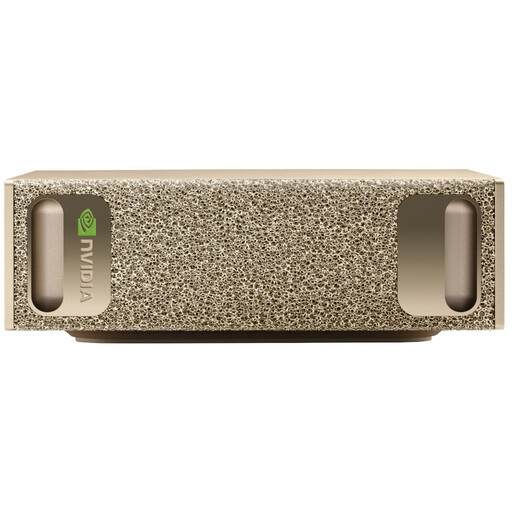
NVIDIA DGX Spark Founders Edition, NVIDIA GB10, 128 GB RAM, 4 TB SSD
If you’re considering a compact system with the high memory specifications listed, check that your drawing and layout software is compatible with NVIDIA DGX OS before buying.
The product details list 128 GB RAM, a 4 TB SSD, and HDMI and USB-C video outputs.
Joybuy
 No image available
HP Z2 Tower G1i A40MMET, Core Ultra 7 265, 32 GB, Windows 11 Pro
If you’re comparing a tower workstation with Windows 11 Pro and integrated graphics, check the exact memory specifications and ports of the model on offer.
The product details list 32 GB DDR5 RAM and Intel Graphics. Check the SSD specifications of the exact model before buying.
Joybuy
 No image available
Dell Alienware Aurora ACT1250 1J3N5, Core Ultra 9-285K, 32 GB, 2 TB SSD, RTX 5080
If other tasks alongside illustration require a dedicated graphics card, check whether it’s useful for your specific software and compare the overall specifications with your needs.
The product details list 32 GB DDR5 RAM, a 2 TB SSD and an RTX 5080 with 16 GB of graphics memory; the operating system is listed as Windows 11 Home.
Joybuy
Frequently asked questions about desktop PCs for recipe book illustrations
Do I need a dedicated graphics card for illustrations with lots of layers?
Not just because you’re working with layers. Adobe describes RAM as the workspace for image and layer data; check separately whether your software needs any specialist GPU features before making a graphics card a deciding factor.
How can I check colours before printing my recipe book?
Ask your printer for the output profile and check your design using a suitable soft-proofing feature. Krita explains that paper, ink and the printer affect the range of colours that can be displayed; a CMYK file alone doesn’t guarantee matching print colours.
What should I consider when connecting devices and backing up my projects?
Check that the ports on the exact desktop model are suitable for your monitor and input devices. Keep editable original files on a separate backup device too; the storage space you need depends on the number and size of your files.
What are my rights in Germany if a desktop PC bought online is faulty?
Your statutory rights against the seller are separate from any voluntary guarantee. The Verbraucherzentrale says that, for faulty goods, the first step is for the seller to put things right by repairing or replacing the item. Online purchases generally also come with a right to cancel, which can usually be exercised within 14 days of receiving the goods.
Can I put an old desktop PC in my household rubbish?
No. The German Environment Agency explains that old electrical equipment must be collected separately. Check with your local council for a collection point or see whether you can return it to a retailer that is required to accept it.


