Which setup is right for you?

Archivists with linked files

If you catalogue reviews with source files stored elsewhere, plan for file paths and folder structure when switching computers. Zotero explains how a base directory can allow relative paths, and notes that linked files need to be synced separately.

Researchers with lots of PDFs

If you want to find passages in reviews and documents, check typical files to see whether they contain searchable text. Zotero explains how to search indexed PDF content; image scans may need text recognition.

Buyers with limited desk space

If you’re setting up a dedicated research workspace, check that the PC’s connections work with your monitor, input devices and external storage. Configurations can vary within compact ranges, as the specifications from HP and Lenovo show.

What should you look for when buying?

Compact mini PC

A good fit if: desk space is limited and your monitor and required drives can connect to the ports on the specific configuration.

Bear in mind: A small footprint is no substitute for backing up source files or checking connections and expansion options. HP and Lenovo offer different configurations.

Slim or tower desktop

A good fit if: you need scope for future storage expansion or to connect several devices alongside your day-to-day research.

Bear in mind: The computer needs more desk space. MSI lists free drive bays for the PRO DP80 A14G only on certain configurations.

Requirement What to check before buying Who should pay particular attention?
Keeping track of source files Check your folder structure and required storage space, and make sure you have connections for external drives. In Zotero, linked files can be stored relative to a base directory; they aren’t transferred automatically through file syncing. If I move reviews and their original files between computers, I need stable paths and a separate backup. Around 36% of consumers would put linked source files first.
Finding text in reviews Use your own sample files to check whether the text in a document is searchable, and check the requirements of the software you actually use. Zotero explains how to search indexed PDF text. If I want to find specific passages rather than just titles or keywords, I check the text in my PDFs first. Around 29% of consumers would make full-text search their top priority.
Backing up your index and files Decide where your index, attachments and linked original files will be stored, and make sure you can restore everything you need. Zotero distinguishes between syncing library data and files. If I don’t want a PC failure to put my research and source files at risk too, I plan for a restorable backup. Around 21% of consumers would prioritise protecting their collections.
Matching your workspace Check the video output, USB ports, case dimensions, what’s included and possible upgrades for the exact model configuration. Specifications for a product range don’t necessarily apply to every configuration. If I want to use an existing monitor and keep desk space to a minimum, the connections and case need to suit my setup. Around 14% of consumers would prioritise a compact workspace with the right connections.

Common buying and usage pitfalls

  • Assuming syncing is the same as backing up all your files

    Zotero distinguishes between library data and files: linked files aren’t transferred automatically through Zotero file syncing. A catalogue entry may therefore still be there even if its file link no longer works after you move it.

    Before switching to another PC, check that you can open a typical entry and its source file from the new storage location.

  • Assuming image scans are automatically searchable

    Full-text search can only find text that is actually present in the document and accessible to the search function. A scan without searchable text won’t become searchable just by using a more powerful PC.

    Before buying hardware, check that typical scans contain searchable text and review the search results.

    Text recognition and quality checks can mean extra work.

  • Comparing product ranges instead of specific configurations

    Manufacturers offer different configurations within a range, for example with different amounts of RAM, SSD storage and operating systems. The product family name alone doesn’t tell you what’s included in a specific offer.

    Check the full model or part number, connections, storage and what’s included in the offer.

Key brands at a glance

Dell

The Pro Slim Plus QBS1250 is positioned as a configurable Windows office desktop for a dedicated workspace.

  • For the offer configuration described, Dell lists 16 GB DDR5, a 512 GB SSD and Windows 11 Pro.
  • Specifications may vary depending on the configuration you choose, so check the specific offer.

HP

The Pro Mini 400 G9 is a compact Windows option if you need to make sure it fits your available space and connects to your existing equipment.

  • For the German configuration 938A5EA#ABD, HP lists 8 GB RAM and a 256 GB SSD.
  • HP notes that configurations vary across the range. Check that the specific configuration has enough capacity for your local collection.

Lenovo

The ThinkCentre Neo 50q Gen 5 Tiny is designed for compact, dedicated workspaces.

  • Lenovo offers several configurations in this range.
  • Offers differ in areas such as RAM, SSD storage and Windows edition. Don’t assume specifications apply to a different part number without checking.

MSI

The PRO DP80 A14G is an office desktop for buyers comparing specific configurations and drive options.

  • MSI lists additional drive bays for certain documented configurations.
  • Processors and SSD capacities vary by configuration; the specifications don’t apply across the entire range.

GEEKOM

The A5 Pro 2026 Edition is a mini PC option for a space-saving research setup.

  • For the German configuration with Ryzen 5 7530U, GEEKOM lists 16 GB RAM and a 1 TB SSD.
  • Other processor configurations are available under a similar A5 Pro name, so check the exact edition.

Joybuy products for your research setup

The products below include compact mini PCs and tower desktops, as well as a compact desk for a dedicated research setup.

Beelink Mini PC EQ7, 16 GB RAM, 512 GB, Grey

Beelink Mini PC EQ7, 16 GB RAM, 512 GB, Grey

A compact mini PC option for a dedicated research setup.

The product name specifies 16 GB RAM and 512 GB storage.

Joybuy

HP Z2 Tower G1i A40MMET, Core Ultra 7 265, 32 GB

HP Z2 Tower G1i A40MMET, Core Ultra 7 265, 32 GB

A tower workstation for a dedicated research setup, provided the specific configuration is suited to the software you use.

The product name specifies a Core Ultra 7 265, 32 GB RAM and Windows 11 Pro. Check the exact storage capacity of the configuration on offer.

Joybuy
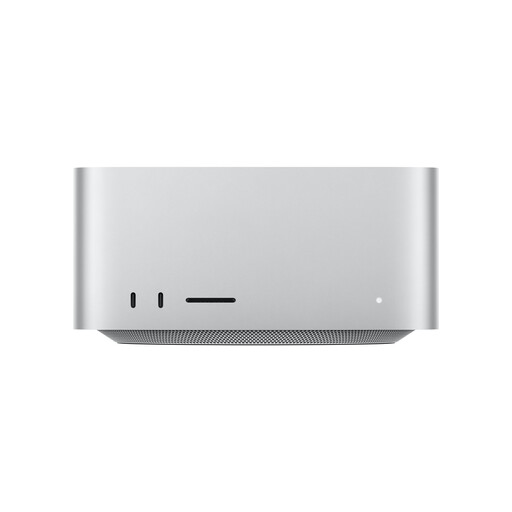
Apple Mac Studio, M5 Max, 36 GB Unified Memory, 512 GB SSD

Apple Mac Studio, M5 Max, 36 GB Unified Memory, 512 GB SSD

A desktop computer for a dedicated research setup, as long as the software you use is compatible with the specific configuration.

The product name specifies 36 GB Unified Memory and a 512 GB SSD.

Joybuy

Captiva PC Highend Gaming R90-463, Ryzen 7 7800X3D, 64 GB RAM, 2 TB SSD

Captiva PC Highend Gaming R90-463, Ryzen 7 7800X3D, 64 GB RAM, 2 TB SSD

A tower PC for a dedicated workspace. Check that the specific configuration suits your research software.

The product name specifies a Ryzen 7 7800X3D, 64 GB RAM, a 2 TB SSD, an RTX 5070 Ti and Windows 11.

Joybuy
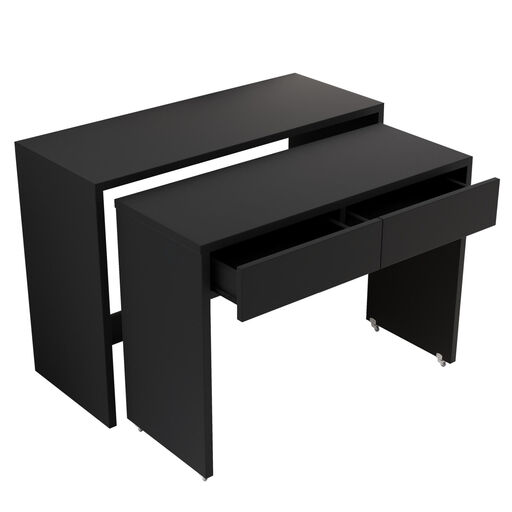
Compact desk with drawer unit, extendable, Black

Compact desk with drawer unit, extendable, Black

This version is described as a compact desk with a drawer unit and castors. It’s an addition to your workspace, not a desktop PC.

Joybuy

Frequently asked questions

How do I set up linked source files so I can switch computers later?

If you use linked files in Zotero rather than stored files, a base directory can allow relative file paths. Zotero notes that linked files need to be synced or backed up separately, so test access to a typical file after moving it.

Do I need a particularly powerful PC for scanned reviews?

Not necessarily. First check whether your scans contain searchable text, as more powerful hardware can’t replace text recognition. Zotero explains how to search indexed PDF text and recommends checking the quality of the text in the document.

What else should I plan for alongside my PC?

Check that the specific configuration works with your existing monitor, keyboard and mouse, and that you have the right cables and storage for backups. Also check where your source files are stored and how you’ll restore them when switching computers.

What are my rights in Germany if my PC is faulty?

Your statutory rights against the seller are separate from any voluntary guarantee. In July 2026, the German Federal Government described the general entitlement to two years of rights for defects against the retailer. The consequences in an individual case depend on the purchase and the applicable rules.

Can I put an old desktop PC in the household waste?

No. In Germany, the Federal Environment Agency explains that old electrical equipment must be collected and returned separately under the ElektroG. Use a suitable collection point, and back up and remove your data before handing the PC in.