What setup is right for you?

Students using specific diagram software

If you need to edit diagrams in a particular programme or submit them in a required file format, check the operating system and file format first. Inkscape and draw.io Desktop both list Windows, macOS and Linux as supported systems; this says nothing about compatibility with other software used on your course.

Students short on desk space

If there’s little room left once you’ve made space for your notes and monitor, a compact PC could be a good fit. Compare the case, ports and what’s included. A small computer won’t reduce the space needed for your monitor and cables.

Students who work across multiple views

If you want your diagram, sources and text visible side by side, check that the video outputs on the specific PC variant match your monitors’ inputs. Specifications can differ between variants in the same product range.

What should you look for when buying?

Buying criteria What to check Who should consider it?
Software compatibility Check your course requirements, supported operating system and the file or export formats you need. If I need to use specific course software and submit files in a required format, I check those exact requirements. Around 33% of consumers put compatibility with their diagram software first.
Space and noise Allow room for the case, power supply and cables; only apply noise assessments to the specific model tested. With a small desk, I want to keep space for my monitor and study materials while choosing a device that’s quiet enough for my room. Around 27% of consumers prioritise a small footprint.
Monitor connections Compare the number and type of video outputs with the inputs on your existing or planned monitors. If I want to see diagrams, sources and text at the same time, I need to be able to connect my PC to my screens. Around 20% of consumers first look for connections that support multiple views.
Complete setup Check whether RAM, storage, an operating system, keyboard, mouse, monitor and suitable cables are included. If I want the computer ready to use for work without needing extra parts, I want to know in advance what’s missing from the package. Around 20% of consumers prioritise a complete workstation.

Pitfalls when buying a PC for diagrams

  • Assuming a barebone system is a fully set-up PC

    According to COMPUTER BILD, the tested Intel NUC 13 NUC13ANKI7 doesn’t include RAM, storage or an operating system. It therefore isn’t directly comparable with a fully configured PC.

    Before choosing one, check which components you’ll need to buy and install yourself, and whether you’re happy to set it up.

    Missing components and the extra setup can delay getting your workstation ready to use.

  • Assuming the monitor and peripherals shown in product images are included

    According to COMPUTER BILD, the tested Geekom A5 Pro didn’t include a keyboard or mouse. Product images alone don’t tell you what’s included, even for a compact PC range.

    Check the details for the specific product number and make sure its ports match your monitor.

    If devices or cables are missing, you’ll need to source them before you can use the PC.

  • Assuming a test result applies to every variant in a range

    Manufacturers offer different operating system, RAM and storage options under the same product range name. A review applies to the model tested and won’t automatically apply to every variant.

    Compare the full model number and the specifications of the configuration on offer with the details of the model that was tested.

Compact desktop PC brands at a glance

GEEKOM

The A5 Pro 2026 Edition is a documented compact Windows configuration.

  • The manufacturer’s configuration lists a Ryzen 5 7530U, 16 GB RAM and a 1 TB SSD.
  • COMPUTER BILD’s review covers the configuration tested. The missing keyboard and mouse, as well as the stated limitations with graphically demanding games, apply to that test configuration. The manufacturer’s claims about noise and performance aren’t independent measurements.

MSI

The Cubi NUC 1M is a compact desktop range with different processor and operating system options.

  • MSI lists two HDMI ports, two Thunderbolt 4 ports and RAM slots in the specifications.
  • The test results described by COMPUTER BILD apply to the device tested, not automatically to every variant.

HP

The Pro Mini 400 G9 range includes compact Windows desktop configurations.

  • COMPUTER BILD describes the tested HP Pro Mini 400 G9, model number D6B240EA, as very quiet and notes that its RAM and storage can be upgraded.
  • These comments refer to the configuration tested; make sure the model number and specifications match when comparing products.

Lenovo

The ThinkCentre Neo 50q Gen 5 is a small desktop range with various configurations.

  • Lenovo describes it as a 1-litre Tiny PC and offers different RAM, operating system and storage options.
  • The details about its form factor and variants don’t amount to an independent assessment of noise or diagram performance.

Dell

The Pro Micro QCM1250 is a compact, configurable Windows desktop option.

  • For one configuration, Dell lists Windows 11 Pro, 16 GB RAM and a 512 GB SSD.
  • Dell says that the finish and images may vary depending on the configuration; this doesn’t provide a basis for comparing diagram performance or noise.

Joybuy products for your diagram workstation

These compact mini PCs are an option if you’re looking for a desktop computer for creating diagrams without taking up much space. Check that the operating system, ports and included components suit your software and workspace.

SOYO Y5Pro Mini PC with Intel Core i5 8250U/8350U, 8 GB RAM and 256 GB SATA SSD

SOYO Y5Pro Mini PC, Intel Core i5 8250U/8350U, 8 GB RAM, 256 GB SATA SSD, Windows 11

Could be a good fit if your diagram software runs on Windows and you’re looking for a compact design.

Windows 11, 8 GB RAM and a 256 GB SATA SSD are listed. The description specifies HDMI, DisplayPort and Type-C video outputs, and dimensions of 105 × 113 × 45 mm.

View at Joybuy
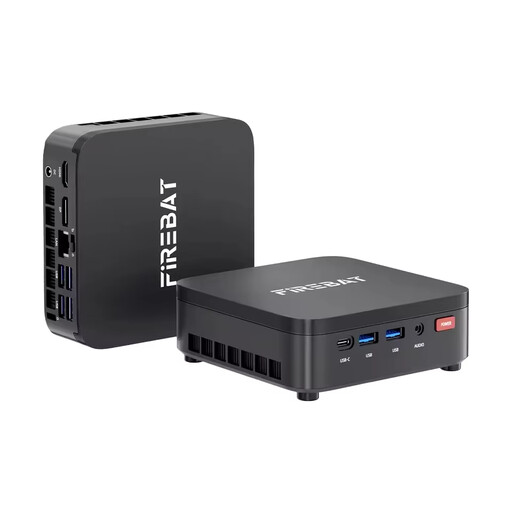
FIREBAT R3 Mini PC with AMD Ryzen 3 4300U, 16 GB RAM and 512 GB SSD

FIREBAT R3 Mini PC, AMD Ryzen 3 4300U, 16 GB RAM, 512 GB M.2 SATA SSD, Windows 11 Pro

A compact Windows configuration to compare with your course software requirements and existing monitor.

The product title lists 16 GB LPDDR4 RAM and a 512 GB M.2 SATA SSD. Wi-Fi 6 and Bluetooth 5.2 are also listed.

View at Joybuy
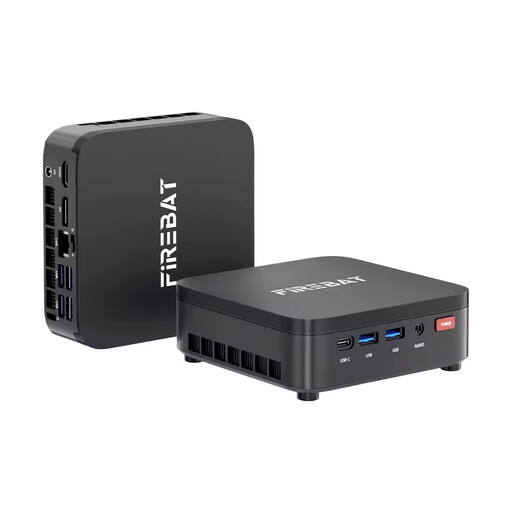
FIREBAT R3 Mini PC with AMD Ryzen 3 4300U, 8 GB RAM and 256 GB SSD

FIREBAT R3 Mini PC, AMD Ryzen 3 4300U, 8 GB RAM, 256 GB M.2 SATA SSD, Windows 11 Pro

You can assess this compact variant based on its operating system and form factor; make sure the storage suits how you plan to use it.

The product title lists 8 GB LPDDR4 RAM and a 256 GB M.2 SATA SSD. Wi-Fi 6 and Bluetooth 5.2 are also listed.

View at Joybuy

BMAX B6 Mini PC with Intel Core i3-8109U, 12 GB RAM, 256 GB SSD, HDMI and DisplayPort

BMAX B6 Mini PC, Intel Core i3-8109U, 12 GB RAM, 256 GB SSD

The listed video outputs could be useful for a workstation with multiple views; check your monitors’ inputs.

The product title lists 12 GB RAM and a 256 GB SSD. The description specifies HDMI and DisplayPort, and dimensions of 125 × 112 × 34 mm.

View at Joybuy

BMAX B7A Plus Mini PC with AMD Ryzen 5 6600H, 12 GB RAM and 512 GB NVMe SSD

BMAX B7A Plus Mini PC, AMD Ryzen 5 6600H, 12 GB RAM, 512 GB NVMe SSD

If you want to connect multiple screens, check that the listed video outputs match your monitors.

The product title lists 12 GB LPDDR5 RAM and a 512 GB NVMe SSD. The description specifies two HDMI outputs, one fully featured Type-C port and dimensions of 113 × 113 × 44,5 mm.

View at Joybuy

Frequently asked questions

Do I need Windows to create diagrams?

Not for Inkscape or draw.io Desktop: both providers list Windows, macOS and Linux. If your course requires a different application or a specific file format for submissions, check those requirements before buying a PC.

How can I check whether a PC supports two monitors?

Compare the video outputs on the specific PC variant with the inputs on both monitors, and make sure you have the right cables. MSI lists two HDMI ports and two Thunderbolt 4 ports in the Cubi NUC 1M specifications; the specifications of the variant you choose are what matter.

Can I edit diagrams without an internet connection?

According to the provider, the desktop version of draw.io can be used entirely offline. The offline features of the browser-based PWA are different, including cloud storage and certain export functions; choose the installation option that suits your workflow.

What should I consider when buying a barebone system?

Check whether RAM, storage and an operating system are included, and whether you want to install any missing components yourself. According to COMPUTER BILD, all three were missing from the tested Intel NUC 13 NUC13ANKI7.

Who is responsible if a new PC is faulty?

For consumer purchases in Germany, the seller is generally responsible for statutory liability for defects. The Verbraucherzentrale states that this applies for two years from delivery. For purchase contracts from 31 July 2026, it describes a one-off 12-month extension if you choose a repair instead of a replacement. Any voluntary guarantee is subject to its own terms and conditions.