First, choose the operating system that works with your screen reader and the directory editor you plan to use. Then decide between a mini PC, a larger desktop or a Mac mini. For research and ongoing data entry, look for the right specification, accessible connections and a keyboard or braille setup you’ve tested. NV Access describes NVDA as a screen reader for Windows, while Apple documents VoiceOver and the use of supported braille displays. However, this doesn’t mean that a particular editor will be accessible.
Who this guide is for
NVDA users working with a web editor
If you research and manage workshop listings in a browser, test the specific editor with NVDA and your usual keyboard controls. NV Access describes NVDA as a screen reader for Windows. WordPress documents keyboard shortcuts for its own block editor, but not for every additional plugin.
Braille display users
If you use a braille display alongside speech output, check that it’s supported and that the computer has the connection you need. Apple describes using supported braille displays with VoiceOver; you should check the compatibility of your own display separately.
Users of magnification and speech
If you combine screen reader output with visual cues, consider the screen, display settings and layout of your workspace too. The German Federation of the Blind and Partially Sighted describes screen readers as software that converts on-screen content into text.
What to look for when buying
Windows mini PC
A good fit if: you want to use NVDA or Windows’ built-in screen reader and keep using your existing screen and input devices.
Things to consider: The case and what’s included vary by offer. Windows screen reader functionality doesn’t prove that every editor is accessible.
Windows small form factor desktop
A good fit if: you need a desktop with documented internal slots, such as the HP configuration CP9J4EA#ABD.
Things to consider: The slots on this configuration tell you nothing about other models or how easy the editor is to use.
Mac mini with macOS
A good fit if: you want to work with VoiceOver and your editor, as well as any braille display you use, fits into your workflow.
Things to consider: NVDA is a Windows solution. Check separately that any third-party editor is accessible and that you have the right input devices.
| Buying priority |
What to look for |
Who may find it particularly important |
| Screen reader and editor |
Try creating, editing and finding a listing in the editor you plan to use; check that the operating system works with your screen reader. |
If I want to manage workshop listings in my chosen editor using my screen reader, I want to test those exact steps beforehand. For around 33 % of consumers, screen reader and editor compatibility is the top priority. |
| Research and managing listings |
Check the operating system, RAM and SSD for the full model number; try the programmes you actually need together. |
If I use several applications while researching, I want to check that my specific combination works for managing listings. Around 27 % of consumers say that researching and entering data at the same time is their main buying priority. |
| Braille display and input devices |
Check that your braille display is supported and that the specific model has the audio, USB and keyboard connections you need. |
If I want to connect a braille display or other input devices, I need to check compatibility and connections for my assistive technology. For around 20 % of consumers, connecting existing devices is the most important buying priority. |
| Form factor and expansion |
Compare the space available, your existing devices and any internal slots you actually need with the specification of the configuration you’re considering. |
If space is limited or I have a specific upgrade in mind, I want to choose a form factor to suit. Around 20 % of consumers put form factor or expandability first. |
Avoid common buying mistakes
-
Assuming a screen reader means an editor is accessible
Documentation for an operating system or screen reader doesn’t prove that every input field, filter and dialogue in an additional plugin will be accessible.
Use your own screen reader to test the steps you plan to take: create a listing, edit it and find it again.
-
Assuming a similar model has the same specification
HP product code D6B240EA is not the same as the separately documented configuration CP9G3EA#ABD. A similar model name doesn’t mean the specifications are identical.
Compare the full product number, operating system, RAM, SSD and connections for the specific offer.
-
Mistaking an internal SSD for a backup
Microsoft describes File History as storing copies on an external drive or network location. The internal storage alone is therefore not a separate backup.
Plan to use a separate backup location and check that you can restore the files you need for your directory.
You may need an external drive or suitable network storage.
Brands at a glance
GEEKOM
The A5 Pro 2026 Edition is a documented Windows mini PC configuration for a workspace you put together separately.
- For the Ryzen 5 7530U version, GEEKOM lists 16 GB RAM, a 1 TB SSD and Windows 11 Pro.
- Check the specification of the specific version; this doesn’t confirm that your own editor is accessible.
HP
The Pro Mini and Pro SFF offer different case and expansion configurations.
- HP lists 16 GB RAM and a 512 GB SSD for CP9G3EA#ABD, while PCIe slots are documented for CP9J4EA#ABD.
- These are different configurations. Compare the full product number rather than assuming they share the same features.
Lenovo
The ThinkCentre M70q Gen 6 is a compact range of Windows desktops. The details here refer to version 13A4002LMH.
- For this version, the Lenovo data sheet lists Windows 11 Pro, 16 GB RAM, a 512 GB SSD and several types of connection.
- The documented keyboard layout is English (EU); check the keyboard and what’s included with the specific offer.
Dell
The Pro Micro QCM1250 is a configurable range of Windows micro desktops for workspaces where space is limited.
- The documented German offer configuration lists Windows 11 Pro, 16 GB DDR5 and a 512 GB SSD.
- Dell notes that specifications may vary depending on the configuration you choose; check the details against the specific offer.
Apple
The Mac mini is a macOS option for people who want to use VoiceOver.
- Apple documents Mac mini configurations and the use of supported braille displays with VoiceOver.
- This doesn’t confirm compatibility with NVDA or that a specific third-party editor is accessible.
MSI
The Cubi NUC 1M range offers mini PC configurations. Their connections and operating systems need to suit your existing workspace.
- For the range, MSI documents USB-A, audio and HDMI connections, among others.
- The data sheet covers different processor and operating system configurations; check the specification of the specific offer.
Joybuy products to consider
This selection includes a small form factor desktop and several mini PCs. Check that the operating system, connections and specification of each offer suit your screen reader and workspace.
 Image unavailable
Dell Pro Plus SFF QBS1250 Slim
This model may suit a Windows workspace with a screen reader if the stated Windows 11 Pro configuration works for your workflow. Test the editor separately.
Intel Core Ultra 7 265, 32 GB DDR5, 512 GB NVMe SSD, Intel Graphics and Windows 11 Pro.
View at Joybuy
 Image unavailable
Ninkear L12 Pro
This is an option for a compact Windows workspace if the operating system version you choose works with your screen reader and editor.
Intel Core i9-12900HK, 16 GB DDR4, 1 TB SSD, Windows 10/11 as an option, USB 4.0; stated dimensions: 130 × 127,5 × 52 mm.
View at Joybuy
 Image unavailable
Ninkear M7
Before choosing this compact Windows desktop, check that the Windows version on offer and the displays you need will work for your setup.
Intel Core i7-1185G7, 16 GB DDR4, 512 GB SSD, Windows 10/11 as an option, support for up to three displays, Wi-Fi 6 and Bluetooth 5.2.
View at Joybuy
 Image unavailable
Ninkear L20
If you want to use several displays at your workstation, check that the stated display support works with your devices and test the editor with your screen reader.
Intel Core Ultra 5 226V, 16 GB RAM, 512 GB/1 TB SSD, Windows 11, support for three 4K screens and a stated case volume of 0,66 l.
View at Joybuy
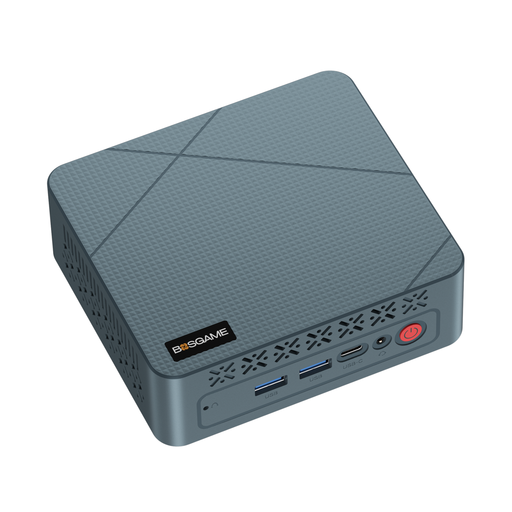 Image unavailable
BOSGAME E2 neo
This mini PC may suit a screen reader workstation only if the operating system in the specific offer is compatible with your screen reader and editor.
AMD Ryzen 5 3500U, 16 GB RAM and 256 GB SSD.
View at Joybuy
Frequently asked questions
Is the built-in Windows 11 narrator enough, or do I need NVDA?
Windows 11 includes Narrator, while NVDA is a separate screen reader for Windows. Testing the actual steps you’ll take to enter, search for and edit information in your chosen editor will help you decide which works for you.
How can I test a directory editor without a mouse?
Use your screen reader to create a test listing, edit it and navigate through the fields and settings. If you use the WordPress block editor, WordPress documents keyboard shortcuts for it; this doesn’t automatically tell you anything about additional directory plugins.
Which connections should I check for my braille display and input devices?
Check the specific model for the connections you need and confirm that your braille display is supported. Apple describes using supported braille displays with VoiceOver; check separately that your own device is supported.
How do I back up my workshop data on Windows?
Microsoft describes File History as a way to keep copies of personal files on an external drive or network location. Also check whether your directory service needs a separate export or its own backup of listings.
Does a workshop directory published in Germany have to be accessible under the BFSG?
You can’t determine this simply from the fact that a directory has been published. The Federal Agency for Accessibility describes services in electronic commerce, among other things, as involving an individual consumer request with a view to concluding a contract. It also states an exemption for micro-enterprises providing services with fewer than ten employees and an annual turnover of no more than 2 million euros. Whether these conditions apply to a particular directory with a booking function depends on the service and its operator. The BFSG has applied since 28 June 2025.


