NVDA users working on editorial projects
If you create gardening articles using a Windows screen reader, you should choose an operating system, browser and editor that suit your workflow. NV Access describes NVDA as a screen reader for Windows.


Choose your desktop based first on the operating system that runs your familiar screen reader and the website tools you need: Windows works with NVDA, macOS with VoiceOver, and Linux is an option if Orca and the applications you use work in your setup. Next, consider the specification of the exact configuration, its ports and what’s included in the box. Processor or graphics specifications alone can’t replace compatibility or a complete workstation.
If you create gardening articles using a Windows screen reader, you should choose an operating system, browser and editor that suit your workflow. NV Access describes NVDA as a screen reader for Windows.
If you manage your website on a Mac, choose macOS, a keyboard, audio output and other peripherals to suit your setup. Apple documents VoiceOver as the Mac’s built-in screen reader.
If you use additional local applications alongside writing, or may want to change components later, check the exact specification and the upgrade options actually available.
First, make sure your screen reader and editorial tools work with the operating system. Then consider how accessible the editor is, which ports are available and whether the PC is suitable for other local applications.
A good fit if: you already use NVDA or the editorial tools you need run on Windows.
Keep in mind: Try your editor and extensions as part of your own screen-reader workflow; specifications can vary by model and configuration.
A good fit if: you prefer VoiceOver and can use your website tools on macOS.
Keep in mind: NVDA is a Windows screen reader, so it is not an equivalent replacement for a familiar NVDA setup on a Mac.
A good fit if: you already use an Orca-compatible desktop environment and your editorial applications work with it.
Keep in mind: Orca can access graphical applications only if they support the AT-SPI interface.
| Buying priority | What to check before buying | Who is this important to? |
|---|---|---|
| Screen reader and operating system | Check that the operating system on the exact configuration works with your screen reader, browser and editorial software. | If I want to keep using a familiar screen reader and my website tools, compatibility comes first; around 36% of consumers are likely to prioritise this. |
| Keyboard-accessible editing | Try your chosen editor with your screen reader and keyboard; consider the browsers you need and, if applicable, a braille display. | When editing articles every day, I want to be able to complete the necessary tasks in the editor using a keyboard; around 29% of consumers would put keyboard-based editing first. |
| Ports and workstation setup | Compare the video, audio and USB ports, as well as what’s included, with the peripherals you already own. | If space is limited and I want to keep using my existing input devices, the whole setup needs to work; around 21% of consumers would prioritise ports and workstation requirements. |
| Local tools and storage | Check the installed RAM, SSD and operating system, as well as the upgrade options available for the exact configuration. | If I use additional local tools alongside my browser and editor, I want the specification to suit my workflow; around 14% of consumers would prioritise local applications, storage and future upgrades. |
NV Access describes NVDA as a Windows screen reader, while VoiceOver is built into the Mac. Switching operating systems also means changing your screen-reader workflow.
If you need NVDA, choose a suitable Windows configuration. Before choosing macOS instead, try VoiceOver and the tools you need as part of your workflow.
Switching may mean getting used to a new setup and adapting your existing workflow.
In a Joybuy listing for the Acer Revo RB102, the model number in the title differs from the details in the selection field or description. Acer lists DT.BMCEG.002 as a Core Ultra 5 configuration with 16 GB, so check that the model number matches the selected configuration.
Before deciding, compare the full model number, the configuration you’ve selected and its technical specifications.
The GEEKOM A5 Pro tested by COMPUTER BILD did not include a keyboard or mouse; Lenovo lists these devices as sold separately for the ThinkCentre configuration mentioned.
Check what’s included with the exact configuration against the monitor, keyboard, audio output and other input devices you need.
Depending on the equipment you already have, you may need to budget for additional devices or suitable ports.
GMKtec describes one version of the NucBox M6 Ultra as a barebone system without RAM, an SSD or an operating system.
Choose a barebone system only if you’re happy to supply the missing components and set it up yourself.
You may also need to buy and install RAM, an SSD and an operating system.
The A5 Pro 2026 is a compact Windows PC that can be added to an existing workstation.
The Cubi NUC 1M range includes compact Windows desktops, with specifications that vary by configuration.
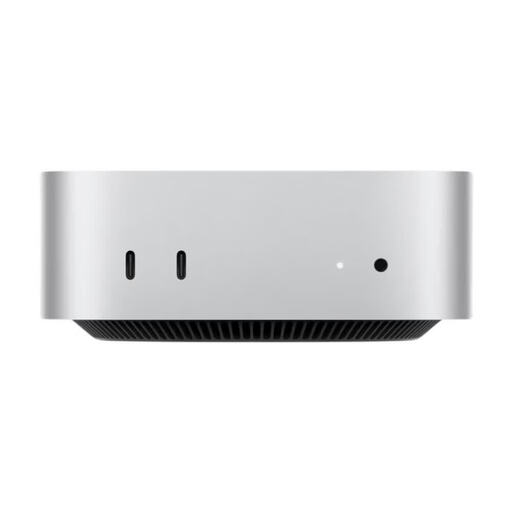
The Mac mini is a macOS desktop option for a VoiceOver workflow.
The Dell Pro Micro QCM1250 is a compact, configurable Windows desktop for a dedicated workstation.
The Pro Mini 400 G9 is a compact Windows range where the full configuration number matters.
This selection includes a Mac mini for a VoiceOver workflow, along with Windows mini PCs that may suit an NVDA workstation.
 No image available
For a macOS workstation with VoiceOver; NVDA is a Windows screen reader and is not an equivalent replacement on a Mac.
Listed in the product name: 12-core CPU, 12-core GPU, 32 GB Unified Memory and 1 TB SSD.
Ports listed include USB-C, Thunderbolt 4 and HDMI.
 No image available
For a Windows workflow with NVDA; check that your specific editor and the extensions you need are accessible with your setup.
Listed in the product name: Windows 10/11, 16 GB DDR4 and a 512 GB SSD.
The listing states support for up to three displays.
 No image available
For a Windows 11 workstation with NVDA; check that your specific editorial tools and extensions are accessible.
Listed in the product name: 24 GB LPDDR5 and a 512 GB SSD.
The listing includes six USB 3.2 ports.
No. First, check that your preferred screen reader runs on the installed operating system and that you can use it for your specific editorial workflow. NVDA is a Windows screen reader, VoiceOver is built into the Mac, and Orca requires graphical applications to support the AT-SPI interface.
First, set up your audio output and chosen screen reader. Keyboard shortcuts for Windows and Mac are documented for the WordPress block editor; use them to test the tasks you need to complete when working on your articles. The W3C Web Accessibility Initiative points out that automated checks do not replace a human review of the website.
Check whether the offer includes a keyboard, monitor and any input devices you need. The Verbraucherzentrale distinguishes the statutory warranty provided by the seller from a voluntary guarantee. Online purchases generally come with a 14-day right to cancel, although conditions and exceptions apply.
You can’t determine whether the BFSG applies simply from a website being described as an advice site. The Federal Government’s Accessibility Agency describes e-commerce services as services provided in response to an individual consumer’s request with a view to concluding a contract. Whether your website falls into this category depends on what it actually offers. The Agency also describes an exemption for micro-enterprises providing services: fewer than ten employees and an annual turnover of no more than 2 million euros. Whether or not the law applies, it makes sense for this project to test how accessible the website is with a screen reader.