Teachers short on desk space
If you use documents and paper resources on the same small desk, think about the space needed for your whole workstation – not just the size of the computer case.


If you already have a suitable monitor, a mini PC can free up more desk space. Before you buy, check the ports, mounting options and what’s included with the specific model. An all-in-one combines the computer and screen, while a compact desktop is worth considering if expandability matters more than having the smallest possible case. If you handle work-related data, you’ll also need to check which devices and processes your school allows.
If you use documents and paper resources on the same small desk, think about the space needed for your whole workstation – not just the size of the computer case.
Check that the operating system and specific configuration work with the programmes you use regularly. If you handle personal data about pupils, you’ll also need to follow your school’s requirements.
If you’d like to keep using your screen and accessories, compare the ports and check whether the mount and any other components you need are included.
A good fit if: You want to keep using a suitable monitor and leave room for teaching materials.
Consider: You’ll also need a monitor and, possibly, input devices. Mounting options and the operating system vary by model.
A good fit if: You want to buy the computer and screen as one unit, and have enough desk space for the screen.
Consider: You’re committed to the integrated screen, so check its dimensions and the specifications of the specific model.
A good fit if: Expandability is a priority and you have space for a separate case.
Consider: The case takes up extra room, and the available upgrade options depend on the model.
When planning your teaching setup for a small desk, consider the whole workstation: computer, screen, input devices and paperwork.
| Priority | What to look for | Who is it important to? |
|---|---|---|
| Clear desk space | Check how much room the complete setup needs, and whether the computer and monitor can be mounted appropriately. | If I want to spread out my paperwork on a small desk, every bit of clear space counts. Around 36% of consumers in this buying context put clear desk space first. |
| School software and workflow | Check the operating system and specific model against the programmes you need; if you handle school data, check your school’s requirements. | For lesson planning, my programmes and workflow need to work with the computer’s specifications. Around 29% of consumers prioritise compatibility with their programmes and workflow. |
| Monitor and ports | Compare the outputs on the model being sold with your monitor’s inputs and the ports on your peripherals. | If I want to keep using my existing screens and devices, their ports need to match the computer. Around 21% of consumers cite ports and monitor compatibility as their main concern. |
| What’s included and upgrade options | Check the full model number and what’s included. Also consider the memory, storage drive, operating system and setup. | I want to know what else I’ll need for a ready-to-use workstation and whether I can upgrade it later. Around 14% of consumers put what’s included and expandability first. |
Even a small computer needs a suitable screen and input devices. Mounting it behind the monitor requires a compatible mount.
Measure the space for your screen, keyboard and paperwork, and check the mounting options, ports and what’s included with the specific model.
A barebone may not include components such as memory, a storage drive or an operating system. This affects what else you’ll need for a ready-to-use workstation.
Before buying, check the component list and compare everything included, rather than relying on the case description alone.
Specifications and components can vary across a product range. The product name alone doesn’t tell you whether the specific model on offer matches the one you’ve checked.
Compare the full model number and the specifications of the offer with the requirements of your programmes and devices.
The A5 Pro 2026 Edition is a mini PC option for a workstation with a separate screen.
The Cubi NUC 1M range is a compact option if monitor ports or the possibility of VESA mounting are important to you.
The ThinkCentre M70q Gen 5 Tiny and ThinkCentre Neo 50a offer a mini desktop and an all-in-one PC respectively.
The Pro Mini 400 G9 and ProOne 440 G9 illustrate the choice between a mini desktop and an all-in-one PC.
The OptiPlex Small Form Factor is an option if you want a separate case and the scope to upgrade your PC.
The Joybuy products below are mini PCs for a workstation with a separate monitor. Compare their specific components and ports with your existing setup.
 No image available
This mini PC could suit a workstation with a separate monitor; check which processor version is on offer.
Windows 11, 8 GB DDR4, 256 GB SATA SSD, Bluetooth 5.2 and Wi-Fi 5.
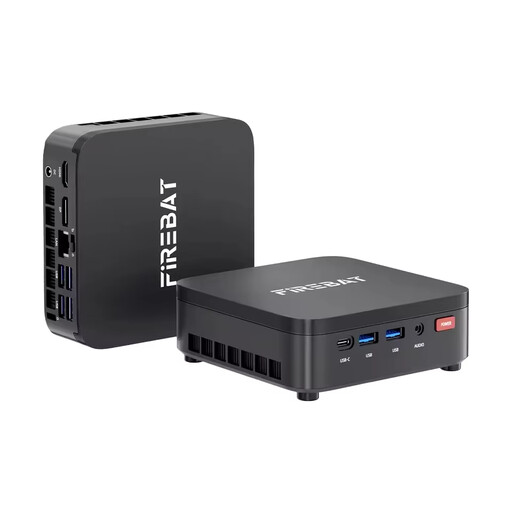 No image available
This mini PC could work for a separate workstation; check its specifications against the programmes you use.
16 GB LPDDR4, 512 GB M.2 SATA SSD, Windows 11 Pro, Wi-Fi 6 and Bluetooth 5.2.
 No image available
This compact mini desktop could suit work with a separate monitor; check that it meets the requirements of your programmes.
16 GB LPDDR4, 512 GB NVMe SSD, Wi-Fi 5, Bluetooth 4.2 and Windows 11.
 No image available
The listed mini PC form factor and HDMI ports are worth considering for a workstation with a separate screen.
8 GB LPDDR4, 256 GB SSD, two HDMI ports and 1000M LAN. Keep the vents clear while the device is in use; the product description says it is intended for indoor use.
 No image available
This mini PC could suit office work with a separate screen; check that its ports match your monitor and peripherals.
12 GB RAM, 256 GB SSD, HDMI, DisplayPort, 1000M LAN, Wi-Fi 5 and Bluetooth 5.0.
Yes, as long as the outputs on the specific PC model match the inputs on your monitor. For example, MSI lists two HDMI outputs for the Cubi NUC 1M; also check that your cable is suitable.
Check what components are included before you buy. A barebone may require you to buy memory, a storage drive or an operating system separately; this isn’t necessarily the case with every mini PC.
When you buy as a consumer from a business seller in the EU, you’re entitled to a legal guarantee of at least two years from the date you receive the goods. This is separate from any voluntary manufacturer’s warranty. For online distance purchases, you generally also have a 14-day right to cancel. Your Europe, the European Union’s information portal, explains these consumer rights that apply across the EU.