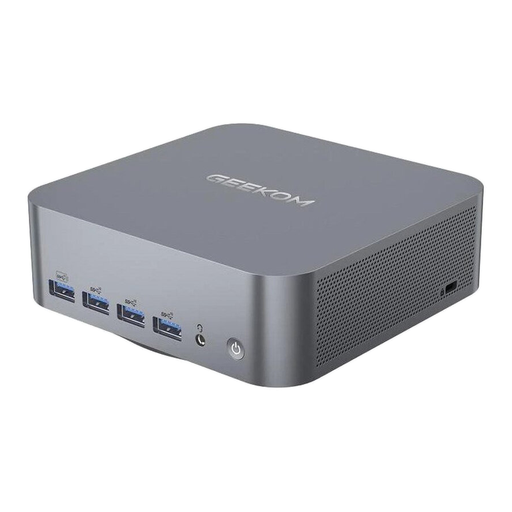
Choose your PC based first on your catalogue software and how it handles linked source files. More processing power can’t make up for unsuitable software or a disorganised filing system. A mini PC could be a good fit if space is limited, but check the ports and upgrade options for the specific configuration. Back up your catalogue and source files together to a separate storage device – the Federal Office for Information Security recommends regular backups.
Which setup is right for you?
Collectors with linked records
If you want to find scans or documents directly from catalogue entries, your software’s file-linking features and a shared backup are essential. OpenNumismat describes features for organising stamp collections; Microsoft Support explains how to create file links in Excel, and the Federal Office for Information Security recommends regular backups.
Collectors who scan their finds
If you regularly catalogue new items, check that the PC’s ports work with your scanner, monitor and external backup device. The Federal Office for Information Security covers backups as a way to protect against data loss; Lenovo Germany lists several USB and display ports on its desktop PCs.
Collectors with limited desk space
If you want a dedicated space for your catalogue without a large computer, a mini PC could be a good choice – provided its ports and storage options meet your needs. Lenovo Germany describes a compact ThinkCentre, while Acer’s data sheet lists the Revo RB102 DT.BPLEG.002 as a mini PC.
What should you look for when buying?
First check that your catalogue software can link to the files you need. Then plan the storage, backup and ports for your complete setup.
| What matters |
What to check before buying |
Who should pay particular attention? |
| Catalogue software and file links |
Check the operating system requirements and test links to your own files – including after a backup and restore. |
If I want to open a scan or record directly from an entry later, I test my software’s linking feature with my own files. Around 31% of consumers put suitable catalogue software and reliable links to source files first. |
| Keeping your catalogue and source files safe |
Check the size of your archive and include both the catalogue and source files in a restore test. |
If you want to restore your catalogue and scans when changing devices, back up both sets of data together. Around 25% of consumers prioritise data backups. |
| Ports for your digitisation setup |
Check that the specific configuration has the right connectors, including enough USB and display ports for all your devices at once. |
If I want my scanner and backup device connected at the same time, I count up the connections I need. Around 19% of consumers pay particular attention to having the right ports for their devices. |
| Desk space |
Check how much room it will take up on your desk, as well as the ports and what’s included with the specific version. |
If you want a dedicated catalogue setup on a small desk, you might prefer a compact design. Around 13% of consumers are most concerned about saving space. |
| Upfront cost and future upgrades |
Compare what’s included with the specific configuration and check which drive options are explicitly listed. |
If I still need a monitor or peripherals, or want to expand my scan archive, I check what’s included and the drive options before choosing. Around 12% of consumers prioritise a clear idea of what’s included and future storage options. |
Common buying mistakes
-
Backing up only the catalogue file
If linked scans and documents are stored separately, backing up only the catalogue won’t restore those source files.
Back up your catalogue and source files together, then check that you can open both after restoring them. The Federal Office for Information Security recommends regular backups.
Otherwise, separately stored records may be missing after a restore, and relinking them could take extra time.
-
Assuming similarly named HP models are the same
A review of the HP Pro Mini 400 G9, model number D6B240EA, does not apply to the HP Pro 400 G9 SFF, model number CP9J4EA#ABD.
COMPUTER BILD lists the Pro Mini as its test model. Before buying, compare the full model number, specifications and what’s included.
-
Overlooking ports and accessories on a small PC
Ports vary by model, and a compact computer doesn’t tell you which peripherals are included.
Check that the ports work with your scanner, monitor and backup device, and check what comes with the configuration you’ve chosen.
Depending on the configuration, you may also need to buy a monitor, keyboard, mouse or connection adapter.
Key brands to consider
Lenovo
The ThinkCentre neo 50q Gen 5 is a compact desktop option for a dedicated workspace. For model 13B9009EEZ, Lenovo Germany lists Windows 11 Pro, 16 GB RAM and a 512-GB SSD.
- Lenovo lists several USB and display ports for this model range.
- A monitor, keyboard and mouse are optional extras and sold separately with the model listed. Check the specifications and what’s included with your configuration.
HP
The Pro 400 G9 SFF is a small-form-factor alternative to a mini PC. HP Store Germany lists Windows 11 Pro, 16 GB RAM and a 512-GB SSD for CP9J4EA#ABD.
- According to HP, the listed configuration includes a wired mouse.
- Check the model number and what’s included, as other devices in the Pro 400 range may have different specifications.
MSI
The PRO DP21 14M is a small desktop option for buyers who want to consider documented internal drive options.
- MSI’s data sheet lists an M.2 SSD slot and two 2.5-inch drive bays for this model range.
- These specifications cover a model range with different processors and operating systems, so they may not apply to every configuration on sale.
Dell
The Dell Pro Micro QCM1250 is a configurable compact desktop. Dell Germany offers a range of processor, operating system and RAM options.
- The configuration options can make it easier to find a PC that works with your software.
- Dell notes that images and the actual product may vary depending on the configuration you choose.
Acer
The Revo RB102 is another mini PC option. For DT.BPLEG.002, Acer’s data sheet lists Windows 11 Home, 16 GB RAM and a 512-GB SSD.
- The data sheet lists USB and display ports for this part number.
- These specifications apply to DT.BPLEG.002 and don’t confirm what’s included or the specifications of other RB102 versions.
Joybuy products for your catalogue setup
The Joybuy products below include mini PCs for a compact catalogue setup and a tower PC for a dedicated workspace.
 No image available
Beelink Mini PC EQ7, 16 GB RAM, 512 GB SSD, Grey
The mini PC design could suit a dedicated catalogue setup where space is at a premium. The specifications include 16 GB RAM, a 512-GB M.2 NVMe SSD, two HDMI outputs and USB-C.
View on Joybuy
 No image available
Beelink Mini PC EQ5, 16 GB RAM, 512 GB SSD, Grey
The mini PC design could suit a dedicated catalogue setup where space is at a premium. The specifications include 16 GB RAM, a 512-GB M.2 NVMe SSD, two HDMI outputs and USB-C.
View on Joybuy
 No image available
HP Z2 Mini G1a Ryzen AI Max+ Pro 395, 128 GB RAM, 2 TB SSD
This compact desktop could suit a dedicated workspace with several connected devices. The listed specifications include Windows 11 Professional, 128 GB RAM, a 2-TB M.2 SSD, USB-C, Thunderbolt 4 and Mini DisplayPort.
View on Joybuy
 No image available
Lenovo ThinkStation P2 Tower Gen 2, Core Ultra 7 265, 32 GB RAM, 512 GB SSD
The tower design could suit a dedicated workspace with several connected devices. The listed configuration includes Windows 11 Pro, 32 GB DDR5, a 512-GB NVMe SSD, NVIDIA RTX A400 with 4 GB, plus HDMI, DisplayPort and USB ports.
View on Joybuy
 No image available
Thunderobot Mini PC Workstation AI Max+ 395, 128 GB LPDDR5X 8000MT/s, 1 TB SSD
The mini PC design could suit a dedicated workspace where space is at a premium. The listed specifications include 128 GB LPDDR5X 8000MT/s RAM and a 1-TB SSD; the description also lists a side-mounted SSD interface.
View on Joybuy
Frequently asked questions
Can I open scans or records directly from my catalogue?
It depends on your catalogue software. Microsoft Support explains that Excel cells can be linked to existing files. If you use other software, test with your own files to check that the links still work after moving or restoring your archive.
What should I bear in mind when backing up my catalogue and scans?
Back up your catalogue and source files together, then check that you can open both after restoring them. The Federal Office for Information Security recommends regular backups and lists an external hard drive as one possible backup medium.
Do I need to budget separately for a monitor and peripherals with a mini PC?
It depends on the configuration. Lenovo describes the monitor, keyboard and mouse for the ThinkCentre neo 50q Gen 5, model 13B9009EEZ, as optional extras sold separately. So check what’s included with the specific device.
Is Windows 10 still supported as standard?
No. Microsoft says standard support ended on 14 October 2025. Microsoft describes Extended Security Updates as a limited-time option available until 12 October 2027. Check whether the specific configuration is eligible and works with your catalogue software.


