What should you look for?
First check your software and the operating system it needs, then look at connections, what’s included and data backup. The percentages are a rough guide to the relative importance of these concerns, not a ranking of devices.
| What matters |
What to check before buying |
Who should pay particular attention? |
| Organising sections |
Check whether your writing software displays sections individually and lets you rearrange them; make sure the operating system and display connection suit your setup. |
If I often rearrange scenes and sections, I want my writing software’s outlining features to support this workflow. Around 28% of consumers put this consideration first. |
| Software compatibility |
Make a note of the software version and required operating system. For articy:draft on Windows, the developer recommends 16 GB RAM and a dedicated graphics card. |
If I’m choosing Scrivener or articy:draft, I want to know first whether the software and operating system are compatible. This compatibility is a priority for around 22% of consumers. |
| Space and screens |
Compare the connections on the specific model with your monitors, and check whether a keyboard and mouse are included. |
If my desk has limited space, I want a compact computer with the right connections for my screens. Around 17% of consumers prioritise their workspace setup. |
| Backing up your draft |
Plan a separate backup copy and check from time to time that you can restore a draft from it. |
If I’m working on a longer draft, I want a copy that isn’t stored only on my PC. Backing up writing files is a priority for around 17% of consumers. |
| Complete setup |
Look at what’s included, the operating system and software, and whether you’ll need a monitor, peripherals and a separate backup drive to complete your setup. |
If I don’t yet have a complete writing setup, I want to factor in any missing components and potential extra software licences. Around 16% of consumers prioritise the total cost of their setup. |
Desktop PCs for your writing setup
The Joybuy products below include compact Windows mini PCs, a carefully specified Windows desktop and a Mac mini setup. For each device, check that the operating system, connections and specification suit your software and the equipment you already have on your desk.
 Image unavailable
HP Z2 Mini G1a Ryzen AI Max+ Pro 395, 128 GB RAM, 2 TB SSD
This mini PC configuration could suit a compact Windows writing setup if its connections work with your screens.
The Joybuy product details list Windows 11 Pro, 128 GB RAM, a 2-TB SSD and two Mini DisplayPort outputs.
View at Joybuy
 Image unavailable
HP EliteDesk AI Mini 8 G1i 623K2ET, Core Ultra 9 285T, 64 GB RAM, 1 TB SSD
This compact Windows configuration could suit your writing setup if you need DisplayPort or HDMI connections for your monitors.
The Joybuy product details list Windows 11 Pro, 64 GB RAM, a 1-TB SSD, DisplayPort and HDMI. The description says a VESA mount is optional.
View at Joybuy
 Image unavailable
HP Z2 SFF G1i A40M2ET#ABD, Core Ultra 7 265K, 32 GB RAM, 1 TB SSD
If you want to use articy:draft on Windows, check the developer’s recommendation for your specific software version and compare it with this carefully specified desktop model.
The Joybuy product details list Windows 11 Pro, 32 GB RAM, a 1-TB SSD, an NVIDIA RTX A400 with 4 GB and two DisplayPort outputs. These details alone don’t confirm software compatibility.
View at Joybuy
 Image unavailable
ACEMAGIC E3B Mini Desktop Computer, Ryzen 7 7735HS, 24 GB RAM, 512 GB SSD
This model could work as a compact Windows setup if its listed display outputs match your monitors.
The Joybuy product details list Windows 11 Pro, 24 GB LPDDR5, a 512-GB NVMe SSD, and HDMI, DisplayPort and USB-C display outputs. According to the description, it supports up to three displays at 4K and 60 Hz.
View at Joybuy
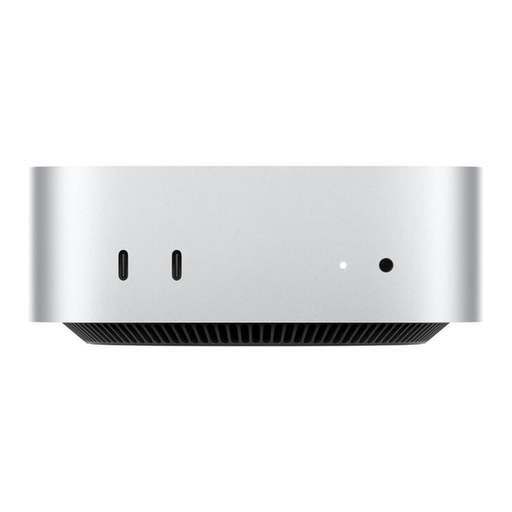 Image unavailable
Apple Mac mini M6 MHQK4ZD/A_CTO, 12-Core CPU, 12-Core GPU, 24 GB Unified Memory, 512 GB SSD
This Mac mini could suit a macOS writing setup, provided your specific software version is compatible with the operating system.
The Joybuy product details list 24 GB unified memory, a 512-GB SSD, HDMI and support for up to three external displays. The description says the keyboard and mouse are sold separately.
View at Joybuy
Frequently asked questions
Do I need a gaming PC to write a story with an outline?
The Scrivener outlining features described by Literature & Latte don’t require a gaming graphics card for writing and rearranging sections. If you want to use articy:draft on Windows, check its separate recommendation for a dedicated graphics card. This doesn’t apply automatically to every writing project.
How can I back up my draft as well as saving it on my PC?
Create a separate backup copy and check where it’s stored and that you can read it. Scrivener describes automatic local backups, while Germany’s Federal Office for Information Security explains how backup copies can help protect against data loss caused by issues such as hardware failure or accidental deletion.
Can I transfer my Scrivener licence between Windows and Mac?
According to Literature & Latte, each Scrivener licence covers one platform only. So if you switch between Windows and macOS, check which licence you’ll need for the other platform.
What are my rights when buying a desktop PC online in Germany?
For a standard online consumer purchase in the EU, you generally have 14 days from delivery to cancel your order; exceptions and return costs may apply. If goods are faulty, you generally have a statutory guarantee of at least two years from the seller. Your Europe explains these consumer rights, which are separate from a voluntary manufacturer’s warranty.
Is a Windows 10 PC still a good choice for a new writing setup?
According to Microsoft, standard support for Windows 10 ended on 14 October 2025. Microsoft recommends upgrading eligible devices to Windows 11 and offers the Consumer ESU programme as a temporary alternative. Check whether you’re eligible rather than assuming that a PC’s ability to run means it will receive standard security updates.


