Start by checking the video outputs on the specific PC and the inputs on both your monitors. Both screens need to work simultaneously as an extended desktop. A compact mini PC may be suitable for writing, research and presentation slides; for larger layout and image projects, your software requirements, storage needs and potential upgrades are what matter. Microsoft Support explains how to set up multiple screens as an extended desktop in Windows.
Who this selection is for
Pitch creators using two monitors
You want to keep your draft or slides open alongside research, images and feedback. Microsoft Support explains how to arrange and extend multiple screens in Windows; the ports and support offered by the specific PC are just as important.
Layout designers working with large project files
You work on extensive page layouts or images as well as your pitch. For InDesign 21.3 or later on Windows, Adobe specifies at least 8 GB RAM and recommends 16 GB. These requirements apply to that application, not to every piece of pitch software.
Pitch creators short on desk space
You need room for notes and documents as well as two monitors. A mini PC can help keep your setup compact; upgrade options and included accessories depend on the specific model.
What to look for when buying
| Buying priority |
What to check |
Who is it important to? |
| Two separate screens |
Check how many displays can be used at the same time, then match the video outputs to the connections and resolutions of both monitors. |
If I want to keep my draft and sources open side by side, both monitors need to run simultaneously at suitable resolutions. That’s why around 36% of consumers put two separate workspaces first. |
| Software for your layouts |
Check the software version, operating system, processor requirements and RAM. For InDesign 21.3 or later on Windows, Adobe specifies at least 8 GB RAM, recommends 16 GB and requires AVX2. These aren’t general minimum requirements for every magazine pitch. |
When working on extensive layouts, I first want to know whether the operating system and specific software version are suitable. That’s why around 29% of consumers prioritise compatibility with their layout software. |
| Files and backups |
Choose SSD capacity to suit the size of your project files and check whether storage can be expanded. Plan to keep a separate backup. The Federal Office for Information Security recommends backing up data regularly. |
I need enough storage for pitch and image files, as well as a separate backup option. Around 21% of consumers put extra capacity for files and backups first. |
| Space and setup |
Check the case and mounting options, as well as whether the power supply, keyboard, mouse and video cables are included. |
If desk space is limited, I also want to know whether everything I need to get set up is included. Around 14% of consumers prioritise a space-saving setup that comes fully equipped. |
Avoiding buying pitfalls
-
Assuming two ports mean you can use two screens
The number of ports alone doesn’t tell you whether both monitors will work simultaneously at the resolutions you want. The ports, graphics hardware and screens all need to be compatible.
Check how many displays the specific configuration supports against the inputs and resolutions of both monitors. You can then set up an extended display in Windows and arrange the screens.
Depending on the combination of ports, you may also need suitable cables or adapters.
-
Confusing a barebone offer with a ready-to-use PC
GMKtec also offers the NucBox M6 Ultra as a barebone without RAM, an SSD or an operating system. This version isn’t the same as a fully equipped model.
Check what’s included with the version you’ve chosen and make a list of the components you’ll need for your workspace.
-
Assuming a review or brand name applies to every version
Different model codes can mean different ports, memory, SSDs and operating systems. For example, HP model CP9J4EA#ABD isn’t the same device as D6B240EA.
Compare the full model code and check the RAM, SSD, operating system and video outputs for the exact configuration on offer.
Brands worth considering
GEEKOM
The A5 Pro 2026 is a compact Windows option. The documented configuration combines a Ryzen 5 7530U, 16 GB RAM and a 1 TB SSD.
- A COMPUTER BILD review reports good performance for office tasks and quiet fan noise with this configuration.
- The version tested didn’t include a keyboard or mouse. The review findings can’t automatically be applied to other GEEKOM models.
MSI
The Cubi NUC 1M family is a compact PC range with two HDMI outputs and a VESA mounting option.
- MSI lists two HDMI outputs and two RAM slots for the specified range.
- The operating system, processor and included accessories depend on the specific version, so check them separately.
GMKtec
The NucBox M6 Ultra is a mini PC range with HDMI, DisplayPort and a choice of configurations.
- The manufacturer describes a range of video outputs and configurations, including a barebone version.
- The barebone model on offer includes no RAM, SSD or operating system, so be sure to distinguish between the different versions.
HP
The Pro SFF 400 G9 is a larger office desktop for buyers who want room to add components.
- For the German configuration CP9J4EA#ABD, HP lists expansion slots and support for up to three displays.
- These details apply to the configuration listed, not automatically to every Pro 400 model or the differently named D6B240EA version.
Apple
The Mac mini with M6 is a compact macOS option if it’s compatible with the software you need and the monitors you already have.
- Apple documents support for up to three external displays on the Mac mini with M6, depending on the resolution and combination of connections.
- The display specification doesn’t confirm that every pitch application is compatible or that a particular configuration includes accessories.
Lenovo
The ThinkCentre neo 50q Gen 5 is a compact Windows PC family with HDMI and DisplayPort.
- Lenovo lists these connection types and selectable upgrades for the family.
- Specifications and optional ports may vary by configuration and region.
Joybuy products for a two-screen workspace
This selection includes compact mini PCs for a space-saving desk, including one macOS option and several Windows models. Check that the specific configuration is compatible with your software and both monitors.
 No image available
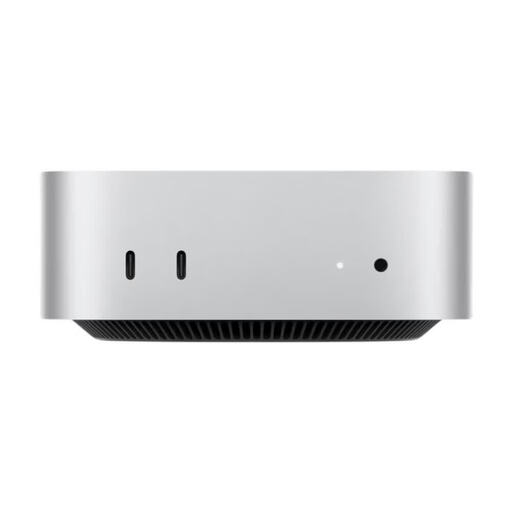
Apple Mac mini MHQM4_CTO_8 (A3534, M6), 32 GB unified memory, 1 TB SSD
A compact macOS option, provided your pitch and layout software runs on macOS. Apple documents support for up to three external displays on the Mac mini with M6, depending on the resolution and connection combination. Be sure to check compatibility with your monitors separately.
Joybuy
 No image available
Ninkear M8 mini PC, AMD Ryzen 7 8745HS, 16 GB DDR5, 1 TB SSD
A compact Windows mini PC for a space-saving workspace. Check that the video outputs on the specific version work with both monitors.
Listed in the product title: AMD Ryzen 7 8745HS, 16 GB DDR5, 1 TB SSD and Windows 10/11.
Joybuy
 No image available
Ninkear M7 mini PC, Intel Core i7-1185G7, 16 GB DDR4, 512 GB SSD
A compact Windows option for a small workspace. The product title lists support for up to three displays, but still check that the ports and resolutions meet the needs of both your monitors.
Listed in the product title: Windows 10/11, dual-band Wi-Fi 6 and Bluetooth 5.2.
Joybuy
 No image available
Ninkear L20 mini PC, Intel Core Ultra 5 226V, 16 GB RAM
For a space-saving desk. Check that the support for three 4K screens listed in the product title works with your monitors and preferred connection combination.
Listed in the product title: Windows 11 and a 0.66-litre case. The SSD is listed as 512 GB/1 TB; check the capacity of the specific version.
Joybuy
 No image available
FIREBAT A8 mini PC, AMD Ryzen AI 9 365, 24 GB DDR5, 1 TB SSD
A compact option for a multi-screen workspace. The product title lists support for a 4K quad-display setup; check your exact monitor and connection combination before choosing.
Listed in the product title: Radeon 880M Graphics, PCIe 4.0 SSD, USB4, HDMI 2.1 and Oculink.
Joybuy
Frequently asked questions
Do two video ports automatically let you show different content on two screens?
No. Check how many displays the specific PC supports simultaneously and whether its ports and resolutions are suitable for both monitors. Microsoft Support explains how to select an extended display in Windows and arrange the screens in display settings.
How can I back up pitch files before submitting them?
Back up your drafts and related files regularly to a separate location from your PC, and check that you can open the files you need. The Federal Office for Information Security recommends backing up data regularly; a larger internal SSD isn’t a substitute for a separate backup.
Which extra components should I check before buying?
Check whether you already have, or whether the package includes, suitable cables or adapters, a keyboard, a mouse, the software you need and a backup drive. The GEEKOM A5 Pro tested by COMPUTER BILD didn’t include a keyboard or mouse; that doesn’t tell you anything about other models or versions.
Can I put my old computer in the household rubbish?
No. The German Environment Agency recommends taking electrical appliances to a suitable collection or take-back point rather than putting them in household rubbish.


