When space is limited, a mini PC is a sensible starting point, provided its specific configuration meets the needs of your IDE, tests, storage and monitor connections. Features and accessories vary by offer. For Apple platform tools, consider a Mac mini, while a larger desktop is worth looking at if internal expandability matters more than desk space. If you’ll be sharing the computer too, the Federal Office for Information Security recommends setting up separate, password-protected accounts with appropriate access rights.
Who is a desktop PC at a shared desk suitable for?
Developers running tests in parallel
If you use an IDE, run tests and possibly use containers at the same time, choose a specification that meets the requirements of the tools you actually use. Microsoft Learn sets out the system requirements for Visual Studio, while Docker Desktop has its own installation requirements.
Teams with limited desk space
If you’re setting up a desktop PC on a small, shared work surface, check its dimensions as well as its connections and mounting accessories. ASUS Germany lists the VESA mount, keyboard and mouse as optional for the ExpertCenter PN55.
Teams sharing a computer
If several people take turns using the same PC, set up separate, password-protected accounts with appropriate access rights. The Federal Office for Information Security recommends this for shared devices.
What should you look for when choosing one?
First, decide which IDE, tests and, if needed, containers you’ll be running. Then compare the operating system, footprint, connections and the actual contents of each configuration.
| What matters |
What to check before buying |
Who should consider this? |
| IDE and testing workload |
Check the IDE version, project size, container use, and the CPU, RAM and SSD configuration of the specific offer. |
If I run an IDE, tests and possibly containers at the same time, the configuration needs to suit those exact tools. Around 29% of consumers put testing workload first when choosing. |
| Desk space and connections |
Check your existing monitors and their inputs, the USB devices you need and whether a mount is sold separately. |
If I share a desk, I need enough room for the screen and input devices, as well as the right connections. Around 23% of consumers prioritise desk space and connections. |
| Separate user accounts |
Check whether you’re sharing just the desk or the computer too. If the PC is shared, plan for separate accounts and access rights. |
If several people use the same computer, I want to set up personal workspaces with appropriate permissions. Around 18% of consumers prioritise separate accounts. |
| Operating system and tools |
Choose your IDE and target platform. For Docker Desktop, check its Windows, WSL and edition requirements in the Docker Docs. |
If my tests require a particular platform or development environment, the operating system needs to be compatible. Around 18% of consumers base their choice primarily on the operating system and tools. |
| Expandability and what’s included |
Check the available RAM and SSD configurations, and whether a monitor, input devices and mounting accessories are included. Lenovo Germany lists the monitor, keyboard and mouse as optional for the configuration mentioned. |
If I’m planning future upgrades or a complete workstation, I want to compare the configuration and what’s included beforehand. Around 12% of consumers prioritise these points. |
Avoid common buying mistakes
-
Choosing based on case size alone
A small case helps when desk space is limited, but it doesn’t tell you whether the PC has the monitor and USB connections you need. ASUS Germany lists the VESA mount as optional for the ExpertCenter PN55.
Check the exact configuration against your existing screens and devices, and find out what’s included.
If connections or mounting accessories are missing, you may need to buy adapters or accessories separately.
-
Assuming a basic specification will suit every testing setup
Resource requirements depend on your IDE version and the tools you use at the same time. Docker Desktop has additional installation requirements, so a single RAM figure won’t necessarily suit every project.
Before choosing a configuration, check the requirements of your actual projects, IDE versions and applications running in parallel.
If your storage needs grow, you may need to upgrade or replace the PC later.
-
Using a shared administrator account
If several people use the same PC, shared login details and broad permissions can affect personal settings and project files. The Federal Office for Information Security recommends separate, password-protected accounts with appropriate access rights.
Set up personal accounts for each user and agree who is allowed to install software.
-
Assuming similarly named configurations are identical
A model range can include different processor, storage and operating system options. HP notes that components vary by configuration, and Dell also says that specifications can differ between offers.
Check the full model name, exact specification and what’s included in the offer.
Key brands at a glance
ASUS
The ExpertCenter PN55 is a compact Windows mini PC range for workstations that need several connections.
- ASUS Germany lists HDMI, DisplayPort and USB, along with a choice of RAM and SSD configurations.
- The VESA mount, keyboard and mouse are listed as optional, so check the specification of the offer you’re considering.
Lenovo
The ThinkCentre M70q Gen 6 Tiny is a configurable range for compact business workstations.
- The configuration listed by Lenovo Germany includes Windows 11 Pro, 24 GB RAM and a 512-GB SSD.
- The monitor, keyboard and mouse are optional or sold separately with this configuration; other versions may differ.
HP
The Pro Mini 400 G9 is a compact business PC range with a choice of specifications.
- HP lists several Windows editions and processor options.
- HP says components can vary by configuration, so check the exact specification of the offer.
Dell
The Dell Pro Micro QCM1250 is an ultra-compact option in a product range that also includes larger desktop form factors.
- Dell Germany lists Windows 11 Pro and a range of connections for the Micro series.
- Specifications depend on the offer, and the model name alone doesn’t tell you exactly what’s included.
Apple
The Mac mini is a compact option for development environments that require macOS or Apple platform tools.
- Apple’s German specifications list configurations with M6 and M5 Pro, as well as different storage options.
- Check that your IDEs and tests run on macOS; this doesn’t mean it’s suitable for workflows that run exclusively on Windows.
Joybuy products for development workstations
This selection includes compact mini PCs for fixed development workstations, as well as a Mac mini for tools that require macOS.
 No image available
HP Z2 Mini G1a, Ryzen AI Max+ Pro 395, 128 GB RAM, 2 TB SSD
For a compact development workstation, provided the listed processor, memory and SSD configuration suits the tools you use.
Product name specifies: Ryzen AI Max+ Pro 395, 128 GB RAM and 2 TB SSD.
View at Joybuy
 No image available
ACEMAGIC E3B, Ryzen 7 7735HS, 24 GB, 512 GB NVMe SSD
For a Windows development workstation, provided the listed specification suits your IDE, projects and connected screens.
Windows 11 Pro, 24 GB LPDDR5 and a 512 GB NVMe SSD are specified.
The product name lists two M.2-2280 slots supporting up to 4 TB, as well as HDMI, DP and USB-C; the triple-display specification is 4K@60Hz.
View at Joybuy
 No image available
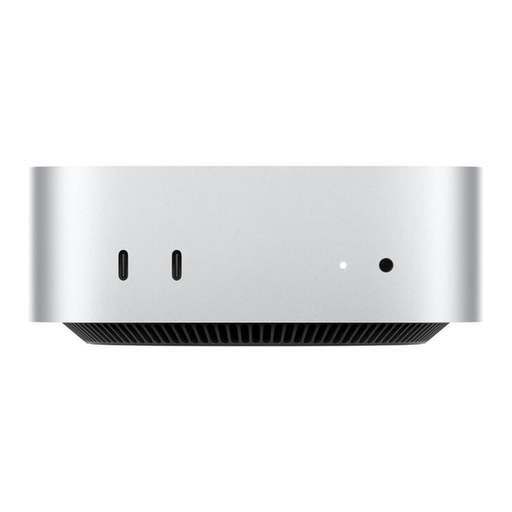
Apple Mac mini MHQK4ZD/A_CTO, M6, 24 GB, 512 GB SSD
For development tools that require macOS; your IDEs and tests must be compatible with macOS.
Apple M6, 12-Core CPU, 12-Core GPU, 24 GB Unified Memory and 512 GB SSD are specified.
View at Joybuy
 No image available
SOYO S5Air, Ryzen 5 7535HS, 16 GB, 512 GB NVMe SSD
For a Windows development workstation, provided the listed specification suits the projects and tools you use.
Windows 11 Pro, 16 GB LPDDR5 and a 512 GB NVMe SSD are specified; the product name lists 6 cores, 12 threads and up to 4,55 GHz.
View at Joybuy
 No image available
FIREBAT F1, Ryzen 5 7640HS, 24 GB, 512 GB PCIe 4.0 SSD
For a compact development workstation, provided the listed specification and monitor connections suit your workflow.
The product name lists 24 GB LPDDR5 RAM, a 512 GB PCIe 4.0 SSD and a 6-core/12-thread processor.
Outputs for up to three screens, as well as USB 4.0 and HDMI 2.1, are specified.
View at Joybuy
Frequently asked questions
Do we need separate accounts if we’re only sharing the desk?
No, not simply because several people use the same desk. If several people also use the same PC, the Federal Office for Information Security recommends giving each person their own password-protected account with appropriate access rights.
Can I use Docker Desktop in the same way with any Windows configuration?
No. Docker sets out requirements for the Windows version, WSL and installation mode. Also check the licence terms that apply to your personal or business use; sharing a desk alone doesn’t determine the size of a business.
What should I check when setting up a mini PC and choosing accessories?
Check that the connections match your screens and devices, and confirm whether the mount you need is actually included. ASUS Germany lists the VESA mount as optional for the ExpertCenter PN55; don’t assume the same applies to other models.
Is a manufacturer’s warranty the same as statutory guarantees?
No. For a consumer purchase from a business seller in the EU, you generally have statutory rights against the seller for at least two years from receiving the goods; a commercial guarantee is in addition to these rights. Don’t assume this consumer protection applies to a business purchase without checking. The European Union’s Your Europe information portal explains the scope of these rights.
Can I put a replaced desktop PC in my household rubbish?
No. The German Environment Agency states that electrical appliances must not go in household rubbish. If you’re returning a larger device, check the acceptance conditions at your local collection point or under the relevant take-back scheme.


