For a busy home office background, first check whether Zoom or Teams supports the effect you want with your specific combination of computer, operating system and app. You don’t automatically need a separate RTX graphics card. For Windows Studio Effects, Microsoft specifies a Copilot+ PC with an NPU rated above 40 TOPS, while NVIDIA Broadcast has its own RTX requirements. No digital effect can guarantee that confidential details will remain hidden (Microsoft Support; NVIDIA).
Who is this guide for?
People with a sensitive or busy background
If you want to hide objects or people behind you as much as possible during video calls, check the camera preview before joining. Microsoft Support points out that a digital effect cannot reliably conceal confidential information.
People who have frequent video meetings
If you use other programmes during a call, your computer’s specific hardware should be compatible with the effects in your meeting app. Zoom Support lists requirements for virtual backgrounds and blur; Windows Studio Effects and NVIDIA Broadcast have their own hardware requirements.
People short on desk space
A small desktop PC can be a good choice if you want to keep using your existing monitors and accessories. Check the ports and features on the specific version; Apple Germany and GEEKOM list different compact device configurations.
What should you consider when choosing?
First check that your chosen effect works in the specific meeting app you use, then consider your camera and lighting conditions, and only then decide whether you need additional system-wide hardware.
| Concern |
What to check before buying |
Who it matters most to |
| Background and privacy |
Test the preview with your own camera; move confidential items out of shot, regardless of the effect you use. |
If I don’t want to show sensitive items in the room, I check the effect in the camera preview and still move confidential things out of shot. Around 36% of consumers say hiding the background is their top concern. |
| Effect compatibility |
Decide which meeting app, operating system and effect you want to use; compare the requirements with the full model and hardware specifications. |
If I use other programmes during a video call, the effect I want must work with that specific app, operating system and PC configuration. Around 29% of consumers prioritise effect compatibility and multitasking. |
| Camera image and lighting |
Check the camera connections and test the preview in typical daylight and artificial lighting. |
If I want my image to look consistent in my usual lighting conditions, I test the camera and lighting in advance. Around 21% of consumers prioritise a consistent camera image. |
| Space and overall setup |
Check the case, ports and items included against your monitor, camera and input devices. |
If I’m short on desk space and want to keep using my existing accessories, I need a suitably sized computer with the right ports. Around 14% of consumers prioritise a compact, complete workspace. |
Common buying misconceptions
-
“AI PC” automatically means Windows Studio Effects
For Windows Studio Effects, Microsoft specifies supported NPU hardware, drivers and Windows updates. A Copilot+ PC with an NPU rated above 40 TOPS is required for the full range of features.
Check the exact device version and which camera effects are actually available, rather than relying on the product name alone.
-
Virtual blur gives you complete privacy
Microsoft Support warns that confidential information may still be visible despite blur or background replacement.
Move sensitive items out of shot and check the live image before important conversations.
-
The mini PC alone determines your workspace
Case size, ports and features vary by model and version. The computer alone doesn’t determine the camera position or the connections available for the rest of your setup.
Check the ports and included items for the specific version against your monitor, camera and input devices.
Depending on your existing setup, you may also need a monitor, camera or input devices.
Notable brands and product ranges
HP OmniDesk Desktop AI M03
A range of Windows desktop PCs for a permanent workspace. For the M03-0790ng version, HP lists an Intel Core Ultra 7 265, 32 GB RAM, a 2 TB SSD and integrated Intel graphics.
- COMPUTER BILD described the tested M03 model as quiet and energy-efficient.
- COMPUTER BILD also noted that upgrade options are limited. The “AI” label alone doesn’t guarantee Windows Studio Effects or NVIDIA Broadcast.
MSI PRO DP80 A14G
A range of Windows desktop PCs for office tasks, with different processor and hardware configurations.
- MSI lists versions with an NVIDIA graphics card.
- A graphics card in the product range doesn’t confirm that the specific PC you buy has RTX hardware. For NVIDIA Broadcast, check the full GPU model and the other requirements.
GEEKOM A5 Pro 2026 Edition
A compact Windows mini PC for workspaces with limited room. For this edition, GEEKOM lists a Ryzen 5 7530U, 16 GB RAM and a 1 TB SSD.
- The listed components describe a specific version and make it easier to check whether it suits your existing workspace.
- The manufacturer’s specifications don’t confirm any special performance for background masking; the integrated AMD graphics aren’t an NVIDIA RTX GPU.
Apple Mac mini
A compact macOS alternative if your work programmes, meeting app and peripherals are compatible with macOS.
- Apple Germany lists the ports and differences between Mac mini configurations.
- Device specifications don’t tell you whether a particular meeting app supports the background effect you want. Check the apps you use and your accessories.
Joybuy products for a compact workspace
The Joybuy picks below are mini PCs for a space-saving home office. Before buying, check whether the specific configuration supports the effect you want in your meeting app.
 No image available
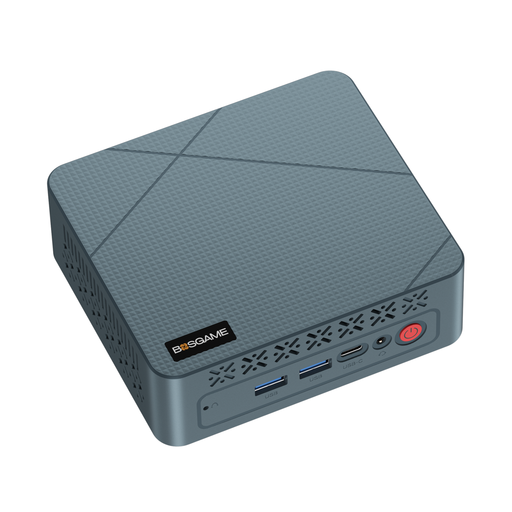
BOSGAME Mini PC E2 neo
The mini PC form factor suits a workspace with limited room, but doesn’t guarantee support for specific background effects.
The product title lists an AMD Ryzen 5 3500U up to 3.7 GHz, 16 GB RAM and a 256 GB SSD.
View at Joybuy
 No image available
Ninkear L20 Mini PC
The compact case could suit a workspace with limited room. Check that the specific configuration supports the effects you want, rather than relying on the Copilot+ label alone.
The product title lists an Intel Core Ultra 5 226V, 16 GB RAM, Windows 11 and SSD options of 512 GB or 1 TB. The stated case volume is 0.66 litres.
View at Joybuy
 No image available
BMAX B6 Mini PC
The mini PC form factor is a good option if you want to save desk space; check that the ports work with your existing monitor and accessories.
The product title lists an Intel Core i3-8109U up to 3.6 GHz, 12 GB RAM, a 256 GB SSD, HDMI and DisplayPort, 1000M LAN, Wi-Fi 5 and Bluetooth 5.0.
View at Joybuy
 No image available
MaxMini B3 Mini PC
The mini PC form factor could suit a space-saving workspace; check that the listed specifications meet your meeting and connectivity needs.
The product title lists an Intel N4100 up to 2.4 GHz, 8 GB LPDDR4, a 256 GB SSD, two HDMI ports, 1000M LAN, Wi-Fi 5 and Bluetooth 5.0.
View at Joybuy
Frequently asked questions
Is blur in Zoom or Teams enough for a busy background?
It may be enough for video calls if the effect is available on your device. Zoom Support makes blur subject to the requirements for virtual backgrounds without a green screen. Check the result before joining: Microsoft Support warns that confidential information may still be visible despite blur or background replacement.
How can I make a virtual background look more consistent?
Test the preview with your camera in your usual lighting conditions. Zoom recommends even lighting; according to Zoom, a solid-colour green screen can give you sharper edges while using fewer resources. Test the effect in the meeting app you use before your call.
Do I need to buy an RTX graphics card for background masking?
Not just for Zoom or Teams background effects. NVIDIA Broadcast has separate RTX and RAM requirements. In its setup guide dated 17 September 2020, NVIDIA specifies a GeForce RTX 2060 or a supported equivalent RTX GPU, and at least 8 GB RAM. Check the current requirements and the specifications of the exact PC version.
What are my rights in Germany if a PC is faulty or bought online?
Your statutory rights when goods are faulty are separate from a voluntary guarantee. For an online purchase as a consumer, you generally have a 14-day right to cancel; check the contract and any exceptions for your specific circumstances. The Verbraucherzentrale explains these points in articles dated 28 September and 13 August 2026.
What should I look out for when it comes to desktop PC safety?
The Bundesnetzagentur lists CE marking, product traceability and accurate manufacturer details among the points it checks during market surveillance. This guidance can help when buying, but it doesn’t prove that a specific individual device has been tested.


