What should you look for when buying?
These four priorities reflect what consumers value most when choosing a desktop PC for this setup.
| Priority |
What to check before buying |
Who this matters most to |
| Development workflow |
Check the requirements of your editor, browser and any additional local tools, as well as the RAM and SSD in the specific configuration. |
If I run local services alongside my editor and browser, I want to check the requirements of my programmes rather than simply assume I need a high-performance computer. That's why around 36% of consumers put the right specification for their development workflow first. |
| Desk space and monitor |
Compare the case dimensions, placement, cable routing, mounting options and video ports for your monitor. |
If I want to leave room on my desk for my monitor and workspace, I look at the case and port positions, not just the computer's height. Around 29% of consumers prioritise desk space. |
| Operating system and devices |
Check that your programmes and peripherals work with the operating system and ports on the exact variant. |
If I want to keep using specific programmes or devices I already own, compatibility is essential. For around 21% of consumers, choosing the right system and devices is the main priority. |
| Building it yourself and what's included |
For a kit or complete PC, check the RAM, SSD, operating system, included accessories and possible upgrades. |
If I want to choose the components myself, I want to plan for any missing parts and the time needed to set everything up. Around 14% of consumers look first at building their own PC and what's included. |
Joybuy products for a space-conscious workspace
The Joybuy products below include compact Windows mini PCs and Mac mini configurations for a space-conscious website development setup. For each variant, check the operating system, ports, what's included and the product information required for Germany.
 No image available
HP EliteDesk AI Mini 8 G1i 623K2ET, Core Ultra 9 285T, 64 GB RAM, 1 TB SSD
A compact Windows workspace option if you need to account for several tools and local project files.
Windows 11 Pro, 64 GB DDR5-5600 MHz RAM and a 1 TB M.2 SSD.
DisplayPort and HDMI; according to the product description, an optional VESA mount is required to mount it to a monitor.
View at Joybuy
 No image available
Apple Mac mini M6, 16 GB unified memory, 256 GB SSD
A compact macOS option if your development tools and devices are compatible with macOS.
16 GB unified memory and a 256 GB SSD.
Thunderbolt 4 and HDMI, according to the product description.
View at Joybuy
 No image available
ACEMAGIC E3B Mini Desktop, AMD Ryzen 7 7735HS, 24 GB RAM, 512 GB SSD
A compact Windows option if you want to use the listed display ports for your workspace.
Windows 11 Pro, 24 GB LPDDR5 RAM and a 512 GB NVMe SSD.
HDMI, DisplayPort and USB-C; according to the product name, it has two M.2-2280 slots for SSDs of up to 4 TB.
View at Joybuy
 No image available
Apple Mac mini MHQL4_CTO_8 A3534 M6, 24 GB memory, 1 TB SSD
A compact macOS workspace option if your tools are compatible with macOS and you need the listed storage capacity.
24 GB memory and a 1 TB SSD.
HDMI, Thunderbolt 4, USB-C and USB-A, according to the product description.
View at Joybuy
 No image available
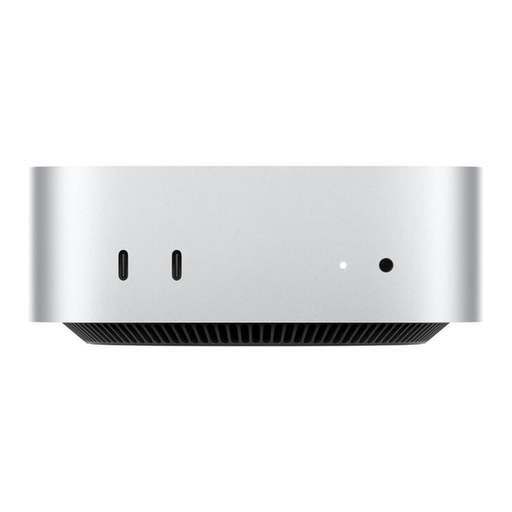
Apple Mac mini MHQK4ZD/A_CTO M6, 24 GB unified memory, 512 GB SSD
A compact macOS option, provided your development tools are compatible with macOS.
24 GB unified memory and a 512 GB SSD.
HDMI and Thunderbolt 4; according to the product description, it supports up to three external displays.
View at Joybuy
Frequently asked questions
Do I automatically need a particularly powerful PC for a small website?
No, not just for a code editor. Microsoft recommends a processor of at least 1.6 GHz and 1 GB RAM for Visual Studio Code; these figures don't automatically reflect what your entire workflow needs. Also check the requirements of any other programmes you use at the same time.
Can I simply mount a mini PC behind my monitor?
Only if the mount is suitable for the specific PC and monitor variant. Lenovo describes a mounting option for the ThinkCentre M70q Gen 5, but that doesn't mean the same mount will work with every mini PC. Remember to plan for cable routing and access to the ports too.
What else do I need to set up with a mini PC kit?
According to ASUS, the ASUS NUC 14 Pro Kit NUC14RVH-B comes without pre-installed RAM, storage or an operating system. Before buying, check which components it supports and allow for the time and cost of sourcing and setting them up.
What should I know about faults or buying online in Germany?
Your statutory rights when goods are faulty are different from a voluntary warranty. The consumer advice centre says that online consumer contracts generally come with a 14-day right to cancel; exceptions may apply, and the details depend on the contract.
What labels and documents should a PC sold in Germany have?
For retailers selling electrical and electronic equipment, Germany's Federal Network Agency lists requirements including correct CE marking, details identifying the device and the responsible economic operator, and German-language instructions for non-commercial users. Check the information for the specific variant.


