Writers planning a series
If you write several related pieces, you can keep your headings, drafts and research organised as you work. LibreOffice Writer’s Navigator, for example, displays document headings.


Choose a desktop PC that runs your writing software and has the connections you need for your monitor and input devices. A compact computer saves desk space; if you may want to upgrade its internal components later, check the options available in the specific case. Factor in any peripherals you still need, and back up your drafts independently of your PC.
If you write several related pieces, you can keep your headings, drafts and research organised as you work. LibreOffice Writer’s Navigator, for example, displays document headings.
A compact computer case can be useful if you have limited room at your dedicated writing desk. Your monitor and input devices still need to suit your workspace.
If you keep lots of drafts and related files, plan to store backups separately from your PC. Germany’s Federal Office for Information Security recommends backing up data so that files can be recovered on another device if something goes wrong.
A good fit if: your writing and editing software requires Windows and you have limited space for a computer case at your desk.
The trade-off: The monitor, keyboard and mouse are sold separately for the Lenovo ThinkCentre neo 50q Gen 5 configuration documented here. PC-WELT also notes generally that mini PCs are often harder to upgrade than larger cases.
A good fit if: the software and file formats you need work with macOS, and you want a compact desktop computer.
The trade-off: Apple offers different chip and memory options, so check the exact configuration and its ports. The technical specifications alone don’t prove that it will make you more productive when writing.
A good fit if: future internal upgrades matter more to you than having the smallest possible footprint.
The trade-off: Dell describes the Pro Slim QCS1250 as upgradeable; whether a particular component will fit depends on the exact configuration.
| Buying priority | What to check | Who is it important to? |
|---|---|---|
| Outlines and research | Check that your writing software is compatible with the operating system and that the PC has the monitor connections you need. | If I need to keep track of headings, drafts and research for several instalments, being able to work with an outline matters to me. Around 33% of consumers have this as their main priority. |
| Desk space | Check the case dimensions, where you plan to put it and what comes with the specific version. | If space is limited on my desk, I want to minimise the room taken up by the computer without overlooking the monitor and input devices. Around 27% of consumers prioritise a compact design. |
| Cost of your writing setup | Consider what’s included, the operating system and any writing software you may need. | If I don’t have a monitor or input devices, I want to know what else I’ll need for a complete writing setup. Around 20% of consumers prioritise the total cost of their workspace. |
| Back up drafts and keep your PC for longer | Plan to keep backups separately from the internal drive, and check the upgrade options for the exact version. | If I keep lots of drafts from my series, I want to be able to recover them if my device or drive fails. Around 20% of consumers have this as their main priority. |
The monitor, keyboard and mouse are sold separately for the Lenovo ThinkCentre neo 50q Gen 5 configuration documented here. So buying the computer alone won’t necessarily give you a complete writing setup.
Check what comes with the exact configuration and factor in any parts you still need.
If a drive or device fails, you could lose the only copy of your column drafts.
Keep backups separately from your PC and check that you can restore the files. Germany’s Federal Office for Information Security recommends backups to protect against faults and accidental deletion.
PC-WELT says that mini PCs are generally harder to upgrade than larger form factors, and the options vary by model.
Check the documented upgrade options for the exact version on offer.
The ThinkCentre neo 50q Gen 5 is a compact Windows desktop for a dedicated writing space.
The Mac mini is a compact macOS alternative, provided it’s compatible with the writing and editing software you need.
The Dell Pro Micro and Pro Slim are worth considering if you want a small footprint or a slightly larger case with documented configuration options.
The Pro Mini 400 G9 is another compact Windows business PC, and its specific specification can be compared with other options.
This selection of Joybuy products includes compact Windows PCs, tower desktops and Mac mini models for writing with outlines and research. What matters is whether your writing software works with the operating system on each computer and whether its connections suit your workspace.
 No image available
A compact Windows 11 option, provided your writing software is compatible with this specific configuration.
The product name lists 8 GB DDR4, a 256 GB SATA SSD, BT5.2 and Wi-Fi 5. It lists the processor as Intel Core i5 8250U/8350U.
 No image available
A tower desktop for a dedicated writing space, if its larger case suits your setup.
The product name lists 32 GB DDR5, a 512 GB NVMe SSD, NVIDIA RTX A400 with 4 GB and Windows 11 Pro.
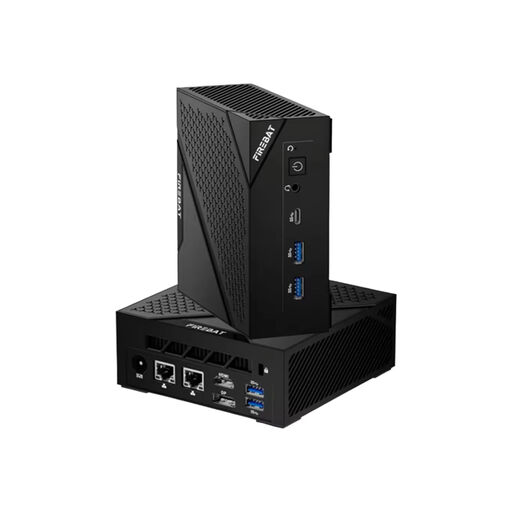 No image available
A compact Windows 11 option if you have limited space for a computer case.
The product name lists 16 GB LPDDR5, a 512 GB SSD, HDMI, Wi-Fi 6 and Bluetooth 5.2, as well as 6 Cores and 12 Threads.
For indoor use; use the original power supply provided and keep the ventilation openings clear.
 No image available
A compact macOS option if your writing and editing software works with macOS.
The product name lists a 12-Core CPU, a 12-Core GPU, Thunderbolt 4, HDMI, 2.5GbE, Wi-Fi 7 and Bluetooth 6.
The product description says the keyboard and mouse are sold separately.
 No image available
A compact macOS option if your writing and editing software works with macOS.
The product name lists a 12-Core CPU, a 12-Core GPU, Thunderbolt 4, HDMI, 2.5GbE, Wi-Fi 7 and Bluetooth 6.
The product description says the keyboard and mouse are sold separately.
Start by choosing suitable writing software: LibreOffice Writer’s Navigator, for example, displays document headings. Then choose hardware to suit any other software and monitors you use at the same time; the outlining feature alone doesn’t tell you what minimum processor performance you need.
Check that the monitor connection, keyboard, mouse and intended location suit the exact configuration. The monitor, keyboard and mouse are sold separately for the Lenovo ThinkCentre neo 50q Gen 5 configuration documented here.
Back up your files regularly, keeping the backup somewhere separate from the only internal drive, and check that you can restore them. Germany’s Federal Office for Information Security recommends backups as a way to protect against faults and accidental deletion.
If an item you buy is faulty, statutory liability for defects applies to the seller; a guarantee is an additional voluntary promise with its own terms. Section 438 of the German Civil Code (BGB) generally provides for a two-year limitation period for standard claims relating to defects in a sale, starting from delivery. When you buy, check who the seller is and what additional guarantee terms apply.
CE marking is relevant if EU rules that apply to the specific device require it. The EU lists electrical and electronic equipment among the product groups covered by relevant CE rules; the marking isn’t an independent quality seal for writing performance. Check which product and conformity details are required for the specific device.