Choose a desktop based on your writing software, the screen space you need and the devices you already own. Microsoft Support, Apple Support and LibreOffice Help document features that let you view windows or documents side by side, making it easier to refer to your manuscript and recipes at the same time. A mini PC saves desk space, while a larger desktop only makes sense if you have specific upgrades in mind. Check the operating system, video ports and what’s included with the particular model.
Which desktop is right for you?
Writing with two views
If you want to keep recipes, notes or another part of your manuscript in view while you write, your software’s features and the usable screen space are key. Microsoft Support, Apple Support and LibreOffice Help document features for arranging windows or opening another view of a document.
A long-term project with a photo archive
For a long writing project with text files and possibly recipe photos, choose storage capacity to suit the material you actually have, and plan to keep a separate backup. The consumer advice centre recommends protecting files with a backup copy.
A fixed desk with limited space
If your computer needs to fit in a limited space, its case design, ports and the input devices you already own all matter. Lenovo notes that the monitor, keyboard and mouse are optional extras sold separately with the ThinkCentre neo 50q Gen 5, so check what’s included with the specific configuration.
What matters in a desktop for writing a cooking memoir?
First, check how your writing software can display your manuscript and reference material. Then choose a screen, ports and computer size to suit your workspace.
| What matters |
What to check before buying |
Who is it most relevant to? |
| Two writing views |
Try out your software’s viewing options and check the screen space, scaling and, if you’re using multiple monitors, the video outputs on the specific PC. |
If I want to see recipes or another part of my manuscript while writing, I need a view that remains easy to read on my screen. Around 33% of consumers put having two writing views first. |
| Backing up your manuscript and reference material |
Make sure the storage suits your files and plan regular backups on a separate device or service, checking that they work. |
If my writing project grows over time and I add recipe photos, I want enough storage and a way to recover lost files. Around 27% of consumers prioritise keeping their long-term project safe. |
| Desk space and a complete setup |
Compare the case dimensions and ports with your desk, and check which devices are included. |
If I have limited desk space, I want to fit the computer and the devices I already own without overlooking a missing monitor or input device. About 20% of consumers prioritise a space-saving workspace with everything accounted for. |
| Software and future changes |
Check your writing software’s system requirements, as well as the PC’s operating system, ports and genuinely accessible upgrade options. |
If I need to use a particular application or have specific hardware changes in mind, the system needs to support them. Around 20% of consumers focus on their software choice or planned upgrades. |
Desktop buying pitfalls for your writing project
-
Buying a second monitor before trying out your writing views
You can arrange windows differently depending on your operating system. LibreOffice can also open a second view of the same document. What matters is whether the display on your screen gives you enough room.
First, try your writing software and window layout on the screen space you plan to use.
An extra monitor takes up desk space and needs a compatible video port.
-
Assuming a mini PC is a complete writing setup
With a compact computer, the monitor, keyboard or mouse may be sold separately. The computer alone won’t tell you whether you can get started with the equipment you already have.
Compare what’s included with the specific configuration against your devices and the ports you need.
-
Relying on the internal SSD as the only backup of your book project
A copy on the same computer won’t reliably protect you if it fails or goes missing. That applies to both your manuscript and the recipe material you’ve collected.
Plan regular backups in a separate location and check that you can restore files from them.
You may need an additional storage device or backup service to keep a separate copy.
-
Assuming a compact design means you can upgrade it later
Upgrade options vary from model to model. COMPUTER BILD describes them as limited on the HP OmniDesk Desktop AI M03 it tested.
If you’re genuinely planning a future upgrade, check for available slots and drive bays on the exact model.
If the upgrade you want isn’t possible, you may need to replace the computer sooner.
Desktop brands to consider
Lenovo
The ThinkCentre neo 50q Gen 5 range includes compact Tiny PCs for a permanent workspace.
- Lenovo lists several USB and display ports for the range.
- The monitor, keyboard and mouse may be optional extras sold separately, so check the ports and what’s included with the configuration you choose.
HP
The Pro Mini 400 G9 range offers compact office PCs; HP lists a configuration with Windows 11 Pro.
- COMPUTER BILD rated the OmniDesk Desktop AI M03 it tested as quiet and energy-efficient.
- COMPUTER BILD described the upgrade options on the OmniDesk M03 it tested as limited. This test result does not apply to every HP model.
GEEKOM
The A5 Pro 2026 is a mini PC range for writing spaces where a compact design is important.
- COMPUTER BILD describes the version it tested, with Ryzen 5 7530U, 16 GB RAM and a 1 TB SSD, as compact and notes that its memory can be upgraded.
- The device tested did not include a keyboard or mouse; other A5 Pro versions may differ.
Apple
The Mac mini is a compact option for a writing space running macOS.
- Apple documents window tiling, as well as different storage and display options for the Mac mini configurations it lists.
- Check the specific configuration and make sure your writing software is compatible; Apple’s technical specifications don’t assess how well it performs for writing.
Dell
OptiPlex and Dell Pro include desktop ranges for a permanent workspace.
- Dell offers space-saving desktop and all-in-one models.
- Ports and performance depend on the model, so check the specifications for the exact version.
Joybuy desktop PCs for your writing space
This selection includes Windows mini PCs, a tower desktop and an all-in-one PC, as well as a Mac mini, to suit different desk and software requirements.
 No image available
HP Z1 Tower G1i A40T1ET#ABD Ultra 9 285, 64 GB, 1 TB SSD
A good fit for a permanent Windows workspace if you want to use the listed display outputs.
Windows 11 Pro; 64 GB DDR5 at 5600 MHz; 1 TB M.2 SSD; DisplayPort and HDMI.
View at Joybuy
 No image available
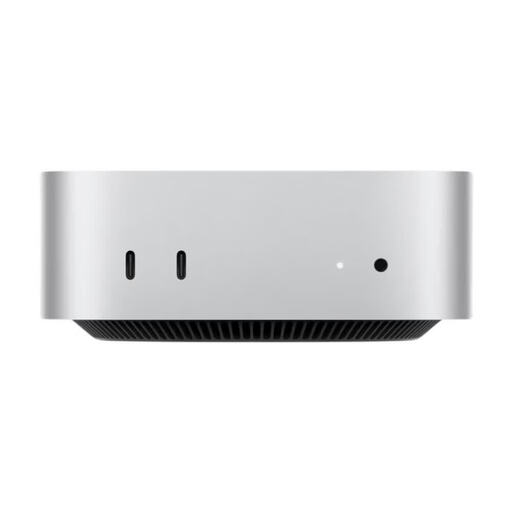
Apple Mac mini MHQM4_CTO_8 A3534 M6, 32 GB, 1 TB SSD
A compact option if your writing software runs on macOS and you want to use a Mac mini.
32 GB unified memory; 1 TB SSD; supports up to three external displays. Listed dimensions: 12,7 × 12,7 × 5,0 cm. A display, keyboard and mouse are not listed as included.
View at Joybuy
 No image available
SOYO S5Air Mini PC, Ryzen 5 7535HS, 16 GB, 512 GB SSD
A good fit for a compact Windows writing setup if the listed video outputs work with your display.
Windows 11 Pro; 16 GB LPDDR5; 512 GB NVMe SSD; HDMI, DisplayPort and Type-C video output. Listed case dimensions: 128 × 128 × 47,6 mm.
View at Joybuy
 No image available
SOYO S4PLUS Mini PC, Ryzen 7 H 255, 24 GB, 512 GB SSD
A mini PC option for a desk with limited space, provided its operating system and ports suit your setup.
Windows 11; 24 GB LPDDR5; 512 GB PCIe 3.0 SSD; HDMI, DisplayPort and Type-C video outputs. Listed case dimensions: 128 × 128 × 47,6 mm.
View at Joybuy
 No image available
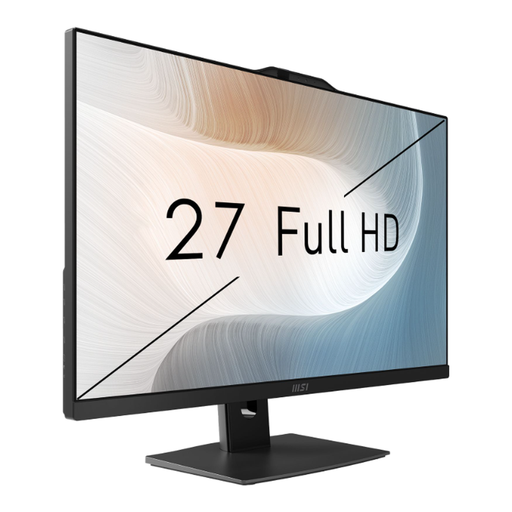
MSI Modern AM272P 1M-836DE, Core 5 120U, 8 GB, 512 GB
This all-in-one PC could suit you if you’d prefer a built-in screen to a separate monitor.
Windows 11 Pro; integrated 27-inch FHD display; 8 GB RAM; 512 GB SSD; Thunderbolt 4. The stand is described as adjustable.
View at Joybuy
Frequently asked questions
Do I need two monitors to view two parts of my manuscript?
No, not necessarily. LibreOffice can open a second view of the same document in a new window, while Windows and macOS offer features for arranging windows. Try it with your writing software and screen to see whether there’s enough room to read and write comfortably.
How can I back up my draft while I’m writing?
Set up regular backups of your manuscript and reference files in a separate location, and check that you can restore files from them. A larger internal SSD is no substitute for a separate backup copy.
What should I look out for when buying an older Windows PC?
Microsoft ended regular support for Windows 10 on 14 October 2025. Before buying, check which operating system is installed and whether the computer can run a system that will continue to receive support.
What are my rights if a PC bought online isn’t suitable or is faulty?
For a consumer purchase made online in Germany, you generally have a 14-day right to cancel from the date you receive the goods, subject to statutory exceptions. If the product is faulty, your statutory consumer rights are against the seller and are separate from any voluntary manufacturer’s guarantee, as the consumer advice centre explains.


