Who is this PC workstation for?

Writers working through rounds of edits

If several people need to comment on drafts and review changes individually, agreeing on a word-processing programme and a compatible way to exchange files is key. Microsoft Support and the LibreOffice Help describe Track Changes in Word and LibreOffice Writer.

Creators with lots of step-by-step images

If you’re placing photos alongside instructions, check how the text flows on the screen you’ll use and allow enough storage for your images and drafts. Microsoft Support notes that large embedded images can increase a document’s file size.

Setting up a permanent desk

If you still need a monitor, keyboard or mouse, check the listed contents and ports of the specific PC configuration against the accessories you already have.

Which buying priorities and checks matter?

Pre-configured Windows mini PC

A good fit if: you’re short on desk space and the specific Windows configuration supports the agreed word-processing programme.

Things to consider: Monitor connections, accessories and what’s included vary by configuration, so check the details before buying.

Compact office desktop or tower

A good fit if: you need specific ports or confirmed options for adding storage and drives.

Things to consider: The case style alone won’t tell you which components can be upgraded. Check the full model number.

Mac mini with macOS

A good fit if: your agreed writing workflow is based on macOS; Microsoft also explains how to use Track Changes in Word for Mac.

Things to consider: The monitor, ports and input devices need to be compatible with the specific Mac mini model.

Buying priority What to check before buying Who it matters most to
Programme and Track Changes Check the operating system and available software against the requirements of the agreed word-processing programme. If I exchange edits with others, changes should remain easy to follow in the programme we share. Around 29% of consumers put a shared editing workflow first.
Images, text flow and output Check the monitor connection and storage of the specific configuration against your image and draft library. If I add step-by-step photos alongside instructions, I want to check the page layout and the final PDF. Around 24% of consumers prioritise illustrated page layouts.
Space, ports and accessories Compare the desk space, monitor connection, USB ports and stated contents with the devices you already own. If I’m setting up my desk from scratch, the PC needs to suit the space and the peripherals I have. Around 18% of consumers put a suitable desk setup first.
Backing up drafts and images Plan for a separate backup option and a way to restore your files. If I don’t want to lose my writing and images, the internal SSD alone isn’t enough as a separate backup. Around 18% of consumers prioritise protecting their draft files.
Complete workstation Factor in any missing equipment, software and backup storage alongside the PC. If I still need a monitor, input devices or writing software, I want to see the full cost of my workstation upfront. Around 11% of consumers put the cost of a complete setup first.

Which mistakes can you avoid?

  • Mistaking hidden changes for deleted changes

    In Word, the ‘No Markup’ view only hides changes temporarily. They may reappear when you open the document again.

    Review suggested changes and accept or reject them. Also check comments and the intended PDF version before sharing the file; Microsoft Support explains these steps for Word.

  • Assuming a mini PC includes everything you need

    A monitor, keyboard, mouse and suitable cables aren’t automatically included with every configuration.

    Compare the stated contents and ports of the specific device with the accessories you already have.

  • Assuming a short product name tells you the full model specification

    Processor, operating system and drive can vary between configurations in the same product range.

    Check the full model number and the specifications listed for the specific offer.

  • Relying on the internal SSD as your backup

    If a device fails, you could lose the writing and images stored on it. Germany’s Federal Office for Information Security recommends backing up data regularly.

    Plan a separate backup method and check that you can restore your files.

    A separate backup drive or another backup method requires extra setup and ongoing maintenance.

Which brands and product ranges are worth considering?

GEEKOM

The A5 Pro 2026 is a range of compact Windows mini PCs designed for a space-saving writing setup.

  • For the R5-7530U configuration, GEEKOM lists Windows 11 Pro, 16 GB RAM and a 1-TB SSD.
  • These specifications apply to the stated configuration. A COMPUTER BILD review described one tested device as compact and noted that a keyboard and mouse weren’t included; you can’t assume other configurations come with the same contents.

MSI

The PRO-DP80-A14G range is aimed at buyers who want to check specific ports and possible upgrade options.

  • MSI lists different configurations in the range, with a choice of processors, operating systems and drives.
  • An assessment of the upgrade options on one tested device won’t necessarily apply to every configuration. Check the exact model number and its specifications.

Lenovo

The ThinkCentre M70q Gen 5 Tiny is a compact desktop for a permanent workstation.

  • Lenovo describes tool-free access to the memory and storage.
  • For part number 12TD0083EZ, Lenovo lists Windows 11 Pro, 16 GB RAM and a 512-GB SSD; the monitor is sold separately.

Dell

The Pro Micro QCM1250 is a configurable compact desktop range for office work.

  • Dell lists a configuration with Windows 11 Pro, 16 GB RAM and a 512-GB SSD.
  • Dell notes that the actual specifications can vary depending on the configuration you select.

Apple

The Mac mini is a compact macOS desktop for writing workflows based on a Mac.

  • Microsoft Support explains how to use Track Changes in Word for Mac.
  • Apple lists different storage and display options for different Mac mini models; check the specifications for the configuration you’re considering.

Joybuy products for your writing desk

The Joybuy products below include compact Windows PCs, a tower, a Mac mini and an all-in-one PC. Check the word-processing programme, ports and included accessories for each specific configuration.

HP EliteDesk AI Mini 8 G1i 623K2ET, Ultra 9 285T, 64 GB RAM, 1 TB SSD

HP EliteDesk AI Mini 8 G1i 623K2ET, Ultra 9 285T, 64 GB RAM, 1 TB SSD

Described as a compact Windows writing PC for a small desk; you’ll need to connect a monitor and input devices.

Windows 11 Pro, 64 GB RAM, 1 TB SSD, HDMI and DisplayPort.

Joybuy

Lenovo ThinkStation P2 Tower Gen2, Intel Core Ultra 7 265, 32 GB RAM, 512 GB SSD

Lenovo ThinkStation P2 Tower Gen2, Intel Core Ultra 7 265, 32 GB RAM, 512 GB SSD

Listed as a tower for a Windows writing setup with multiple ports; a keyboard and mouse are stated as included with this configuration.

Windows 11 Pro, 32 GB DDR5, 512 GB NVMe SSD, HDMI, DisplayPort and NVIDIA RTX A400 with 4 GB.

Joybuy

Apple Mac mini with M6, 24 GB unified memory and 512 GB SSD

Apple Mac mini, M6, 24 GB unified memory, 512 GB SSD

For a compact macOS writing setup if the agreed word-processing programme is used on a Mac.

12-core CPU, 12-core GPU, 24 GB unified memory, 512 GB SSD, Thunderbolt 4 and HDMI.

Joybuy
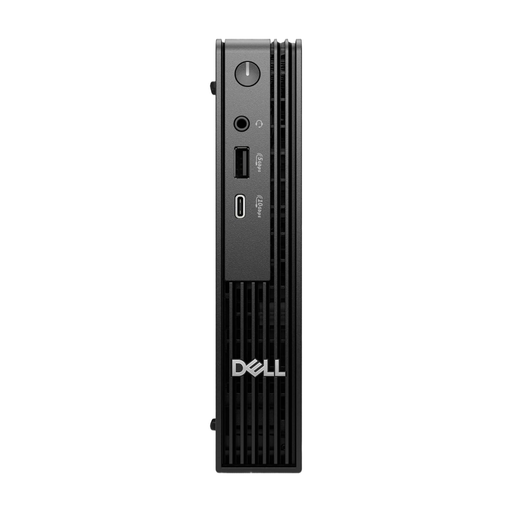
Dell Pro Micro QCM1250 MJ5TK TPM, i7-14700T, 16 GB RAM, 512 GB SSD

Dell Pro Micro QCM1250 MJ5TK TPM, i7-14700T, 16 GB RAM, 512 GB SSD

Described as a micro desktop with Windows 11 Pro for a writing setup where desk space is limited.

16 GB DDR5, 512 GB NVMe SSD and four USB ports.

Joybuy
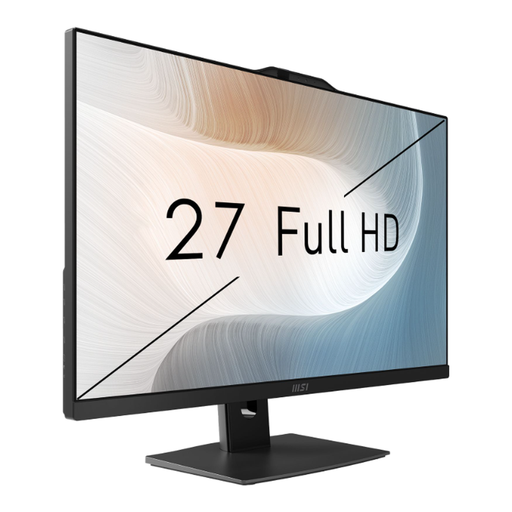
MSI Modern AM272P 1M-836DE, Core 5 120U, 27-inch FHD display

MSI Modern AM272P 1M-836DE, Core 5 120U, 8 GB RAM, 512 GB SSD

All-in-one PC with a built-in display for a permanent Windows writing setup.

27-inch FHD display, 8 GB RAM, 512 GB SSD and Thunderbolt 4.

Joybuy

Frequently asked questions

Do I need a special graphics card to track changes?

No. Track Changes is a feature in Word or LibreOffice Writer, not a graphics card feature. What matters is which programme everyone uses and whether it runs on your chosen operating system. Microsoft Support and the LibreOffice Help explain these features.

How do I remove tracked changes before sharing a document?

In Word, you need to accept or reject tracked changes; ‘No Markup’ only hides them. Also check comments and the PDF version you intend to share, as Microsoft Support recommends.

Are Word and accessories automatically included with a desktop PC?

No. Check what’s listed as included and whether a Word licence is provided. Microsoft describes Office suites as separate subscription or purchase products. For the documented Lenovo ThinkCentre M70q Gen 5 Tiny 12TD0083EZ configuration, the monitor is sold separately.

What are my rights if a PC bought online in Germany is faulty?

If a product is faulty, you have statutory rights against the seller; these are separate from any voluntary guarantee. Online purchases generally come with a 14-day right to cancel, but check the terms and any exceptions that apply to your specific contract. The Verbraucherzentrale explains these two rights separately.

What should I check for product safety when buying an electrical appliance in Germany?

The Bundesnetzagentur lists CE marking, product identification and correct manufacturer details among the checks it makes as part of market surveillance. These checks are no substitute for assessing the specific offer.

Can I put an old PC in my household rubbish?

No. Electrical and electronic waste must not go in household rubbish. The Umweltbundesamt recommends separate collection; local recycling centres are one free way to dispose of it.