For outlining and writing, start by choosing your writing software and operating system, then check that the PC has the right display connection. A compact desktop is a good starting point if you don’t need extra expansion slots. For audio samples, you’ll also need to check that your audio software is compatible and, if necessary, choose a recording device.
Who is this PC suitable for?
Writers who plan scenes and create outlines
If you rearrange scenes and develop longer stretches of dialogue, you’ll want an outlining workflow that suits you and a screen that’s comfortable to work on. Microsoft Support explains how to navigate using formatted headings in Word, while Literature & Latte outlines the outlining features in Scrivener.
Writers with limited desk space
If you want to keep using a monitor you already own and leave as little room as possible for the computer case, check the video connections and what’s included in the box. Lenovo Germany notes that the monitor and input devices are sold separately for its ThinkCentre M70q Gen 5.
Writers who record audio samples
If you also want to record dialogue or edit test versions, make sure your operating system, audio software and, if needed, recording device all work together. The Audacity manual notes that multichannel recording also depends on the device, drivers and operating system.
What should you consider when choosing?
Compact Windows desktop
A good fit if: you want to use Word with headings or Scrivener on Windows and connect a monitor you already own.
Bear in mind: connections and accessories vary by model. As Literature & Latte explains, a Scrivener licence must match the platform you’re using.
Small form factor Windows desktop
A good fit if: internal expansion slots matter more to you than a particularly small case. HP lists these slots for the Pro SFF 400 G9 CP9J4EA#ABD.
Bear in mind: a larger case takes up more desk space, and extra expansion options aren’t necessarily needed for writing alone.
Mac mini
A good fit if: you want to use macOS and plan to buy a monitor and input devices separately. Literature & Latte also offers outlining tools in Scrivener for macOS.
Bear in mind: according to Literature & Latte, a Scrivener licence for Windows doesn’t unlock the macOS version. Also check the connections and the exact configuration.
| What you want from your purchase |
What to check before buying |
Who this matters most to |
| Rearranging scenes and sections |
Decide whether Word with formatted headings or Scrivener best suits your workflow. Microsoft Support and Literature & Latte describe the outlining features of each; check the operating system and software version. |
If I often rearrange scenes, I want my outline to grow with my manuscript. Around 36% of consumers have this as their main consideration. |
| Making use of your workspace and existing equipment |
Check that the video output on the specific model matches your monitor, and confirm whether a keyboard and mouse are included. |
I want to choose a case, connection and input devices that suit my desk and the screen I already own. Around 29% of consumers have their existing workspace as their main consideration. |
| Equipment and backing up your data |
Check which components are included with the computer, and plan to back up your files regularly to an external storage device. Germany’s Federal Office for Information Security recommends keeping separately stored backups of files you’ve created yourself. |
If I want to plan my setup properly and keep drafts backed up separately, I need to consider any missing accessories and where to store my backup copies. Around 21% of consumers have this as their main consideration. |
| Recording or editing audio samples |
Check that your audio software is available for your operating system and that the device, drivers and connections are suitable for the recordings you have planned. The Audacity manual lists these as relevant factors for multichannel recordings. |
If I also want to record or edit dialogue, my computer needs to work with my software and recording device. Around 14% of consumers have audio work as their top priority. |
Common buying mistakes
-
Assuming every model in a range comes fully equipped
GMKtec also sells the NucBox M6 Ultra as a barebone model without RAM, an SSD or an operating system. The range name alone doesn’t tell you which components are included in the version you choose.
Before you buy, check what’s included with the specific version and whether it has the components you need for your writing space.
-
Choosing a mini PC without considering your whole writing setup
Lenovo Germany lists the monitor, keyboard and mouse as sold separately for the ThinkCentre M70q Gen 5. A small case doesn’t remove the need to check that the PC works with your existing screen and accessories.
Check that the video connections and input devices you already own are compatible with the specific version.
-
Assuming a large internal SSD is a backup
If the internal drive fails, your manuscript files stored on it could be affected too. Germany’s Federal Office for Information Security recommends regularly backing up files you’ve created yourself to an external storage device.
Plan to keep your backup copies somewhere separate and check that the PC has a suitable connection.
If you don’t already have an external storage device, you’ll need to budget for one to keep a separate backup.
-
Assuming your existing Scrivener licence works across platforms
According to Literature & Latte, a macOS licence doesn’t unlock the Windows version, and vice versa.
Before switching between Windows and macOS, check which version of your writing software you’ll actually need.
Brands and model ranges to consider
GEEKOM
The A5-Pro range includes compact Windows PCs for a workspace with a separate monitor.
- For the A5-Pro version with Ryzen 5 7530U, GEEKOM Germany lists 16 GB of RAM and a 1 TB SSD.
- For the A5-Pro configuration tested by its editorial team, COMPUTER BILD notes that a keyboard and mouse weren’t included. Check what comes with the specific version you’re considering.
MSI
The Cubi NUC range and the PRO DP10 A14MG are compact lines designed for smaller workspaces.
- MSI lists a case volume of 0.826 litres for the Cubi NUC range, with the option to mount it behind a monitor.
- MSI notes that specifications vary by model. You shouldn’t assume that the features of a Cubi NUC 1M apply to other versions.
GMKtec
The NucBox M6 Ultra is a compact model range with versions that differ in what’s included.
- GMKtec lists both barebone versions and versions that include RAM, an SSD and an operating system.
- The barebone model doesn’t include RAM, an SSD or an operating system. Check the exact version before choosing it for a ready-to-use writing setup.
HP
HP offers both compact mini PCs and small form factor desktops with more room for internal expansion slots.
- For the Pro SFF 400 G9 CP9J4EA#ABD, HP lists 16 GB of RAM, a 512 GB SSD and PCIe slots.
- These specifications apply to the SFF version listed, not to the HP range as a whole. COMPUTER BILD describes its tested Pro Mini 400 G9 D6B240EA as very quiet, but that doesn’t mean other versions will be the same.
Apple
The Mac mini is a compact macOS option. You’ll need to plan for a separate monitor and input devices.
- Apple lists support for up to three external displays for the Mac mini with M6; storage and SSD configurations vary.
- According to Literature & Latte, a Scrivener licence for Windows doesn’t unlock the macOS version. Check the software version and the configuration of the specific device.
Lenovo
The ThinkCentre M70q Gen 5 Tiny is a compact, Windows-focused range for desks with an existing monitor.
- Lenovo Germany lists the option to place it behind a monitor and tool-free access to storage components.
- According to Lenovo, the monitor, keyboard and mouse are sold separately. Check the connections and what’s included with the version you choose.
Joybuy PCs for your writing space
The Joybuy PCs listed here include compact Windows mini PCs and tower desktops. Compare the connections and components specifically listed with your desk and the accessories you already own.
 No image available
SOYO Y5Pro Mini PC, Intel Core i5 8250U/8350U
This compact Windows PC could suit outlining at a small writing desk; check that its video outputs match your monitor.
Specifications include Windows 11, 8 GB DDR4, a 256 GB SATA SSD, Bluetooth 5.2 and Wi-Fi 5. HDMI and Type-C video outputs and four USB ports are listed.
Joybuy
 No image available
MaxMini B3 Mini PC, Intel N4100
The mini PC format could work well in a space-saving writing setup; check that the listed video connections match your screen.
The title lists 8 GB LPDDR4, a 256 GB SSD, two HDMI ports, 1000M LAN, 2.4/5 GHz Wi-Fi and Bluetooth 5.0. The processor is specified at up to 2.4 GHz.
Joybuy
 No image available
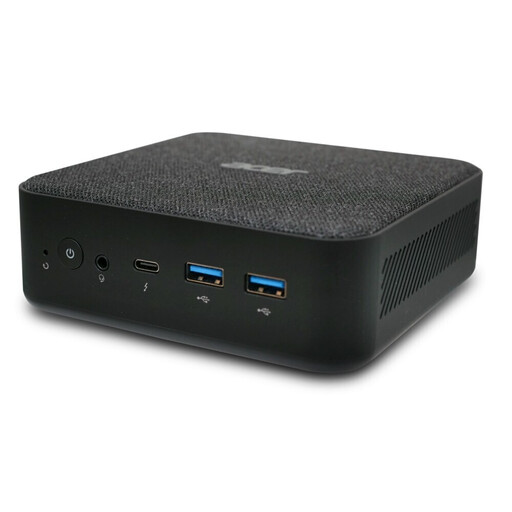
Acer Revo RB102 Mini PC, Core Ultra 5 125U
Its compact design could suit a small Windows writing setup; check the connections you need and the accessories you already have before buying.
Specifications include Windows 11 Pro, 16 GB of RAM, a 512 GB SSD and four USB 3.0 ports. The model number is DT.BMCEG.002.
Joybuy
 No image available
Acer Predator Orion 3000, i5 Ultra
This tower could suit you if you have room for a larger case at your desk; it takes up more space than a mini PC.
Specifications include Windows 11 Home, 16 GB DDR5, a 512 GB SSD and RTX5060. Listed connections include HDMI, USB-C, USB-A and RJ45; the case measures 378 × 190 × 438 mm.
Joybuy
 No image available
HP Z2 Tower G1i, Core Ultra 7 265, 32 GB
This tower is an option if you have enough desk space and the listed connections suit your monitor and accessories.
Specifications include Windows 11 Pro, a 20-core Core Ultra 7 265, 32 GB DDR5 at 5600 MHz and Intel Graphics. DisplayPort, HDMI and several USB ports are listed; the case measures 388 × 175 × 426 mm.
Joybuy
Frequently asked questions
Do I need a special graphics card for outlining sections?
The outlining features covered here are part of Word and Scrivener. Microsoft Support and Literature & Latte explain how these features work. Focus on choosing the right software and operating system, and a suitable screen setup.
Can I connect a mini PC to a monitor I already own?
It depends on whether the video outputs on the specific version match your monitor or a suitable adapter. Also check whether a keyboard and mouse are included; Lenovo Germany lists these as sold separately for the ThinkCentre M70q Gen 5.
How can I protect my drafts if a drive fails?
Back up files you’ve created for your projects regularly to an external storage device. Germany’s Federal Office for Information Security explains that keeping separate backups of files you’ve created yourself can help protect against data loss.
Can I transfer my Scrivener licence between Windows and Mac?
No. According to Literature & Latte, a macOS licence doesn’t unlock the Windows version, and vice versa. Factor in the right version when choosing your operating system.
What should I consider if I also want to record audio samples?
Check that your audio software and recording device work with your operating system and the connections available. According to the Audacity manual, multichannel recordings also depend on the device and drivers.


