Which setup is right for you?

Series writer working with lots of sections

If you’re drafting several related pieces, writing software that treats headings as part of the document structure can be helpful. Microsoft Support explains how to use the Navigation pane in Word for Windows, while LibreOffice Help covers navigating headings in the Navigator.

Research-heavy academic writer

If you manage research and references alongside your writing, check that your word-processing software works with your reference manager. Zotero documents integrations with Word, LibreOffice and Google Docs.

Writer with limited desk space

If space is at a premium, a compact desktop could be a good fit. Make room for your monitor and peripherals, and check that the specific configuration has the ports you need for your existing devices.

What should you consider when choosing?

What you need What to check before buying Who might prioritise this?
Editing outlines Word-processing software and operating system; headings must be recognised as part of the document outline. If I often rearrange sections, I want to find headings quickly in my writing software. Around 29% of consumers put outline editing first.
Working with sources and drafts side by side Compatibility between your word-processing software and reference manager, plus suitable monitor ports. If you want to manage research, drafts and references side by side, check the complete software and monitor setup. Around 23% of consumers prioritise working with sources alongside their writing.
Planning your complete writing setup Check what’s included against the monitors and peripherals you already have. If I want to put together a fully usable workspace, I factor in the equipment I’ll need alongside the computer. Around 18% of consumers focus first on the total cost of their writing setup.
Protecting drafts against data loss Plan a backup of your writing and sources that’s separate from the computer you use every day. When I’m working on manuscripts, I want to be able to recover important files if something breaks or they’re accidentally deleted. Around 18% of consumers prioritise data backups.
Space and placement Check the available space, the ports you need and access for maintenance on the specific model. If my workspace is small, I want to know in advance where the computer and accessories will go. Around 12% of consumers focus on a compact setup.

Common buying and planning mistakes

  • Planning for the computer, but not the complete workspace

    For the documented Lenovo ThinkCentre M70q Gen 5 configuration, you’ll need to budget separately for a monitor, keyboard and mouse.

    Check what’s included with the specific configuration against the devices you already own.

  • Confusing plenty of internal storage with having a backup

    A copy stored on the same computer won’t help if it fails. Germany’s Federal Office for Information Security lists hardware faults, accidental deletion and malware among the risks to stored files.

    Plan a separate backup of your writing and sources, and check regularly that you can restore files from it.

  • Assuming similarly named model variants are identical

    The HP Pro Mini 400 G9 variant 937U0EA#ABD is not the same as the version listed under D6B240EA, so you can’t assume they have the same specification.

    Before buying, compare the full model and variant numbers, along with the components actually listed.

  • Choosing an older Windows offer without checking support

    According to Microsoft, mainstream support for Windows 10 ended on 14 October 2025. For the computer you’re considering, check the edition, update status and potential compatibility with Windows 11.

    Before you buy, check which operating system is installed and whether the computer can run a supported version of the system you need.

Brands worth considering

Lenovo

The ThinkCentre M70q Gen 5 Tiny is a compact Windows option for a fixed writing setup.

  • Lenovo lists tool-free access to memory and storage, along with support for up to three displays.
  • With the documented configuration, you’ll need to plan separately for a monitor, keyboard and mouse.

Dell

The Dell Pro Micro QCM1255 is a compact Windows option for a fixed workspace.

  • For the documented configuration, Dell lists Windows 11 Pro, 16 GB DDR5 and a 512-GB SSD.
  • These details describe the configuration, not how quickly you’ll be able to write in your particular workflow.

HP

The HP Pro Mini 400 G9 is a compact Windows option; the specific variant is 937U0EA#ABD.

  • For this variant, HP lists 16 GB RAM, a 512-GB SSD and a wired mouse.
  • These specifications apply to this model number and shouldn’t be assumed to apply to other variants.

Acer

The Aspire XC-1785 DT.BLSEG.00B is an example of a larger desktop rather than a mini PC.

  • For this variant, Acer lists Windows 11 Home, 16 GB RAM, a 1-TB SSD and a PCI Express x16 slot.
  • A listed slot doesn’t guarantee that every component you might want to add later will fit.

Apple

The Mac mini with M6 chip is a macOS option for a compact writing setup.

  • Apple’s specifications list several memory and display configurations.
  • The Word Navigation pane for headings described here is for Windows and doesn’t work in exactly the same way on a Mac. Also check the specific configuration and the software you need.

Joybuy products for your writing space

This selection includes compact mini PCs for a fixed writing setup, with Windows models and a Mac mini. Before buying, check that the operating system, writing software and monitor ports suit your workflow.

SOYO Y5Pro Mini PC with Intel Core i5 8250U/8350U, 8 GB DDR4 and 256 GB SATA SSD

SOYO Y5Pro Mini PC (Intel Core i5 8250U/8350U, 8 GB DDR4, 256 GB SATA SSD)

This model could be a good fit for a compact mini PC setup that saves desk space.

The product name lists Windows 11, 8 GB DDR4 and a 256 GB SATA SSD. Check that the specification suits the programmes and files you use at the same time.

View at Joybuy

ACEMAGIC E3B mini desktop PC with AMD Ryzen 7 7735HS, 24 GB LPDDR5 and 512 GB NVMe SSD

ACEMAGIC E3B Mini Desktop PC (AMD Ryzen 7 7735HS, 24 GB LPDDR5, 512 GB NVMe SSD)

Its compact size could be a good fit if you’re setting up a small, fixed workspace.

The product name lists Windows 11 Pro, 24 GB LPDDR5, a 512 GB NVMe SSD, and HDMI, DisplayPort and USB-C video ports. Check that the ports work with your monitors.

View at Joybuy
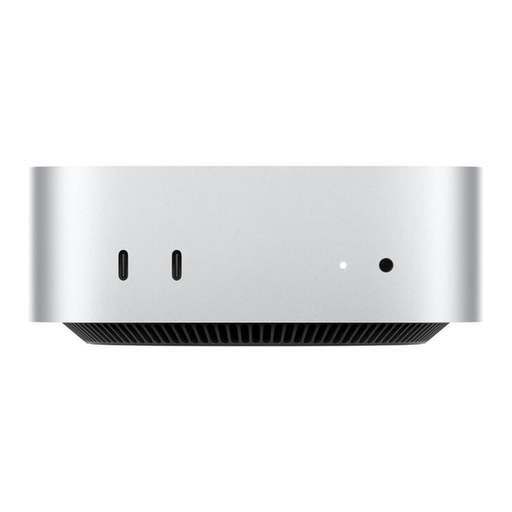
Apple Mac mini MHQK4ZD/A CTO with Apple M6, 24 GB Unified Memory and 512 GB SSD

Apple Mac mini MHQK4ZD/A_CTO (Apple M6, 24 GB Unified Memory, 512 GB SSD)

This model could be a good fit if your writing and reference software works with macOS.

The product name lists 24 GB Unified Memory and a 512 GB SSD. The documented instructions for the Word Navigation pane for headings are for Windows; check how to do the same on your Mac.

View at Joybuy

FIREBAT Mini PC with AMD Ryzen 7 7735HS, 16 GB RAM and 512 GB SSD

FIREBAT Mini PC (AMD Ryzen 7 7735HS, 16 GB RAM, 512 GB SSD)

A mini PC could be a good option if you want to keep your writing setup compact.

The product name lists 16 GB RAM, a 512 GB SSD, Dual M.2 Slots and Triple Display. Check which ports the specific version offers for your monitor setup.

View at Joybuy

SOYO S5Air Mini PC with AMD Ryzen 5 7535HS, Windows 11 Pro, 16 GB LPDDR5 and 512 GB NVMe SSD

SOYO S5Air Mini PC (AMD Ryzen 5 7535HS, Windows 11 Pro, 16 GB LPDDR5, 512 GB NVMe SSD)

This compact Windows mini PC could be a good fit for a writing setup that saves space.

The product name lists 16 GB LPDDR5, a 512 GB NVMe SSD, and HDMI, DisplayPort and USB-C. Check that the video ports listed match the inputs on your monitors.

View at Joybuy

Frequently asked questions

Do I need a particularly powerful PC to work with section outlines?

First, check the outline features in your writing software. In Word for Windows, headings with the right formatting can appear in the Navigation pane, where you can also move sections. There’s no general minimum hardware requirement for this; also consider which programmes you use at the same time.

How do I add references to a series of articles?

If you use Zotero, it documents integrations with Word, LibreOffice and Google Docs that can create citations and bibliographies dynamically. Before buying, check that your chosen word-processing software is supported.

How do I back up unfinished manuscripts?

As well as keeping your files on your computer, make a separate backup of your writing and sources. Germany’s Federal Office for Information Security highlights issues such as hardware faults, accidental deletion and malware, which make it important to have a separate copy.

What are my rights if my desktop PC is faulty?

For a consumer purchase, if goods are faulty, you may have claims under section 437 of the German Civil Code (BGB), subject to the legal requirements. The German Federal Ministry of Justice’s Laws Online website states that the limitation period for ordinary goods is generally two years from delivery; this is separate from any voluntary manufacturer’s warranty.

Can I cancel an online desktop PC purchase?

In most cases, consumers have a right to cancel an online purchase. As at 13 August 2026, the Verbraucherzentrale (German consumer advice centre) says the period is generally 14 days from receipt of the goods and notes that you must notify the seller of your decision. Check the terms of your specific contract and whether any exceptions apply.