
Lieferung heute & morgen

Qualitätsgarantie

Willkommens-Angebote freischalten: KOSTENLOSE Lieferung | Bis zu 80 % RABATT | Kostenlose 30-Tage-JoyPlus-Testphase
App herunterladen
Anyone looking to buy a desktop PC will often compare the processor, RAM and price first. However, that is not always enough. A computer may look powerful on paper, but can quickly reach its limits in everyday use because of an unsuitable form factor, insufficient storage or a weak graphics unit.
This buying guide is aimed at businesses, self-employed professionals, developers, data analysts, designers, engineers, home-office users and gamers. It focuses on clear, easy-to-understand criteria and a selection of suitable systems for different areas of use.
An Intel Core Ultra PC or AMD Ryzen PC can be configured for very different tasks. The model designation alone says little about whether a system is suitable for spreadsheets, video editing, 3D applications or gaming.
The following are more important:
For office and home-office use, a mid-range processor is often sufficient. For parallel data analysis, software development or professional applications, more cores and RAM are worthwhile.
16 GB of RAM is sufficient for many office tasks. However, if you use virtual machines, large spreadsheets, development environments or image-editing software, you should plan for 32 GB or more. With extensive datasets and local AI workloads, 64 GB or 128 GB may be relevant.
SSD capacity is also often underestimated. A 512GB NVMe SSD offers fast system start-up and is suitable for standard software. Large projects, game libraries and local models, on the other hand, generally require 1 TB or 2 TB. Also check whether there is an additional M.2 slot or drive bay.
A tower usually offers more space for expansion cards, additional drives and powerful cooling. A slim PC takes up less desk space, but may be more restricted when it comes to graphics cards and power supplies. A mini PC can fit into small work areas and can sometimes be mounted using a VESA bracket.
Before buying, check the available desk space, monitor connections and the peripherals you need. For two monitors, for example, you need multiple DisplayPort or HDMI outputs. For businesses, Gigabit LAN, TPM 2.0, Windows 11 Pro and remote-management options may also be important.
For a business PC or a PC for office and home-office use, 16 GB of RAM, an NVMe SSD and an integrated graphics unit are often a practical combination. A dedicated graphics card makes sense if CAD, 3D visualisation, video editing or gaming are part of your typical workload.
A workstation should offer sufficient RAM and suitable graphics connections alongside a powerful processor. The Lenovo ThinkStation P2 Tower Gen2, for example, combines an Intel Core Ultra 7 265 with 32 GB DDR5, a 512GB NVMe SSD and an NVIDIA RTX A400 with 4 GB of dedicated graphics memory. According to the product specifications, this configuration is designed for business, design, engineering and visualisation tasks.
Compared with the Home version, a Windows 11 Pro PC offers features such as BitLocker, Group Policy and advanced management options. Windows 11 Home may be sufficient for private use or gaming. For business devices, you should also check update support, manufacturer support and warranty terms.
A mini PC usually uses less energy than a large gaming or workstation tower. However, under sustained load, a compact case can become warmer. Ventilation openings must not be covered; leaving a gap of at least a few centimetres improves airflow.
With a gaming PC, the power supply, graphics card and cooling system need to work well together. According to the product description, a Captiva gaming PC with an AMD Ryzen 7 7800X3D, GeForce RTX 5070 Ti, 64 GB DDR5 and a 2 TB SSD has an 850-W power supply. For actual use, you also need to take the monitor resolution, game settings and desired frame rate into account.
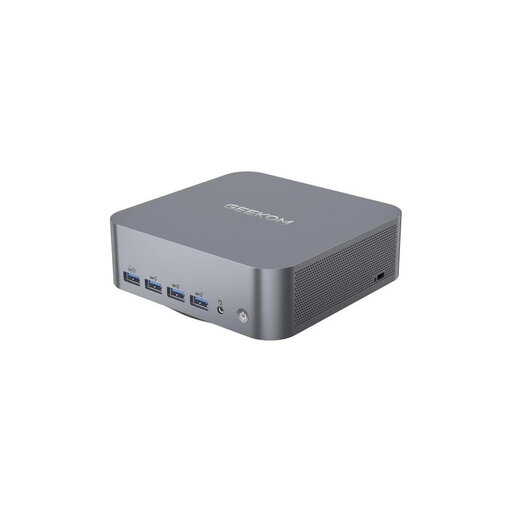
Why this product suits this profile: This compact AMD Ryzen mini PC is suitable for office work, multimedia and everyday tasks on smaller desks.
16 GB of RAM and a 512GB NVMe SSD prevent the basic specification from being too limited. Two HDMI outputs allow you to create a more spacious workstation.
Case dimensions of approximately 126 × 126 × 44 mm, Wi-Fi 6, Bluetooth 5.2 and Gigabit LAN.

Why this product suits this profile: This tower workstation is aimed at businesses, developers and users of data analysis, design and engineering applications.
32 GB DDR5, a dedicated NVIDIA RTX A400 and Windows 11 Pro go beyond a basic office configuration.
Intel Core Ultra 7 265 with 20 cores, 512GB NVMe SSD, DisplayPort, HDMI and a 500-W power supply.

Why this product suits this profile: This compact computer is designed for professional applications, AI development, simulation and large datasets.
128 GB of RAM and a 2 TB SSD reduce bottlenecks when working on large projects. The compact design saves desk space without compromising on modern connections.
AMD Ryzen AI Max+ PRO 395, Radeon 8060S, Wi-Fi 7, 2.5GbE LAN and two Thunderbolt 4 ports.
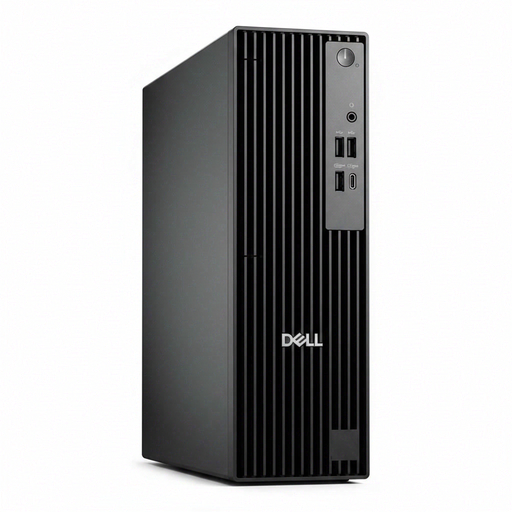
Why this product suits this profile: This slim PC is designed for workstations with limited depth and typical business software.
The 9.5 cm-wide case saves space. 16 GB DDR5, Windows 11 Pro and a free DIMM slot provide a well-balanced office configuration with room for upgrades.
Intel Core Ultra 7 265, 512GB NVMe SSD, TPM 2.0, HDMI, DisplayPort and several PCIe slots.
We have put together a complete, regularly updated list of products that fully meet these strict selection criteria and the safety regulations applicable in the EU.
For word processing, browsing, video conferencing and spreadsheets, 16 GB of RAM is usually sufficient. If you regularly have many programmes open or use image-editing software, virtual machines or data-analysis tools, 32 GB is a better choice.
Yes, provided that the processor, RAM, SSD and connections match your intended workload. Pay particular attention to cooling, monitor outputs and whether the storage or RAM can be upgraded later.
Consumption depends on the processor, graphics card, power supply and operating time. In everyday use, a compact mini PC generally requires less energy than a gaming PC with a dedicated graphics card. For a realistic estimate, multiply the power consumption in watts by the daily operating hours and your electricity price.