
Lieferung heute & morgen

Qualitätsgarantie

Willkommens-Angebote freischalten: KOSTENLOSE Lieferung | Bis zu 80 % RABATT | Kostenlose 30-Tage-JoyPlus-Testphase
App herunterladen
A business PC needs to do more than start quickly. For businesses, the self-employed, IT administrators and professional users, predictable performance, the right connections, security features and a case that suits the workplace all matter. However, when choosing desktop PCs for business and professional applications, additional costs often arise from unsuitable components or marketing terms that offer little practical benefit in everyday work.
A high core count or turbo clock speed primarily describes the processor. This can be relevant for developers, data analysts and multitaskers. For 3D design, CAD, video editing or local AI applications, the graphics solution also plays a decisive role. An Intel Core Ultra PC with integrated graphics is not automatically suitable for every NVIDIA RTX workstation application.
You should therefore check:
An AI PC typically features an NPU, or Neural Processing Unit, for specific AI tasks. With compatible applications, this can support local processing. However, an NPU does not replace a powerful graphics card and will not automatically accelerate every piece of software.
For local models, inference or demanding AI development, systems such as an NVIDIA business PC or a dedicated AI workstation need to be assessed differently from an office PC with integrated graphics. The crucial factors are graphics memory, software support, operating system and interfaces.
A mini PC or slim PC saves space, but usually offers less room for additional drives, expansion cards and powerful cooling. A tower PC requires more desk or floor space, but depending on the model, it can be easier to upgrade. Businesses should therefore plan ahead for future requirements for RAM, SSDs, network cards or graphics cards before buying.
For typical office programmes, browsers, video conferences and a PC for the office and home office, 16 GB of RAM may be sufficient. For development, data analysis, large spreadsheets, virtual machines and creative applications, 32 GB or more is advisable. Workstations with 64 or 128 GB are designed for tasks that require a corresponding amount of memory.
An NVMe SSD shortens start-up and loading times compared with older hard drives. Capacity should match your project data: 512 GB is suitable for a standardised workplace profile, while 1 TB or 2 TB offers more room for local files and applications. Backup and storage strategies remain essential for business data, regardless of the PC.
Integrated Intel or AMD graphics are sufficient for Office, web applications, standard analysis and multiple displays, provided the available outputs are suitable. For CAD, 3D visualisation, professional image editing or GPU-accelerated AI applications, you should consider a dedicated GPU.
You should also look at:
A Windows 11 Pro PC offers features for business environments, including BitLocker, Secure Boot and integration with organisational or management structures. Whether these features are required depends on your company’s IT policies.
For sensitive workplaces, TPM 2.0, a lockable case and, where appropriate, a self-encrypting drive are also relevant technical features. You should also check update procedures, manufacturer support, warranty terms and driver availability.
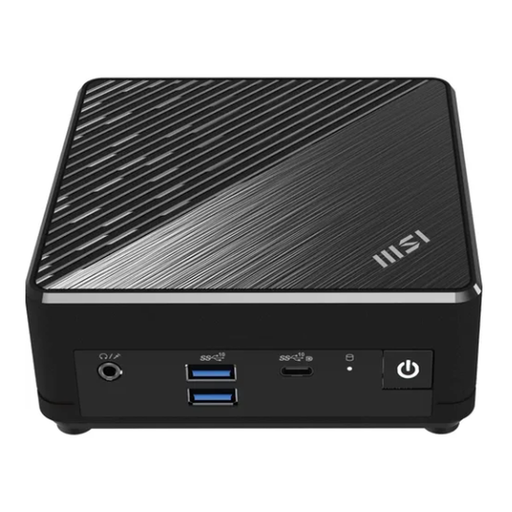
Why this product suits the profile: This compact mini PC is designed for basic office tasks, email, web applications and multiple displays. Thanks to VESA compatibility, it can be mounted behind a monitor or under a desk.
The specifications clearly state the RAM, SSD capacity, connections and operating system. However, 8 GB of RAM and a 256 GB SSD limit it to lighter workloads.
Intel N200, passive cooling, dual Gigabit LAN, HDMI and DisplayPort, plus Windows 11 Pro in a 124 × 124 × 54 mm case.

Why this product suits the profile: This tower PC combines 32 GB of DDR5 RAM with 2 TB of SSD storage, making it suitable for offices, developers and users working on extensive local projects.
The specification avoids a bare-bones configuration for storage and RAM. The integrated graphics remain a limitation to consider for specialist GPU workloads.
Intel Core Ultra 7 265, 32 GB DDR5, 2 TB M.2 SSD, Wi-Fi 7, Bluetooth 5.4 and several DisplayPort connections.

Why this product suits the profile: This compact workstation is designed for data science, simulation, design and local AI workloads where large amounts of RAM are needed without taking up much space.
This configuration is not limited to a small office storage setup: 128 GB of RAM and a 2 TB SSD are designed for large datasets. Software compatibility should be checked in advance.
AMD Ryzen AI Max+ PRO 395 with 16 cores and 32 threads, Radeon 8060S, 2.5 GbE LAN, Wi-Fi 7 and Thunderbolt 4.

Why this product suits the profile: Combining a workstation case, 32 GB of DDR5 RAM and an NVIDIA RTX A400, this system is designed for professional visualisation, technical applications and demanding office workflows.
The dedicated NVIDIA graphics distinguish this system from PCs with integrated graphics only. Driver and certification requirements for the specific specialist software still need to be checked.
Intel Core Ultra 7 265, NVIDIA RTX A400 with 4 GB of graphics memory, 500 W power supply, DisplayPort, HDMI and Windows 11 Pro.
We have put together a complete, regularly updated list of products that fully meet these strict selection criteria and the safety regulations applicable in the EU.
For office work, email and video conferences, 16 GB is often sufficient. For software development, data analysis, numerous browser tabs or virtual machines, 32 GB is a sensible choice. Workstations for large datasets or professional creative applications may require 64 GB or more.
Yes, provided the programmes you use do not require a dedicated graphics card or extensive expansion options. Mini PCs are suitable for reception areas, administration, home offices and standardised workplace profiles. Check the cooling, maintenance options, monitor connections and upgradeability in advance.
Power consumption depends on the processor, graphics card, power supply, usage profile and operating time. Under typical loads, a compact office PC often uses less energy than a powerful workstation. For a realistic estimate, compare the stated power consumption and take standby and sleep modes into account.