What should you look for when buying?
Configurable Windows tower
A good fit if: You regularly work with large files and want to upgrade components or storage later.
Consider: A tower takes up desk space, and the exact specification may differ from the advertised options.
More configurable workstation
A good fit if: Your work genuinely involves 3D modelling, rendering or other demanding tasks alongside 2D design.
Consider: Depending on the model, a powerful graphics card may be an option rather than part of the selected configuration.
Compact Mac mini
A good fit if: Your software and peripherals are compatible with macOS, and an external monitor suits your workspace.
Consider: Check the configured storage capacity and the ports you need in advance, rather than expecting the upgrade options available on a tower.
Adobe recommends 16 GB or more of RAM for Photoshop. The right specification still depends on your files, the software you have open at the same time and your output requirements.
| Buying priority |
What to check |
Who it matters to |
| Large layered files |
Check the RAM and free SSD space for scratch disks in the exact configuration, and compare them with the requirements of the software you use. |
If I work with large, complex designs, I want to allow for enough memory for my actual workflow. Around 36% of consumers put working with large layered files first. |
| Large-format printing and colour |
Confirm the finished dimensions and file specifications with your print provider; also consider your monitor profile and profiles suitable for the print process. |
If my set is going to be printed in a large format, I want to make sure the on-screen colours match the production specifications. Around 29% of consumers prioritise output and colour control. |
| Future upgrades |
Check the exact order configuration, upgrade options and service cover, rather than assuming the advertised maximum specifications apply. |
If my projects could change, I want to know which components can be upgraded and what’s actually included. Around 21% of consumers put upgrade options first. |
| Compact workspace |
Check the configured RAM and SSD capacity, along with the ports you need; include your monitor and input devices in your workspace planning. |
If I have limited space for my computer, I still want to be able to connect my monitor and other peripherals. Around 14% of consumers prioritise a compact setup. |
Desktop deals at Joybuy
The following offers include tower configurations from HP and Lenovo, as well as a compact Mac mini. Compare the components and ports in each configuration with your design and print workflow.
 No image available
HP Z4 G5 Tower workstation, Xeon W3-2535, 64 GB RAM, 1 TB SSD, RTX 4000 Ada
For a tower setup handling large project files and other demanding tasks; check that the specification suits the software you actually use.
The product details list 64 GB RAM, a 1 TB SSD, an RTX 4000 Ada and Windows 11 Pro.
View at Joybuy
 No image available
HP Z2 Tower G1i A40MMET, Core Ultra 7 265, 32 GB RAM
As a Windows tower, this configuration can be compared with your needs for RAM, storage and monitor connections.
The product title lists 32 GB RAM and integrated Intel graphics. Check the SSD specification and ports for the exact version you select.
View at Joybuy
 No image available
HP Z1 Tower G1i A40T1ET#ABD, Core Ultra 9 285, 64 GB RAM, 1 TB SSD
For a Windows tower setup, compare this specification with your large project files and the monitor connection you need.
The product title lists 64 GB RAM, a 1 TB SSD, integrated Intel graphics and Windows 11 Pro.
View at Joybuy
 No image available
Lenovo ThinkStation P2 Tower Gen 2, Core Ultra 7 265, 32 GB RAM, RTX A400
This tower with dedicated graphics is one option to consider if you need to account for a specific GPU as well as RAM and storage.
The product title lists 32 GB RAM, a 512 GB NVMe SSD, an NVIDIA RTX A400 with 4 GB and Windows 11 Pro.
View at Joybuy
 No image available
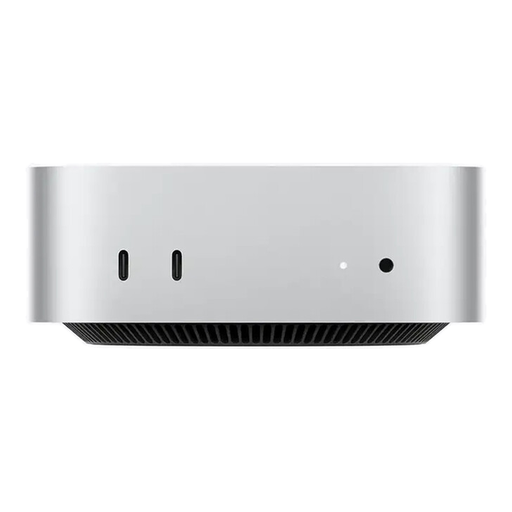
Apple Mac mini M5 Pro, 15-core CPU, 16-core GPU, 24 GB, 512 GB SSD
This configuration could suit a compact workspace if your software and peripherals are compatible with macOS.
Apple lists 24 GB of unified memory and a 512 GB SSD for this configuration. An external display, keyboard and mouse are required; according to the product details, the keyboard and mouse are sold separately.
View at Joybuy
Frequently asked questions
Is 16 GB RAM enough for set designs with lots of layers?
Adobe recommends 16 GB or more for Photoshop, but this doesn’t guarantee a particular level of performance with your file size. If you have several large files or programmes open at once, compare configurations with more RAM and check the free SSD space too.
How can I match colour checking to printed sets?
Calibrate and profile your monitor if accurate colour assessment matters. For a Photoshop-managed print workflow, Adobe also describes using an ICC profile suited to the printer and material. Your print provider should supply the specific file requirements.
When is a tower a better choice than a compact Mac mini?
A tower is worth considering if future upgrades or additional components are important for your workflow. A compact Mac mini may suit you better if your software and peripherals are compatible with macOS and you plan to use an external monitor. In either case, compare the exact configuration and the ports you need.
What should I look for in the CE marking?
Electrical and electronic equipment covered by the relevant harmonised EU rules must carry the CE marking before being placed on the market. The European Union points out that the marking is a declaration by the manufacturer, not approval by an EU authority. When considering a specific offer, check that the marking matches the product identity.
What ongoing costs and rights should I bear in mind?
Check whether a monitor, input devices and the software you need are already available; they aren’t automatically included with a computer configuration. For a consumer purchase from a business seller, statutory consumer rights are separate from a voluntary manufacturer’s warranty. According to the European Union, goods bought in the EU are generally covered by a minimum two-year legal guarantee from the date of receipt.


