For a photo-tagging app, your desktop should suit the way you actually test and manage data. A compact mini PC saves space, while a tower may offer more scope for upgrades, depending on its configuration. Look for enough RAM, a suitable processor, sufficient SSD capacity and an operating system that supports your tools. A powerful GPU is mainly relevant if your particular image-recognition framework can use it locally.
Which desktop configurations suit different users?
Developers running tests in parallel
If you’re running an IDE, browser, local services and several tests at the same time, make sure your RAM and processor can handle your test stack. pytest describes parallel test runs that can start additional processes.
Developers with large photo collections
If you store test images and project data locally, estimate the SSD space you’ll need based on your actual data and plan for suitable backups.
Developers running image recognition locally
If you want to test image-recognition models locally, first check which GPU platforms your particular framework supports. Depending on the hardware, PyTorch lists CUDA for supported NVIDIA GPUs and ROCm for supported AMD GPUs.
What should you look for when choosing?
Start by deciding which development tools and data you want to run locally. Then compare the form factor, operating system and exact specification.
Compact Windows mini PC
A good fit if: you want to run app code, a browser, local services and tests on a small desk, and the specific configuration has enough power for the job.
Consider: Specifications and upgrade options vary by model. If you’re using Windows Dev Containers, also check that your development stack meets the WSL 2 requirements.
Larger Windows desktop
A good fit if: you run several services at once or want to explore options for future upgrades.
Consider: A tower takes up more space, and upgrade options still depend on the exact model.
Mac mini
A good fit if: your development tools run on macOS or Apple Silicon and you’d prefer a compact computer.
Consider: Choose the right amount of memory and SSD storage for your needs. Software that requires NVIDIA CUDA needs a compatible NVIDIA GPU platform.
| What matters when buying |
What to look for |
Who is it important to? |
| Parallel development and testing |
Check the RAM in the specific configuration and the requirements of your test stack. |
If I’m running an IDE, browser, local services and test processes at the same time, I want to match the specification to that workload. Around 36% of consumers put parallel development and testing processes first. |
| Local photos and test data |
Estimate the size of your image and test data, then check the SSD capacity and possible storage upgrade options. |
If I keep images and test data locally, I need enough space for my files and development tools. Around 29% of consumers prioritise local photo and data storage. |
| Operating system and form factor |
Make sure the operating system and processor platform work with your tools; also check the ports and space required. |
If space is limited, I want a compact computer that can run my development stack. Around 21% of consumers prioritise platform compatibility and a space-saving form factor. |
| GPU for local image recognition |
First check whether your framework needs GPU acceleration and which platform it supports. |
If I want to run GPU-accelerated image recognition locally, the graphics hardware needs to match the backend I’m using. Around 14% of consumers prioritise GPU support for local image recognition. |
Which buying mistakes should you avoid?
-
Comparing only the model family
Specifications and upgrade options can vary within a desktop family. Even storage capacity can make a difference in a particular configuration.
Check the full model number, as well as the RAM, SSD and operating system actually included.
A graphics card could add to the cost without being used in your workflow.
-
Buying a mini PC without planning for accessories and storage
The size of the case doesn’t tell you which drives or accessories are included. A computer on its own may not be everything you need for a complete workstation.
Compare the devices and data you already have with the details for the exact model, and check whether you’ll need accessories or extra storage.
Depending on the specification, you may need a monitor, input devices, adapters or extra storage.
Brands to consider
Lenovo
The ThinkCentre M75q Gen 5 Tiny is a compact Windows option for a small development workstation.
- Lenovo describes tool-free access to the SSD and memory modules.
- Lenovo lists 24 GB RAM for configuration 12RQCTO1WWDE1. Check the SSD capacity of the specific model before planning your local image-data workflow.
HP
The ProDesk 4 Tower G1i is for buyers considering a larger desktop and upgrade options that depend on the configuration.
- HP lists 32 GB RAM and a 512-GB SSD for model 9H7M6ET#ABD.
- Specifications and upgrade options depend on the exact model, so check the full configuration.
Dell
The Pro Micro QCM1250 is a compact Windows desktop family with a range of specifications.
- Dell lists a Core Ultra 5 235T, 16 GB RAM and a 512-GB SSD for one configuration.
- The family name doesn’t determine the specification. Check whether 16 GB RAM is enough for the tools and tests you’ll run in parallel.
Apple
The Mac mini with M6 is a compact macOS development setup, provided your tools support Apple Silicon.
- Apple lists configurable options of 16, 24 or 32 GB of unified memory, along with several SSD options.
- If your software stack requires NVIDIA CUDA, the Mac mini isn’t a suitable NVIDIA CUDA platform.
GEEKOM
The A5 Pro 2026 Edition is a compact Windows option for a basic development setup.
- For the version with Ryzen 5 7530U, GEEKOM lists 16 GB RAM, a 1-TB SSD and a RAM upgrade option.
- These are manufacturer specifications and don’t show how quickly your particular tests will run.
Joybuy products for your development setup
The following Joybuy products include compact Mac mini configurations and a mini PC compatible with Windows or Ubuntu, for development setups.
 No image available
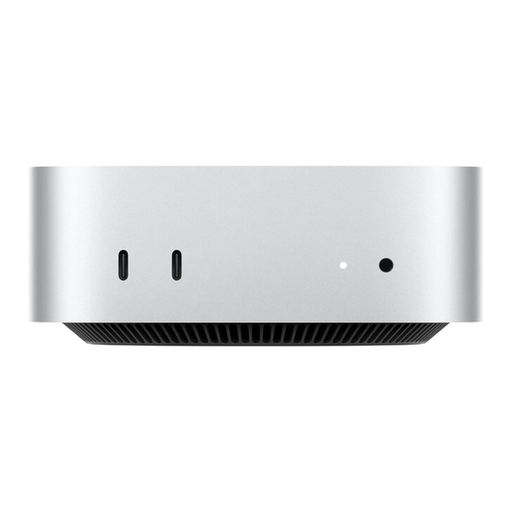
Apple Mac mini MHQK4ZD/A_CTO, M6, 24 GB, 1 TB SSD
A good fit if your development and test stack supports macOS or Apple Silicon and you’re looking for a compact computer.
Configuration: Apple M6, 12-Core CPU, 12-Core GPU, 24 GB Unified Memory, 1 TB SSD and 2.5 Gbps Ethernet.
This isn’t an NVIDIA CUDA platform for image recognition that requires CUDA.
Joybuy
 No image available
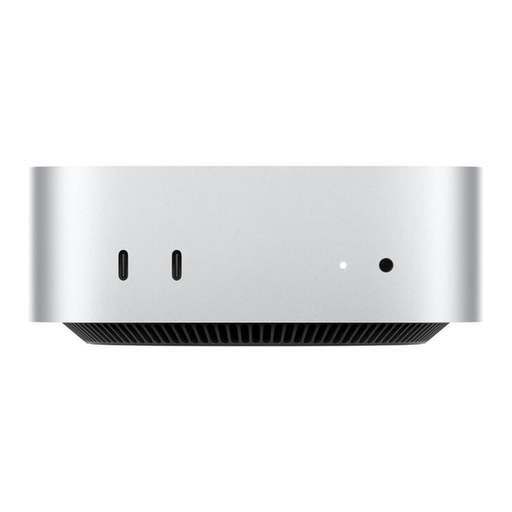
Apple Mac mini MHQK4ZD/A_CTO, M6, 24 GB, 512 GB SSD
A good fit if your development and test stack supports macOS or Apple Silicon, and the listed SSD capacity suits your local data needs.
Configuration: Apple M6, 12-Core CPU, 12-Core GPU, 24 GB Unified Memory, 512-GB SSD and 2.5 Gbps Ethernet.
This isn’t an NVIDIA CUDA platform for image recognition that requires CUDA.
Joybuy
 No image available
Ninkear L12 Pro, Intel i9-12900HK, 16 GB, 1 TB SSD
A good fit for a compact development setup if Windows or Ubuntu is compatible with your software stack.
Configuration: Intel i9-12900HK, 16 GB DDR4, 1-TB SSD and dimensions of 130 × 127,5 × 52 mm. The product title states that it’s compatible with Windows 10/11 and Ubuntu.
Joybuy
Frequently asked questions
Do I need a dedicated graphics card for automated testing?
Not for automated app tests alone. If you also want to run image recognition locally with GPU acceleration, check the specific framework and its supported backend. For example, PyTorch distinguishes between CUDA for supported NVIDIA GPUs and ROCm for supported AMD GPUs.
What should I know about Windows Dev Containers?
Microsoft lists WSL 2 as a requirement for Windows Dev Containers. Also check that your specific PC configuration meets the system requirements for Docker Desktop. Microsoft recommends storing project files in the WSL 2 file system for this workflow.
Does a manufacturer’s warranty replace my statutory rights?
No. If you buy as a consumer from a business seller in the EU, you generally have statutory rights to a minimum two-year legal guarantee from the date you receive the goods. An additional commercial guarantee doesn’t replace these rights. If a service contract is offered, check its coverage separately.
Do I need to consider data protection when using a photo-tagging app?
If the app processes personal data, that processing needs an appropriate legal basis. The requirements depend on the data and how it’s used. Facial data obtained using specific technical methods for unique identification may be biometric data. This doesn’t mean that every photo contains biometric data, or that any particular hardware is required.


