If you mainly back up large landscape film project folders at a fixed workstation, a desktop HDD is a good fit, provided it has enough space for your existing files and planned future backups. If you regularly need to copy files while you’re out and about, a portable, USB-powered HDD is more practical. For a robust backup, you should also plan to keep a separate copy elsewhere and check that you can restore your files.
Which option is right for you?
Filmmakers with large editing archives
If you mainly back up raw footage and complete project folders at a fixed workstation, consider the files you already have and leave room for future backups. Germany’s Federal Office for Information Security (BSI) recommends keeping backup copies in another secure location.
Filmmakers on the move
If you copy project folders between filming locations and your workstation, check the power requirements and your device’s connections. Toshiba describes the Canvio Basics as a USB-powered portable HDD. Transcend lists two cable types for the StoreJet 25M3C, but notes that compatibility with USB-C devices may vary.
Mac users with a backup workflow
If you want to use Time Machine as well as archive files, you’ll need to set up the backup volume appropriately. Apple recommends APFS or APFS (Encrypted); before reformatting, check whether there are still files on the drive.
What should you look for when buying?
Desktop HDD
A good fit if: You mainly back up large video and project folders at a fixed workstation and have a mains socket available.
Bear in mind: Desktop models need a dedicated space and a separate power supply. Choose a capacity that suits your files.
Portable USB HDD
A good fit if: You copy project folders in different locations and want to avoid a separate power adaptor.
Bear in mind: Check that the available capacity is enough for your complete folders and future backups.
Portable HDD with shock protection
A good fit if: You carry your drive around frequently and want a shock-protected case with different cable connections.
Bear in mind: Shock protection is no substitute for an additional backup. Also check compatibility with your specific USB-C device.
| What you need |
What to check when buying |
Who it matters most to |
| Capacity for project folders |
Work out the size of all your files, including raw footage and project files, and leave room for future backups. |
If you want to archive complete folders and additional files, you’ll need enough storage. Around 40% of consumers are likely to prioritise capacity when choosing a drive. |
| A separate backup you can restore |
Check that the backup process includes the folders you need and that you can restore them. Disconnect the drive after backing up and store it separately. |
If you rely on your project files, make sure your copy is regularly updated and can be restored. Around 30% of consumers are likely to give this priority. |
| Use on the move |
Check the power supply, cables and case are suitable for your devices and how you’ll transport the drive. If you choose an HDD with shock protection, check that its connection is compatible. |
If you want to back up project folders in different locations without a separate power adaptor, portability is a priority. Around 20% of consumers are likely to look for this first. |
| Connection and Mac backups |
Check the connector type and supported connection. If you use Time Machine, consider the file system on the backup volume. |
If you want to add a drive to your Mac backup workflow, setting it up correctly is essential. Around 10% of consumers are likely to put system compatibility first. |
Common backup mistakes
-
Assuming one large HDD is a complete backup plan
A drive failure, malware or damage to your building could affect both your original files and a backup stored nearby.
Plan regular backups, keep a copy separately and test that you can restore your files. The BSI recommends disconnecting the storage medium from your device when you’re not backing up.
Keeping a separate copy may require another storage device and extra time to store it safely and test file recovery.
-
Assuming a USB-C connector guarantees device compatibility
Transcend doesn’t guarantee that the StoreJet 25M3C is compatible with every USB-C device. Power supply can also be a factor with some mobile devices.
Before buying, check your specific host device, power requirements and the cables included.
-
Reformatting an existing drive for Time Machine without checking it first
Apple notes that reformatting a volume originally formatted for Windows may erase existing data.
Back up any existing files elsewhere before setting up the volume for Time Machine.
Files that haven’t been backed up elsewhere before reformatting may be lost.
Key brands at a glance
Western Digital
The My Book range is designed for users who mainly back up a large local archive at a fixed workstation.
- Western Digital lists capacities from 4 to 26 TB for the range, along with password protection and hardware encryption. The German product page lists an 8 TB version with model number WDBBGB0080HBK-EESN.
- These features don’t demonstrate greater reliability than other brands, or mean that a single copy is enough for a complete backup.
Toshiba
Canvio Basics is a range of portable, USB-powered 2.5-inch HDDs for storing files. The German product page lists part number HDTB540EK3CA for the 4 TB version.
- Toshiba says the drive is ready to use with Windows, with no software installation required.
- The range listed goes up to 4 TB. Mac users will need to set up the backup volume appropriately for Time Machine.
Transcend
The StoreJet 25M3C is a range of portable HDDs designed for transport and different USB-A and USB-C connections.
- Transcend describes a three-stage shock protection system, two cables and versions up to 4 TB.
- The manufacturer doesn’t guarantee compatibility with every USB-C device. The shock protection system isn’t an independent comparison of failure rates.
Seagate
The One Touch Hub combines a desktop HDD with front-facing ports. According to Seagate, it’s designed for users who want to back up files and connect other devices.
- Seagate lists password protection and backup software as features.
- The manufacturer says a power supply is required. Older software or service offers with a limited validity period aren’t confirmed benefits of a current offer.
Joybuy products for desktop and portable backups
This product selection includes portable USB HDDs for backing up files on the move and desktop HDDs for a fixed workstation.
 No image available
WD Elements Portable 5TB USB-C
For portable backups when you need to take project folders between different work locations.
5 TB; USB-C.
View on Joybuy
No image available
WD Elements Portable 4TB USB-C
For portable backups when you want to copy project folders on the move.
4 TB; USB-C.
View on Joybuy
 No image available
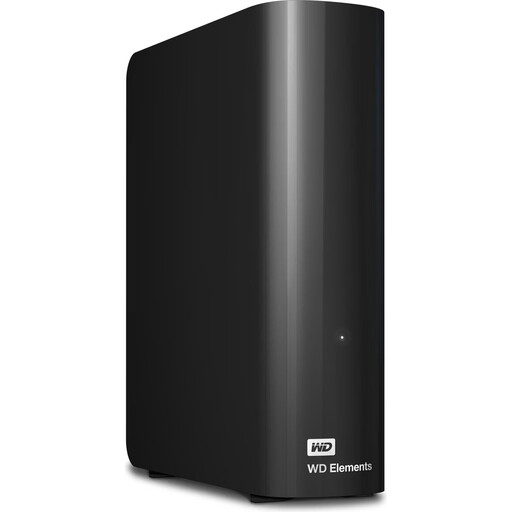
WD Elements 24TB Desktop External Hard Drive
For backing up large local archives at a fixed workstation with a mains socket available.
24 TB; USB 3.2 Gen 1; 3.5 inches.
Requires a power supply and mains socket while in use.
View on Joybuy
 No image available
WD Elements 6TB Desktop External Hard Drive
For backing up project files at a fixed workstation if you’re looking for a desktop drive with the right capacity.
6 TB; USB 3.0; 3.5 inches; NTFS.
Requires a power supply and mains socket while in use.
View on Joybuy
 No image available
WD Elements 8TB Desktop External Hard Drive
For backing up larger project folders at a fixed workstation with a mains socket available.
8 TB; USB 3.0; 3.5 inches.
Requires a power supply and mains socket while in use.
View on Joybuy
Frequently asked questions
How much storage should I buy for my project folders?
First, work out the total size of the files you need to back up, including raw footage and project files, and leave room for future backups. The BSI recommends using storage with enough capacity. Without knowing the size of your files, it isn’t possible to give a one-size-fits-all figure in TB.
How should I set up my backup so it helps if a drive fails?
Back up the folders you need regularly, test that you can restore a sample of them and disconnect the external drive from your computer when you’re not backing up. The BSI also recommends keeping a backup in another secure location.
Can I use the same hard drive straight away for Time Machine and ordinary project files?
Not without checking how it’s set up. Apple recommends APFS or APFS (Encrypted) for Time Machine backup volumes. A volume previously formatted for Windows may need to be reformatted, which could erase existing files. Apple describes adding another APFS volume for extra files on the same physical device.
Is the manufacturer’s guarantee the same as your statutory rights?
No. The EU’s Your Europe consumer information explains that consumer purchases in the EU are covered by a legal guarantee of at least two years from the date you receive the goods, with the seller responsible. Any additional manufacturer’s guarantee is subject to the terms offered by the manufacturer for that specific product.


