Online shop photographers
If you edit product images for viewing on screen, a profiled monitor helps you make colour corrections without relying solely on your eyes. Adobe notes that an inaccurate monitor profile can lead to unnecessary adjustments.


Choose a desktop based on your photo-editing software, the size of your image batches and the connections needed for your intended monitor. For reliable colour decisions, you’ll also need a suitable, calibrated and profiled monitor; more processing power alone won’t ensure accurate colour reproduction.
If you edit product images for viewing on screen, a profiled monitor helps you make colour corrections without relying solely on your eyes. Adobe notes that an inaccurate monitor profile can lead to unnecessary adjustments.
If your images will also be printed, you’ll need to consider the profile for the specific printer, ink and paper combination, as well as the monitor profile. The European Color Initiative provides information about ICC profiles and printing processes.
For large files or lots of them, choose your memory and available storage based on your software and how you work. Adobe publishes software requirements, but you’ll still need to check your specific image files and workflow.
Start by checking the monitor and colour management, then look at your software requirements. After that, decide which desktop configuration will suit your space and complete workstation.
| Buying priority | What to check before buying | Who is this especially important for? |
|---|---|---|
| Assessing colours | Check whether the monitor can be calibrated and profiled, and whether its connections are compatible with the desktop. A compatible connection alone doesn’t guarantee colour accuracy. | When I edit product images for an online shop, I want to assess colours on a profiled monitor rather than by eye. Around 36% of consumers put colour matching first. |
| Editing batches of images | Check the RAM and available storage against your software’s requirements. For Photoshop 27.x, Adobe lists 8 GB RAM as the minimum and 16 GB or more as the recommendation; storage has its own requirements. | When working with lots of large image files, I need enough memory and space for my software and working files. Around 29% of consumers prioritise editing and storing their image batches. |
| Space and connections | Compare the case’s footprint with the space available at your workstation. Check the display connections on the exact configuration and what’s included in the box. | When space is limited in my home office, I want to be able to fit the computer in and connect my monitor. Around 21% of consumers put space requirements and connections first. |
| Workstation costs and service | Factor in any components you’ll need, such as a monitor and input devices. Check service details for the specific configuration separately from your statutory consumer rights. | If I don’t yet have a complete photo workstation, I want to include the cost of any missing components and support. Around 14% of consumers prioritise the cost of the complete workstation. |
Without an accurate monitor profile, colours can look misleading, leading to unnecessary adjustments.
Budget for a monitor and colour management before spending extra on processing power. Adobe recommends calibrating and profiling your monitor for colour-critical work.
You may need to buy a suitable monitor and, if necessary, a calibration device in addition to the computer.
The Lenovo ThinkStation P3 Tiny Gen 2 with the code 30K5CTO1WWDE2 is listed with integrated graphics. So the optional NVIDIA graphics mentioned on the product page aren’t automatically included in this configuration.
Compare the full product code and check the RAM, SSD, graphics and connections for the specific model.
The Lenovo configuration mentioned above doesn’t include a keyboard or mouse; a monitor is sold separately.
Before you buy, make a list of the workstation components you already have and those you still need.
Mac mini: a compact macOS desktop for a workstation with an external monitor.
ThinkStation P3 Tiny Gen 2: a compact Windows workstation.
Z2 Mini and Z2 Tower workstations for compact or larger desktop set-ups.
This selection includes compact Windows and macOS desktops for use with an external monitor. For colour-critical decisions, you’ll also need to consider your monitor and colour management.
 No image available
This compact Windows configuration could suit a workstation with an external monitor; check that its connections are compatible with your display.
Core Ultra 7 265K, 32 GB DDR5 5600MHz, 1 TB M.2 SSD, RTX A400 4GB and Windows 11 Pro.
 No image available
A compact macOS option if you want to use an external monitor; check the specific connection between the computer and display.
16 GB unified memory, 256 GB SSD, Thunderbolt 4 and HDMI.
No image available
A compact macOS option for photo editing with an external monitor; check that the connections match your display before buying.
24 GB unified memory, 512 GB SSD, Thunderbolt 4 and HDMI.
No image available
This compact macOS configuration could be a good fit if you want to use an external monitor; check the connections on the exact model.
32 GB unified memory and 512 GB SSD.
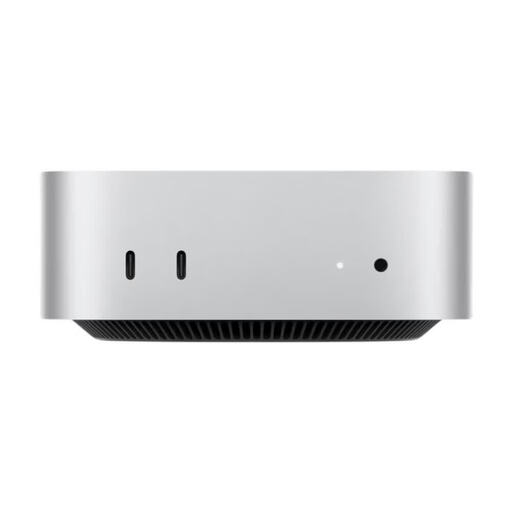 No image available
A compact macOS option for an external monitor; check that the connections on this specific configuration match your display.
32 GB unified memory and 1 TB SSD.
No. For colour-critical adjustments, Adobe recommends calibrating and profiling your monitor. You’ll also need to take the image profiles and the profile for the relevant output process into account.
Calibrate and profile your monitor in lighting conditions that are as consistent as possible. For colour-critical work, Adobe recommends using measuring hardware and recalibrating regularly. This is workflow advice, not a legal requirement.
Check what’s included and the service terms for the specific configuration separately from your statutory consumer rights against the seller. A voluntary guarantee is not the same as your statutory rights; a monitor, if sold separately, may also be needed to complete your workstation.
According to the German Federal Network Agency, CE marking is required for products covered by relevant EU harmonisation legislation and placed on the EU market. The German Environment Agency says that old electrical equipment must not be put in household waste.